Repository navigation
Commands
Names of arguments are wrapped by pointy semicolons, and optional components are wrapped by squared semicolons.
Compile the custom node with the given <name> into bytecode to increace the performance. The expected input type of nodes may be specified with argument <inputType>, in the format pkg1/Class1,pkg2/Class2.
Currently this feature may be buggy.
Define the accessing path specified by argument backend as a custom accessing path node. If <temproary> is false, the node will be saved in the level folder.
Get the list of custom nodes.
Delete the custom node with the given <name>.
Get the number of entities selected by <selector>, or the total entity count of the current dimension if <selector> is not given.
Get the number of entities selected by <selector> and with the same coordation as the one of <stackedWith>.
Get the number of entities which is selected by <selector> and whose distance to <stackedWith>on each axises is smaller than the corresponding component of <maxDistanceVec>.
Get the number of entities which is selected by <selector> and whose distance to <stackedWith> is smaller than <maxDistance>.
Get the information of block state and block entity data (if exists) at <pos> to check if the block is rendered wrongly or is a ghost block.
Make <targets> can/cannot step on blocks directly.
Similar to the last, but the target is always the local player.
Get the value of <field> in the object which corresponds to <target>, an accessing path can be specified if needed. Note that if the mapping is not loaded, the names here are intermediary names like field_18276, which are hard to be understood, please use a mapping to translate them to readable names.
List all fields defined or inherited by the class of <target>.
Set the value of <field> in the object which represents <target> to <newValue>. Check the document on literals in accessing paths for the format of <newValue>. Using an accessing path to specify to where the new value is written.
Start recording the Motion, position, and listened fields of <target> every tick and save them to a CSV file. Note that some of the records will temporarily be saved to a buffer rather than being written to the file immediately, /entity flush could be used to flush recent changes.
Logs are saved to the entitylog folder in the world folder, with a name like the one below:
2023-08-19_17-12-21@12-C-villager.csv
The time when the log file is created is given before '@', and after that, the numerical ID of the entity, the side to process the log ('C' for 'client', 'S' for 'Server', and 'M' for 'Mixed') and the name or the type ID of the entity, respectively, are given.
A storage policy could also be specified, whose possible values are the following:
-
SERVER_ONLY: Only data produced by the server is recorded. -
CLIENT_ONLY: Only data produced by the clientis recorded. -
SEPARATED: The data produced by both the server and the client will be recorded, and saved in two separate files. -
MIXED: The data produced by both the server and the client will be recorded, and saved in a single file.
Stop monitoring <target> and save the records in the buffer to the disk.
Mark <field> as 'listened' so that its value will be recorded if any entity containing this field is subscribed by using /entitylog sub <target>. Currently, <type> wouldn't restrict the scope of influence of this command.
Stop listening a field.
List all listened fields.
Start monitoring a kind of entities automatically.
Stop monitoring a kind of entities automatically.
Start monitoring entities with the given <name> automatically.
Stop monitoring entities with the given <name> automatically.
Save the records in the buffer to the disk without stopping recording.
Get the number of entities whose imformation is being logged.
Set default storage policy used when a policy isn't specified explictly and when entities is subscribed automatically. Prior to the execution of this command, the default policy is SERVER_ONLY.
Add a new line to the entity information sidebar. You can specify where the data get updated and an accessing path if necessary.
Supported ticking phases (sorted by time):
-
WEATHER_CYCLE: When the calculation of weather cycling begins. -
CHUNK: When most stuff related to chunks (including unloading, spawning, freezing , snowing, random ticks and many other tasks) is going to be processed. -
SCHEDULED_TICK: When the calculating of scheduled tick starts. -
VILLAGE: When the states of raids is going to be updated. -
BLOCK_EVENT: When block events is going to be updated. -
ENTITY: When entities is going to be processed. -
TILE_ENTITY: When block entities is going to be processed. -
TICKED_ALL_WORLDS: When all worlds got ticked and the asynchronized tasks like inputs of players haven't got processed. -
SERVER_TASKS: When asynchronized tasks like player inputs is going to be processed. -
REST: When all asynchronized tasks got processed.
Remove a line from the entity information sidebar.
Create an explosion with the power of <power> at <pos>, and create fire if the optional argument <fire> is true. The power of explosions can be any single-precise floating-point number, including Infinities and even NaN.
Add a save component to be exported. Available components:
-
REGION: Region files, contain blocks, entities (1.16-) and block entities. -
POI: POI data. -
ENTITYEntity Data (1.17+). -
RAID: Raid data. -
MAP_LOCAL: Data of maps insecting the selected chunks. -
MAP_OTHER: Data of maps not insecting the selected chunks. -
ICON: The icon of the save. -
ADVANCEMENTS_SELF: The advancement information of the exporter itself (or everyone, if the exported isn't a player). -
ADVANCEMENT_OTHER: The advancement information of everyone except the exporter itself. -
PLAYER_SELF: The player data of the exporter itself (or everyone, if the exported isn't a player). -
PLAYER_OTHER: The player data of everyone except the exporter itself. -
STAT_SELF: The statistics of the exporter itself (or everyone, if the exported isn't a player). -
STAT_OTHER: The statistics of everyone except the exporter itself. -
SCOREBOARD: Scoreboard data. -
FORCE_CHUNKS_LOCAL: Force loaded chunks within selections. -
FORCE_CHUNKS_OTHER: Force loaded chunks outside selections. -
DATA_COMMAND_STORAGE: Storage used in/data. -
CARPET: Configuration file of Carpet; -
MESSMOD: Configuration file of MessMod, and custom nodes.
Using DOS file name wildcards to select multiple items is allowed.
Add a selection, where <corner1> and <corener2> is two block position of two opposite vertex of an rectangle area. Any chunk intersecting the area will be selected.
Delete a selection.
Export the save. Exported saves are storaged in World Folder/exported_saves.
A world generator setting can be given using argument <worldGen>:
- COPY: The same as the original save.
- VOID: The void.
- BEDROCK: A layer of bedrock.
- GLASS: A layer of white stained glass block.
- PLAIN: A layer of grass block.
Get currently subscribed save components.
Get current selections.
Preview a selection. The marks will be displayed for <tick> game ticks.
Exclude a save component.
Reset the save exported.
Pause|continue processing selected entities. It can be used to simulate lazy chunks.
Mark <field> as 'listened' so that its value will be included in the looking at entity HUD. Currently, <type> make no difference to the execution but being used in the resolution of the field name and providing suggestions.You can specify a custom name and an accessing path for the field if necessary.
Add a listened field to the client-side/server-side player information HUD. You can specify a custom name and an accessing path for the field if necessary.
Remove a listened field from a HUD.
Set the player used in getting the data in the server-side player information HUD and the looking at entity HUD in multiplayer games.
Make the a thread of the game sleep for a while. If the thread is not specified explicitly, the server thread will sleep.
Mark the chunk where block position <corner1> as lazy loaded. Once a chunk is marked, entities in the chunk won't be ticked.
No longer mark the chunk where block position <corner1> as lazy loaded so that its entities will be able to get ticked.
Mark the chunk within a rectangle whose two opposite vertexes are the chunks containing block position <corner1> and <corner2> as lazy loaded. Once a chunk is marked, entities in the chunk won't be ticked.
No longer mark the chunk within a rectangle whose two opposite vertexes are the chunks containing block position <corner1> and <corner2> as lazy loaded so that its entities will be able to get ticked.
Get subscribed chunk events.
Start to record chunk loading events. Recorded events will be written to a CSV file in World Folder/chunklog.
The file has 7 columns:
- Event`: The name of the event.
-
Pos: The chunk coordinate of the chunk where the event happened in (or rather, for). -
Dimension: The ID of the dimension where the event happened in. -
GameTime: The game time when the event happened (in game tick). -
RealTime: The relative real time when the event happened (in nanosecond). -
Thread: The thread where the event happenned. "Server Thread" stands for the main thread of the server. -
Cause: The cause of the event. It it disabled by default, but can be enabled using optionblamingMode. -
Addition: The additional information of the event (if any).
Stop recording chunk events.
Subscribe a chunk event. Supported chunk events:
-
LOADING: Starting loading a chunk. -
UNLOADING: Starting loading a chunk. -
GENERATION: Starting or continuing to generate a chunk. -
UPGARDE: Begining a chunk generation stage. -
END_LOADING: Finishing loading a chunk. -
END_UNLOADING: Finish unloading a chunk. -
END_GENERATION: Finish or pause generating a chunk. -
END_UPGARDE: Finishing a chunk generation stage. -
SCHEDULER_LOADING: Scheduling to load a chunk. -
SCHEDULER_UNLOADING: Scheduling to unload a chunk. -
SCHEDULER_GENERATION: Scheduling to generate a chunk. -
SCHEDULER_UPGARDE: Scheduling to start updating a chunk generation stage. -
TICKET_ADDITION: Adding a chunk ticket. -
TICKET_REMOVAL: Removing a chunk ticket (expiration is not included here).
Using DOS file name wildcards to select multiple items is allowed.
Unsubscribe a chunk event.
Subscribe some entities to see how they are pushed by pistons, shulker boxes and shulkers.
Unsubscribe the entities.
Start|stop listening to packets between the server and the client(s). For some reason, the results are only printed in the log.
Using DOS file name wildcards to select multiple items is allowed.
Display the version and the current configurationsof the mod.
Get the current value of <option> and related helping information about it.
Set the save-specific value of <option> to <value>. See the next section of the document.
Read options from mcwmem.prop.
Set the global value (used as the default value of options for new saves) and the save-specific value of <option> to <value>.
Change the value <key> in the entities with to <val>. Much simpler than /entityfield.
Remove <target> from the world.
Move the entity using Entity.move(). The displacement is given in argument <delta>. Usually, "self" should be used as the last argument. After the execution, the actual displacement of the entity is outputted.
Move the entity in the way projectile entities moves. The displacement is given in argument <delta>. The command seems to be buggy now.
Name selected entities.
Kill a part of selected entities.
Get the type of the POI at <pos>.
Get the distance (Maybe the Manhattan distance, and the unit may be a subchunk) to the nearest working site of villagers.
Find POIs with the given type in a sphere whose center and radius are given in the command.
Find POIs with the given type in a Cube whose two opposite corners are given in the command.
Set the POI(Point of Interest) at <pos>to <type> if there is no POI at <pos> or <replace> is true.
Visualize POIs whose to <center> is within <radius>(in meter) and have a given<type>. All visualized entities will be rendered as a green cube, and if the a POI has been occupied, it will have a red frame.
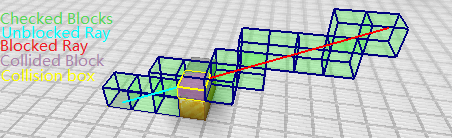
Check if the direction-ed line between two points given in the command is blocked by any block, in the way most projectiles check for collisions. After execution, the coordination of checked blocks will be output, and if the line was blocked, the coordination of the block that blocked the line, the face that blocked the line, and the coordination of the point where the line was blocked will be output. If visual is present, the process of the checking will be visualized, that is, all grids which checked blocks are in is displayed in light green, the colliding shape of the block which blocked the line is displayed in orange, the grid the block is in is displayed in purple, the part of the unblocked line is displayed in magenta and the blocked part is displayed in red.
Here is an example:
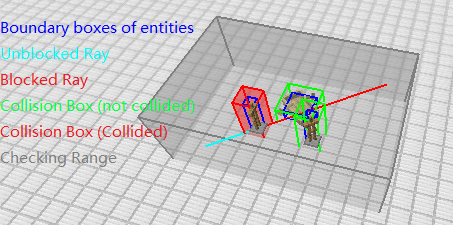
Check if the direction-ed line between two points given in the command is blocked by any entity, in the way most projectiles check for collisions. After the execution, if the line was blocked, the type or the custom name of the entity which blocked the line and the coordination of the point where the line was blocked will be output. The argument <expand> determines the range of checking, which should be one-half of the width of the bounding box of the projectile plus 1 in projectile collision checking simulations.
Example:
Repeat executing a command for a given number of times, the argument <feedback> can be used to indicate if the feedback of the command is enabled.
Make <passengers> ride <vehicle>
Get the current seed of the RNG of the dimension.
Get the next integer generated by the RNG of the dimension in the range [0, bounds).
Get the next value generated by the RNG of the dimension.
Do something with the RNGs of <target> (some entities), just like the last three commands.
Make explosions place <blockState> instead of air and <fireState> instead of fire.
Get the information about the block entity at <pos>.
Set the block entity at <pos> to <type>. Optionally, you can specify a <tag> as the initial data. (It may fail to execute when the block at <pos> is not suitable.)
Remove the block entity at <pos>.In the current version of the mod, if a block needs a block entity, the block entity will be recreated after its removal that is a bug).