Skip to content
This repository was archived by the owner on Mar 2, 2025. It is now read-only.

Folders and files

NameName
Last commit message
Last commit date

Latest commit


History

5 Commits


Repository files navigation

Auto Snap Sender

First of all, you need to install the dependencies:

npm install

Then, you need to create a .env file and add the following:

USR=your_username
PASSW=your_password
SESSION=
URL=https://accounts.snapchat.com/accounts/v2/login
CHAT=https://web.snapchat.com
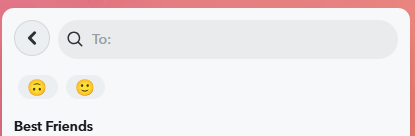
Before running the script, you need to create a shortcut on Snapchat:

img

Which one is the your shortcut, and then change the index.js file with the correct number.

const buttons = await page.$$('button.c47Sk');
await buttons[0].click(); // 1 is the second button (0 is the first button) these are shortcut buttons

Run the script:

node index.js

If you want to run the script in the background, you can use Task Scheduler on Windows:

You should create a bat file to run the script:

@echo off
cd /d C:\path\to\your\project && node index.js

Then, you should create a task in Task Scheduler:

Search App > Task Scheduler > Create Basic Task > Next > Browse > C:\path\to\your\bat\file.bat > Next > Next > Set the trigger > Set the actions > Set the conditions > Create > Ok

About

Automated script using Puppeteer to send Snaps. It captures a photo and sends it automatically. Built for efficiency and reliability.

Resources

Stars

1 star

Watchers

1 watching

Forks

Releases

Packages

Contributors

Languages