Scout Vesuvius Challenge scrolls from a laptop — stream and preview the Herculaneum CT volumes without downloading terabytes or tripping the data server's rate limiter.
The scroll volumes are enormous. Scroll 1 alone is 14376 × 7888 × 8096 voxels ≈ 918 GB at full resolution. If you're on a laptop with limited disk, you can't (and shouldn't) download them to take a look. The data is streamable as multiscale OME-Zarr — but two things bite newcomers immediately:
-
You don't know which resolution level to read. Ask for a full-res cross-section and you'll try to pull hundreds of GB.
-
Naive reads get rate-limited. A large
array[z, y0:y1, x0:x1]makes zarr fire one HTTP request per chunk, all at once. The server replies429 Too Many Requestsand your read dies:aiohttp.client_exceptions.ClientResponseError: 429, message='Too Many Requests', url='https://dl.ash2txt.org/.../54keV_7.91um_Scroll1A.zarr/0/56/19/26'
scrollscout handles both for you: it auto-selects the coarsest pyramid level that satisfies your requested pixel width, and reads it in small, chunk-aligned tiles with exponential backoff on 429, so a read slows down under pressure instead of failing.
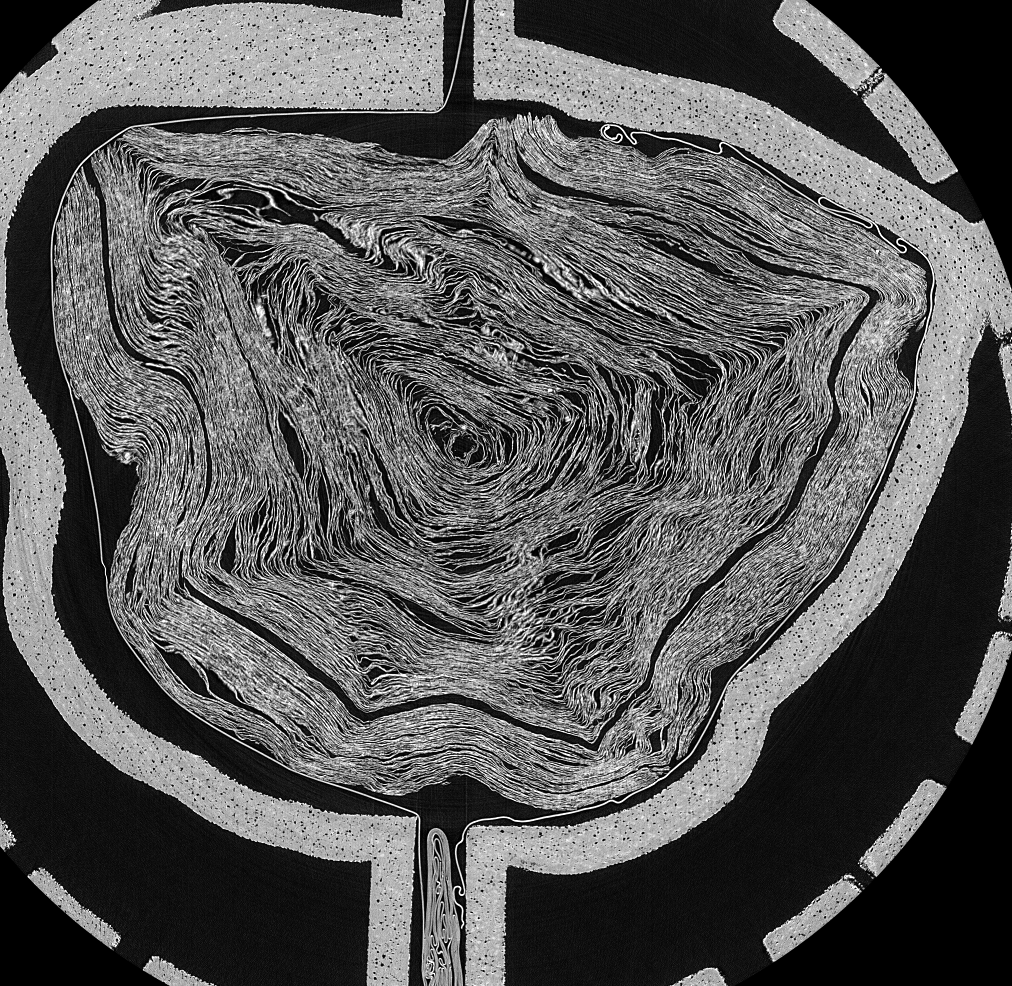
Scroll 1 (PHerc. Paris 4), middle cross-section — streamed with scrollscout thumb 1 -w 1000. Total transfer: a few MB, not 918 GB.
pip install scrollscout
# optional: use the live scroll catalogue from the official `vesuvius` package
pip install "scrollscout[catalog]"
You must accept the Vesuvius Challenge data license before accessing scroll data. scrollscout does not redistribute any scroll data; it streams the public server on your behalf.
# list a scroll's multiscale pyramid — see the sizes before you read anything
scrollscout info 1

# stream a middle cross-section to a PNG (auto-picks the pyramid level)
scrollscout thumb 1 --width 1000 -o scroll1.png

# slice along a different axis: z (default, circular cross-section),
# y or x (longitudinal views down the scroll's length)
scrollscout thumb 1 --axis y --width 700 -o scroll1_length.png

# a shallower slice of scroll 2, larger
scrollscout thumb 2 --frac 0.25 --width 1200 -o scroll2_quarter.png

# scrub through slices interactively in your browser (see below)
scrollscout viewscrollscout view launches a local web app (Python stdlib only, nothing stored
on disk) where you pick a scroll, choose the z/y/x axis, set a target
width, and drag a slider to scrub through cross-sections. Each slice is
streamed on demand through the same throttle-safe reader and cached in memory,
so scrubbing back over visited slices is instant.
scrollscout view                      # opens http://127.0.0.1:8000
scrollscout view --port 9000 --no-browser
Uncached slices take a few seconds to stream at a rate-limit-safe resolution; revisited slices are instant. It's a previewer, not a real-time volume renderer.
scrollscout label <segment_dir> opens a browser tool for hand-labeling ink
on a segment's flattened surface — the ground-truth masks that ink-detection
models train on. Get a segment and label it in two commands:
# 1. stream a segment's layers into a ready-to-label folder
scrollscout fetch-segment --scroll 1 --segment 20230530164535

# 2. open the labeler on it
scrollscout label segments/20230530164535      # opens http://127.0.0.1:8010
fetch-segment streams the mask + a central band of layers (--layers lo-hi
or all). Add --crop Y0 Y1 X0 X1 to grab just a window of a large segment —
it byte-range-reads only the needed rows, so cropping a multi-GB segment is
cheap. It's resumable (existing layers are skipped).
- Scrub the layer stack (slider or ←/→) to find ink at the surface depth
- Brightness / contrast sliders adjust the view live; layers are percentile-stretched server-side for visibility
- Paint over ink with the brush (adjustable size, erase, undo, clear)
- Save writes
<segment_id>_inklabels.png— a binary mask at the layer's native resolution, the format training pipelines expect
Stdlib-only and fully local; nothing is uploaded. Existing labels reload on reopen, so you can label across sessions.

Once you've scouted a scroll, the companion notebook
notebooks/ink_detection_colab.ipynb
takes the next step: it streams a Scroll 1 segment and runs the open-source
Grand Prize TimeSformer ink-detection model on it, using a free Colab/Kaggle
GPU — no local GPU required. It's the on-ramp from previewing data on a laptop
to running the ML that actually reads the scrolls.
Note: the notebook runs on Scroll 1 (already-public text). Text recovered from an unread scroll is a private prize submission under the data terms — don't publish it without Vesuvius Challenge approval.
scrollscout info 1 prints:
Scroll 1
  pyramid levels (6):
    level             shape (z,y,x)          chunks         scale  approx full size
        0       (14376, 7888, 8096)  (128, 128, 128)  (1.0, 1.0, 1.0)    918.07 GB
        1        (7188, 3944, 4048)  (128, 128, 128)  (2.0, 2.0, 2.0)    114.76 GB
        2        (3594, 1972, 2024)  (128, 128, 128)  (4.0, 4.0, 4.0)     14.34 GB
        3         (1797, 986, 1012)  (128, 128, 128)  (8.0, 8.0, 8.0)      1.79 GB
        4           (899, 493, 506)  (128, 128, 128)  (16.0,16.0,16.0)     0.22 GB
        5           (450, 247, 253)  (128, 128, 128)  (32.0,32.0,32.0)     0.03 GB
import scrollscout as ss

vol = ss.open_scroll(1)            # streams only ~KB of metadata
print(vol.level_for_width(1000))   # -> Level(path='3', ...)

# get a cross-section as a numpy array (throttle-safe under the hood)
arr = ss.thumbnail(1, axis="z", frac=0.5, width=1000, out="scroll1.png", verbose=True)
print(arr.shape, arr.dtype)        # (986, 1012) uint8

# a longitudinal slice down the scroll's length
arr_y = ss.thumbnail(1, axis="y", frac=0.5, width=700)

# launch the interactive viewer from Python
ss.serve(port=8000)level_for_width(target_px)picks the coarsest pyramid level whose in-plane width still meets your target. A 1000 px view comes from level 3 (~64 chunks), never level 0 (~4000 chunks). Under-fetching is the first line of defense.read_slice()walks the chosen slice intile-sized blocks with a short pause between tiles, and retries each tile with exponential backoff (base_delay * 2**n) when the server returns 429. Non-rate-limit errors propagate immediately.
- Reads scroll volumes (the
volumes_zarr*OME-Zarr). Segment/surface meshes and ink predictions are out of scope for v0.1. - Preview/QA tool, not an analysis pipeline — it gets you looking at the data fast so you can decide where to work.
- Slices along any of the
z/y/xaxes. Oblique/arbitrary planes are not supported.
MIT (see LICENSE). Scroll data itself is governed by the Vesuvius Challenge /
EduceLab-Scrolls terms and is not included or redistributed here.
If you use scroll data in published work, cite EduceLab-Scrolls: Parsons, S., Parker, C. S., Chapman, C., Hayashida, M., & Seales, W. B. (2023). EduceLab-Scrolls: Verifiable Recovery of Text from Herculaneum Papyri using X-ray CT. arXiv:2304.02084.