


A self-hosted music album rating application that enables precise album scoring through track-by-track ratings.
⭐ If you find this project useful, please consider giving it a star!
Tracklist is a web application for rating and tracking music albums. It integrates with the MusicBrainz database to provide accurate metadata and uses a four-point track rating system to calculate album scores.
Click below for a quick demo
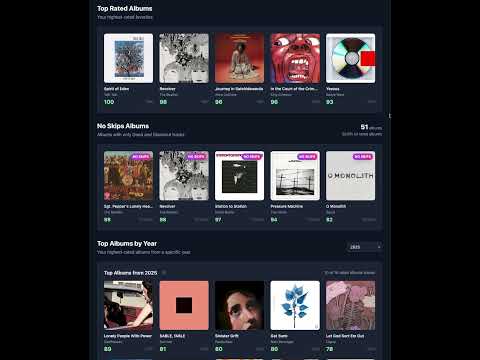
Complete workflow: Search → Rate → Track Progress → View Stats
Core Functionality
- Search and import album metadata from MusicBrainz database
- Track-by-track rating system with four-point scale
- Automatic album score calculation (0-100 scale)
- Cover art fetching and intelligent caching from Cover Art Archive
- Artist and album relationship tracking
Collection Management
- Advanced filtering by artist, year, rating status, and score ranges
- Multi-criteria sorting (rating, release date, artist name)
- Album comparison tool for side-by-side analysis
- Bulk operations for collection organization
Analytics & Visualization
- Comprehensive statistics dashboard with rating distributions
- Artist performance metrics and top-rated album tracking
- Year-based analytics and trends
- No-skip album identification
- Topsters-style collage generation for visual album grids
User Experience
- Dark mode support with system-aware theming
- Mobile-responsive interface
- Real-time search with debouncing
- Progress tracking for in-progress albums
- Customizable album bonus scoring (0.1-0.4 range)
Track ratings:
- 0.0 - Skip: Track to be avoided
- 0.33 - Filler: Tolerable but not noteworthy
- 0.67 - Good: Playlist-worthy track
- 1.0 - Standout: Exceptional track
Album scores are calculated using:
The album bonus defaults to 0.33 and can be configured between 0.1 and 0.4.
- Create a
docker-compose.ymlfile:
version: '3.8'

services:
  tracklist:
    container_name: tracklist
    image: ghcr.io/trevordavies095/tracklist:latest
    ports:
      - "8000:8000"
    volumes:
      - tracklist_data:/app/data
      - tracklist_logs:/app/logs
      - tracklist_cache:/app/static/artwork_cache
    environment:
      - DATABASE_URL=sqlite:///./data/tracklist.db
      - LOG_LEVEL=INFO
    restart: unless-stopped

volumes:
  tracklist_data:
  tracklist_logs:
tracklist_cache:- Start the application:
docker-compose up -d- Access the application at
http://localhost:8000
- Clone the repository:
git clone https://github.com/trevordavies095/tracklist.git
cd tracklist- Create a virtual environment and install dependencies:
python -m venv venv
source venv/bin/activate  # On Windows: venv\Scripts\activate
pip install -r requirements.txt- Initialize the database:
alembic upgrade head- Run the application:
uvicorn app.main:app --reload --port 8000- Web Interface:
http://localhost:8000 - API Documentation:
http://localhost:8000/docs - OpenAPI Schema:
http://localhost:8000/openapi.json - ReDoc:
http://localhost:8000/redoc

Environment variables:
DATABASE_URL: Database connection string (default:sqlite:///./data/tracklist.db)LOG_LEVEL: Logging level (DEBUG, INFO, WARNING, ERROR)
Additional configuration options are available in the docker-compose.yml file for cache management, scheduled tasks, and artwork processing.
- MusicBrainz for music metadata
- Cover Art Archive for album artwork
- FastAPI framework and SQLAlchemy ORM
MIT License - see LICENSE file for details.