








Powerful, real-time OSINT suite for tracking every activity on Instagram - from story updates and bio changes to follower shifts, providing stunning dashboards and instant alerts to keep you in the loop.

New to Python or unsure what is installed? Follow the Python install walkthrough first.
pip install instagram_monitorRun setup wizard:
instagram_monitor --setupThe wizard asks for the targets, the Instagram login, the interface and optional notifications. Review the settings before saving them. See Setup & First Run for the Instagram login options and the first monitoring run.
Use a macOS shell or Windows PowerShell with a Docker-compatible runtime that provides the docker CLI.
docker run --rm --pull=always -it --init -v "${PWD}:/data:z" -v instagram_monitor_session:/home/instagram/.config/instaloader misiektoja/instagram-monitor:latest --setupIn Windows Command Prompt replace ${PWD} with %cd% above.
Run the container with your numeric user and group IDs (--user "$(id -u):$(id -g)" below). This lets the container write files that your host account can edit.
docker run --rm --pull=always -it --init --user "$(id -u):$(id -g)" -v "$PWD:/data:z" -v instagram_monitor_session:/home/instagram/.config/instaloader misiektoja/instagram-monitor:latest --setupDownload the Compose file:
curl -fsSLO https://raw.githubusercontent.com/misiektoja/instagram_monitor/refs/heads/main/docker-compose.ymlLinux container engine requires to export your numeric user ID and group ID so files created in the current directory belong to you instead of root.
export INSTAGRAM_MONITOR_UID="$(id -u)"
export INSTAGRAM_MONITOR_GID="$(id -g)"
Docker-compatible runtimes on macOS and Windows normally do not need these values.
Run setup wizard:
docker compose run --rm --pull=always instagram_monitor --setupFor the manual single-file method, optional extras and upgrade commands, see Installation.
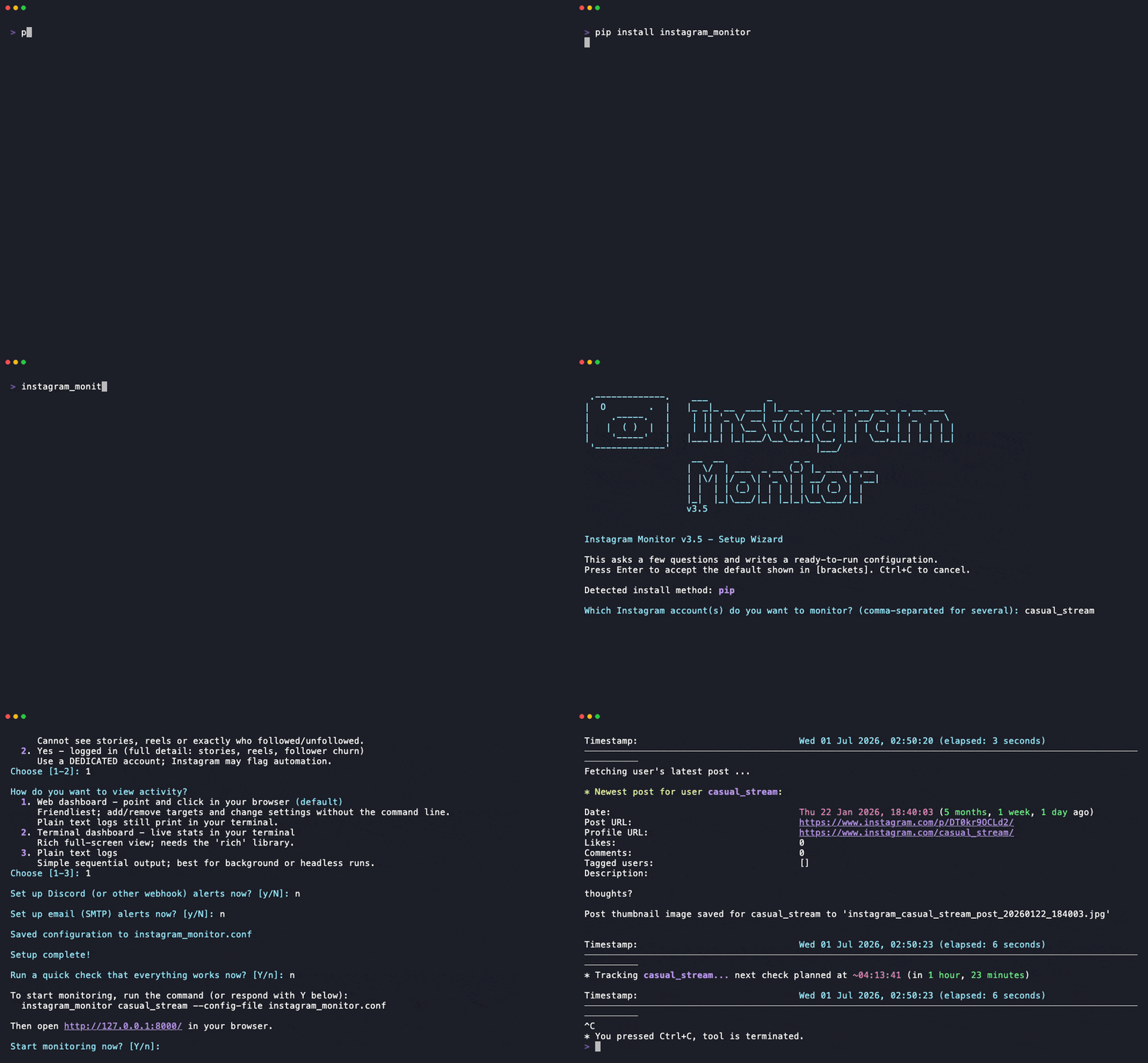
- Profile Activity: Monitor new posts, reels and stories in real-time.
- Private Posts: Detects collab posts leaking from private accounts via public collaborators.
- Audience Insights: Track changes in followings and followers.
- Visual Changes: Detect updates to profile pictures and visibility (public/private).
- Bio Updates: Stay informed about changes to user bio.
- Anonymous Stories: Download story images and videos without leaving traces.
- High-Quality Media: Save post images, reel videos and profile pictures.
- Batch Support: Monitor and download media for multiple users simultaneously.
- Guided Setup: Interactive wizard writes a ready-to-run config for PyPI, script and Docker workflows.
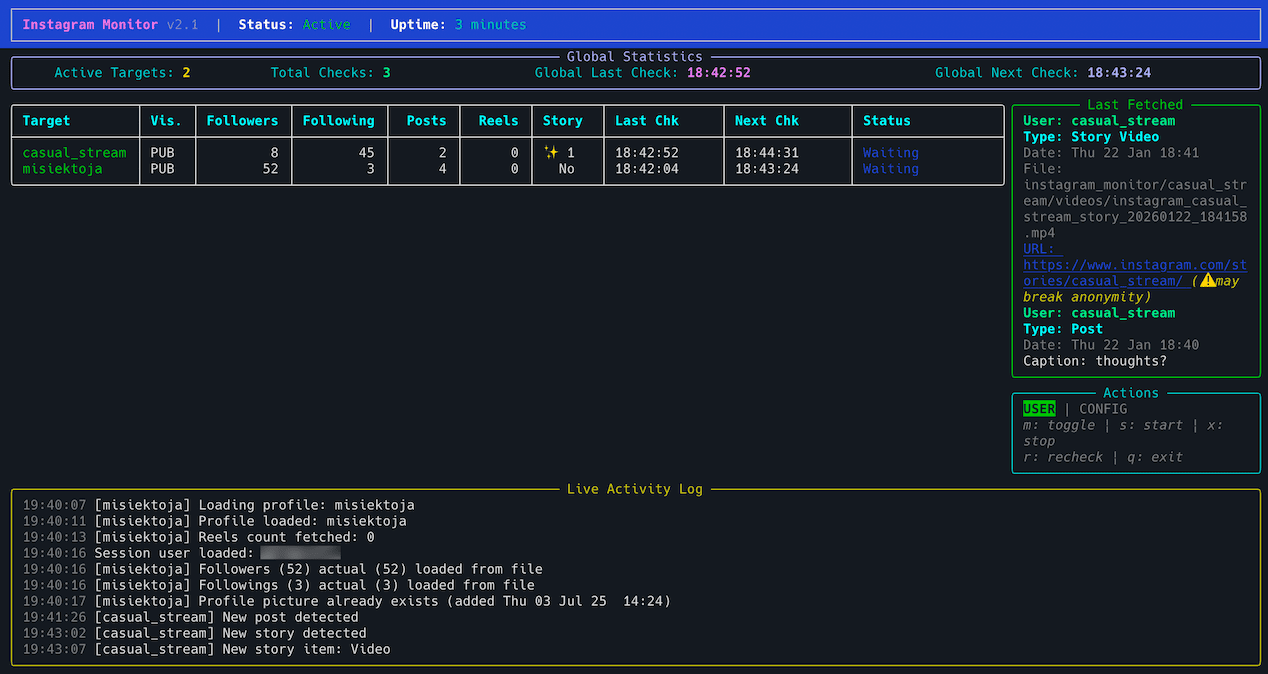
- Terminal Dashboard: Beautiful, live-updating CLI interface with real-time stats.
- Web Dashboard: Modern, local web UI with activity feeds and remote controls.
- Image Support: View profile pictures and media directly in your terminal (via
imgcat).
- Multi-Channel: Instant alerts via Email, Discord webhooks and native ntfy notifications.
- Rich Alerts: Attached media (profile pics, stories, posts) in Discord notifications.
- Error Reporting: Be notified when monitoring starts failing, and again when it recovers.
- Be Human Mode: Simulates random user actions to blend in.
- Jitter Mode: Adds human-like delays to HTTP requests.
- Hour-Range Checking: Limits activity to specific hours of the day.
- Identity Budget: Caps how many follower and following names are fetched per day.
- Circuit Breaker: Stops every target after Instagram challenges your account until a restart or a fresh session clears it.
- Account Flexibility: Works with or without a logged-in Instagram account.
- Browser Session Import: Reuse Firefox, Chrome, Brave or Chromium sessions with profile selection.
- Browser TLS Impersonation: Routes traffic through curl_cffi to mimic a real browser's TLS fingerprint and dodge fingerprint-based blocks.
- Proxy Support: Route Instagram and webhook traffic through your own proxy.
- Privacy Substitutions: Mask or rename identities across all output, logs and notifications.
- Block Awareness: Detects shadowbans and flagged sessions to avoid false alerts.
- CSV Logging: Log all activities and profile changes with timestamps.
- Flexible Config: Support for files, dotenv and environment variables.
- Follower Churn: Detailed tracking of exactly who followed or unfollowed.
- Follow Analysis: Inspect mutual, not-following-back and fan relationships offline from saved lists with
--analyze-followsor the Web Dashboard. - Selectable Follower List Source: Reads follower and following lists from the web REST endpoints Instagram's own app calls, falling back to the older GraphQL queries, with an experimental browser source for when both are broken.
- Batched Fetching: Throttle follower/following downloads into delayed batches.
- Remote Control: Manage tracking features via signals or the web UI.
- Docker Ready: Run via Docker Hub, Docker Compose or local image build with persisted config, dotenv and sessions.

Use Quick Install & Run above for first-time setup. The table uses PyPI commands. For manual script, direct Docker and Docker Compose equivalents, see Run Individual Commands.
Replace the target placeholders with an Instagram username.
| I want to... | Run this |
|---|---|
| Configure the target, credentials and alerts | instagram_monitor --setup |
| Start monitoring a public target without a login | instagram_monitor <target_insta_user> |
| Start monitoring with an existing logged in session (stories, reels and follower details) | Import a browser session then run instagram_monitor -u <your_insta_user> <target_insta_user> |
| Check the selected login, connectivity and targets | instagram_monitor --doctor |
| Monitor several accounts without login | instagram_monitor target_1 target_2 or instagram_monitor --targets target_1,target_2 |
| Start a browser control panel without targets | instagram_monitor --web-dashboard |
| Import an Instagram login from Firefox | Sign in at instagram.com in Firefox then run instagram_monitor --import-browser-session --browser firefox |
| Configure and test webhook alerts | Use the setup wizard or follow Webhook Notifications |
| Save an SMTP password for email alerts | instagram_monitor --set-smtp-password |
| Send a test email | instagram_monitor --send-test-email |
| Save a new webhook URL | instagram_monitor --set-webhook-url |
| Send a test webhook | instagram_monitor --send-test-webhook |
| Write every change to a CSV file | instagram_monitor <target_insta_user> -b changes.csv |
| List every supported command-line flag | instagram_monitor --help |
Running the tool with no arguments offers the wizard if you have not saved any targets or enabled the Web Dashboard. If targets are already saved, it starts monitoring them.
The tool runs until interrupted (Ctrl+C). Use tmux or screen for persistence. One run can monitor several accounts through TARGET_USERNAMES or --targets, so a second copy is not needed.
For browser choices, saved targets, configuration backups and setup recovery, see the full Setup & First Run guide.
For container operation, browser profiles, email and webhook setup, see Configuration. For notification choices, proxy settings and output files, see Usage.
If a run fails, start with Doctor Preflight.
Full documentation is available at misiektoja.github.io/instagram_monitor:
| Page | What it covers |
|---|---|
| Installation | Python walkthrough, PyPI, manual script and Docker installation, upgrades |
| Setup & First Run | Setup wizard, login choices, the first monitoring run |
| Configuration | Settings precedence, saved targets, session login, SMTP, storing secrets, check intervals |
| View Modes | Text output, terminal dashboard and web dashboard |
| Usage | Command formats, monitoring, container operation, notifications, proxy, terminal output |
| Anti-detection | Avoiding challenges and account suspension |
| Troubleshooting | --doctor preflight checks, what to do when something fails, --verbose and --debug output |
| Testing | Running the offline suite, the linter and the docs build |
| About | Change log, contributing, security, license, support |
See RELEASE_NOTES.md for details.
Bug reports, documentation fixes and code contributions are welcome. See CONTRIBUTING.md for the development setup, the checks CI enforces and what a change needs before it is merged. Participation is covered by the Code of Conduct.
Report a suspected vulnerability privately through GitHub security advisories, never as a public issue. SECURITY.md covers the reporting process, the supported versions and the security posture of the Web Dashboard, stored secrets and monitored account data.
- 👤 misiektoja (@misiektoja)
- 👤 tomballgithub (@tomballgithub)
Licensed under GPLv3. See LICENSE. Dependency licenses are listed in THIRD_PARTY_NOTICES.md.
Questions, bug reports and vulnerability reports each have a place, listed in SUPPORT.md.
If the project is useful to you, you can support its development through GitHub Sponsors or Buy Me a Coffee.