Repository navigation
Occupancy matrix figures: categorical cell grids with grouped rows, overlays, a colourbar and margin counts #74
Description

Why
A recurring figure in testing and validation work is the occupancy matrix: a grid in which every cell is one thing (a branch, a test, a subroutine, a requirement) and its colour says what state that thing is in. Coverage maps, test-by-module matrices, feature-support tables and requirement-traceability grids are all this figure. It is information-dense, it is read cell by cell, and it is exactly the kind of figure a reader wants to interact with: hover a cell to learn which branch or which case it is, hide a status class, zoom into one file.
yFoil (an XFOIL translation into Rust) has two of them in its branch-coverage study. They are the only yFoil figures that stayed on matplotlib when the rest moved to IronLAB 0.12.0 (thclark/yfoil#14), because IronLAB cannot yet express them.
The figures as they are today (matplotlib)
Branch map
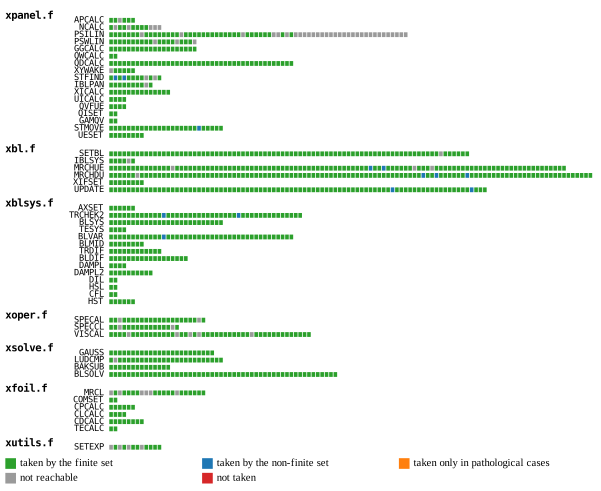
One row per subroutine, grouped under a header row per source file (xpanel.f, xbl.f, …). Each branch of the subroutine is one square cell, left to right, coloured by its status: taken by the finite set, taken by the non-finite set, taken only in pathological cases, not reachable, not taken. Rows are ragged (a subroutine has as many cells as it has branches, 2 to 110). The key is a legend of colour swatches, one per status, laid out in columns under the figure.
Case × subroutine matrix
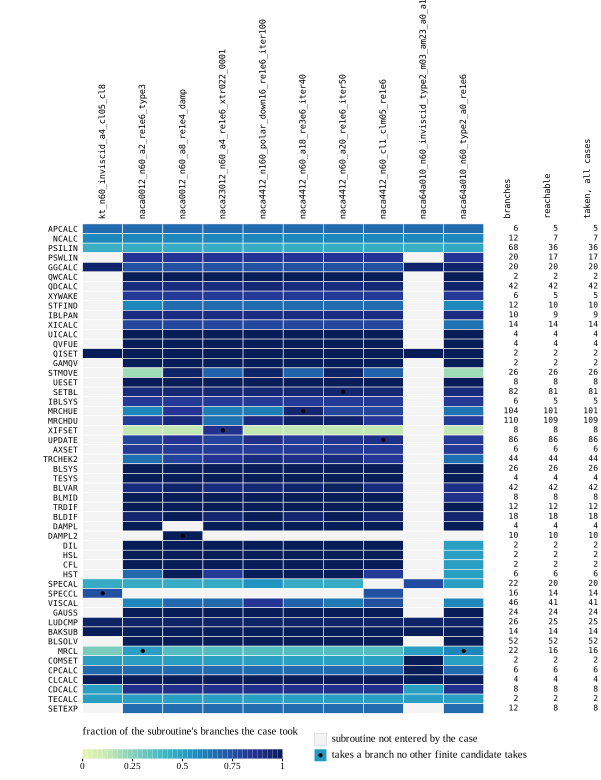
A heatmap of the fraction of each subroutine's branches each case takes:
- columns are cases, labelled by their (long, code-identifier) names, rotated 90° and set in a monospace face. Note that the matplotlib output itself clips the longest label at the top of the page — a layout that sized the figure to its labels would not;
- rows are subroutines, labelled in monospace;
- the cell colour is a continuous value through a stepped (discrete) colourmap, explained by a horizontal colourbar under the matrix with its label above it;
- a cell whose subroutine the case never entered is a neutral grey "not entered" colour (a non-finite value), explained by a swatch key entry beside the colourbar;
- a dot overlay marks the cells where the case takes a branch no other case takes, with its own key entry;
- a side table of counts to the right of the matrix: three numeric columns (branches, reachable, taken, all cases) aligned with the matrix rows, their headers rotated like the column labels.
What we're trying to achieve
Both figures as IronLAB figures, so that they get what every other yFoil figure now has: an embedded, interactive figure in the docs, parameters and labels for the figure browser, and a datatip that says which branch / case / subroutine a cell is — the thing a static figure can only offer through a lookup table.
Missing ingredients
These are the parts IronLAB 0.12.0 lacks, listed so that the figure type can be designed as a whole rather than one ingredient at a time:
- Categorical axes: tick positions named by strings, one per row / column, with the first row at the top. Today an axis has a numeric
Limitsand automatic ticks only; there are no custom tick labels and no reversed axis. - Rotated tick labels, as captured in Quick capture: new feature ideas #70 (tick label angle), with the layout reserving the space they need rather than clipping them.
- Monospace text for tick labels (code identifiers).
Texthas the LaTeX and plain interpreters only. - A cell grid with categorical colours and a key of labelled swatches:
indexed_imagegets the cells, but the key needs per-entry colour labels on the colormap, which is the classification key legend of Consider custom colorbars and classification key legends #24. - Ragged rows and row-group headers for the branch map: rows of different lengths (a
NaN/transparent cell would do) and a header row per group, with a gap between groups. Equivalently, a category axis with grouped categories (group label, then member labels). - A colourbar (Add a colorbar node #8), here horizontal, under the axes, with a discrete colourmap shown as steps, and a label.
- A key entry for the non-finite colour:
mapped_image(...).non_finite(...)already chooses the colour; the colourbar (or the legend) should be able to show it as a "not entered" swatch. - A marker overlay at cell centres with its own key entry (a
scatteron the categorical axes would do once (1) exists). - Margin columns of numbers aligned with the rows: either a text/table artist bound to the row categories, or a second axes sharing the y categories that draws text cells.
- Datatips that name categories: hovering a cell reports the row and column names and the value, rather than pixel indices (Add data cursors and pinned datatips #2, Read pixel datatips of images in three-dimensional axes #36).
Ideal API (sketch)
let mut fig = Figure::new().title("Branch coverage by case");
let mut ax = fig.axes(0, 0);
ax.xcategories(&case_names)                     // categorical axis, tick per category
  .xtick_labels_angle(90.0)                      // #70
  .xtick_labels_font(Font::Mono)
  .ycategories(&subroutines)                     // first category at the top
  .ytick_labels_font(Font::Mono)
  .colormap(ColormapName::YlGnBu)
  .clim(0.0, 1.0)
  .colorbar(ColorbarPlacement::South)            // #8
  .colorbar_label("fraction of the subroutine's branches the case took")
  .colorbar_steps(32);
ax.mapped_image(&fraction)                       // one cell per (case, subroutine)
  .non_finite(OutOfRange::Color(GREY))
  .non_finite_label("subroutine not entered by the case");
ax.scatter(&unique_case, &unique_subroutine)     // category indices or names
  .marker(MarkerShape::Point)
  .display_name("takes a branch no other finite candidate takes");
ax.margin_table(Side::East)                      // columns aligned with the y categories
  .column("branches", &branches)
  .column("reachable", &reachable)
  .column("taken, all cases", &taken);
and for the branch map, a grouped category axis and an indexed image whose colormap entries carry labels (#24):
ax.ycategory_groups(&[("xpanel.f", &xpanel_subs), ("xbl.f", &xbl_subs), /* … */]);
ax.indexed_image(&status)                         // ragged rows padded with NaN = not drawn
  .colormap(Colormap::classes(&[
      (GREEN, "taken by the finite set"),
      (BLUE, "taken by the non-finite set"),
      (ORANGE, "taken only in pathological cases"),
      (GREY, "not reachable"),
      (RED, "not taken"),
  ]))
  .key(KeyPlacement::South, LegendEntryColumns::count(3));
Related
- Categorical strip charts: rows named by item, first at the top #79 (categorical strip charts share the categorical axis and monospace labels); Add a colorbar node #8 colourbar node; Consider custom colorbars and classification key legends #24 custom colourbars and classification key legends; Quick capture: new feature ideas #70 tick label angle (and colourbars placed per row/column); Add data cursors and pinned datatips #2 / Read pixel datatips of images in three-dimensional axes #36 datatips.
- yFoil tracking issue: Figures → ironlab yfoil#14. The generators are
scripts/branch-coverage(Rust, writes JSON) andscripts/branch-coverage/plot.py(matplotlib) in thclark/yfoil.
Activity
FEA!: Draw every figure as an ironlab figure, and show them live in t…
thclark commentedon Oct 26, 2026
The occupancy matrices are delivered by #173: cells, category rows with grouped headers, the occupancy helper, a hidden x axis, turned tick labels (#153), colour keys and datatips that name rows and columns. The gallery has both figures,
branch_coverageandcoverage_matrix. The side table of counts aligned with the matrix rows is left to the table chart type (#121), because it needs text drawn in cells, which no artist does yet.REF: Upgrade to ironlab 0.16 and remove the figure workarounds