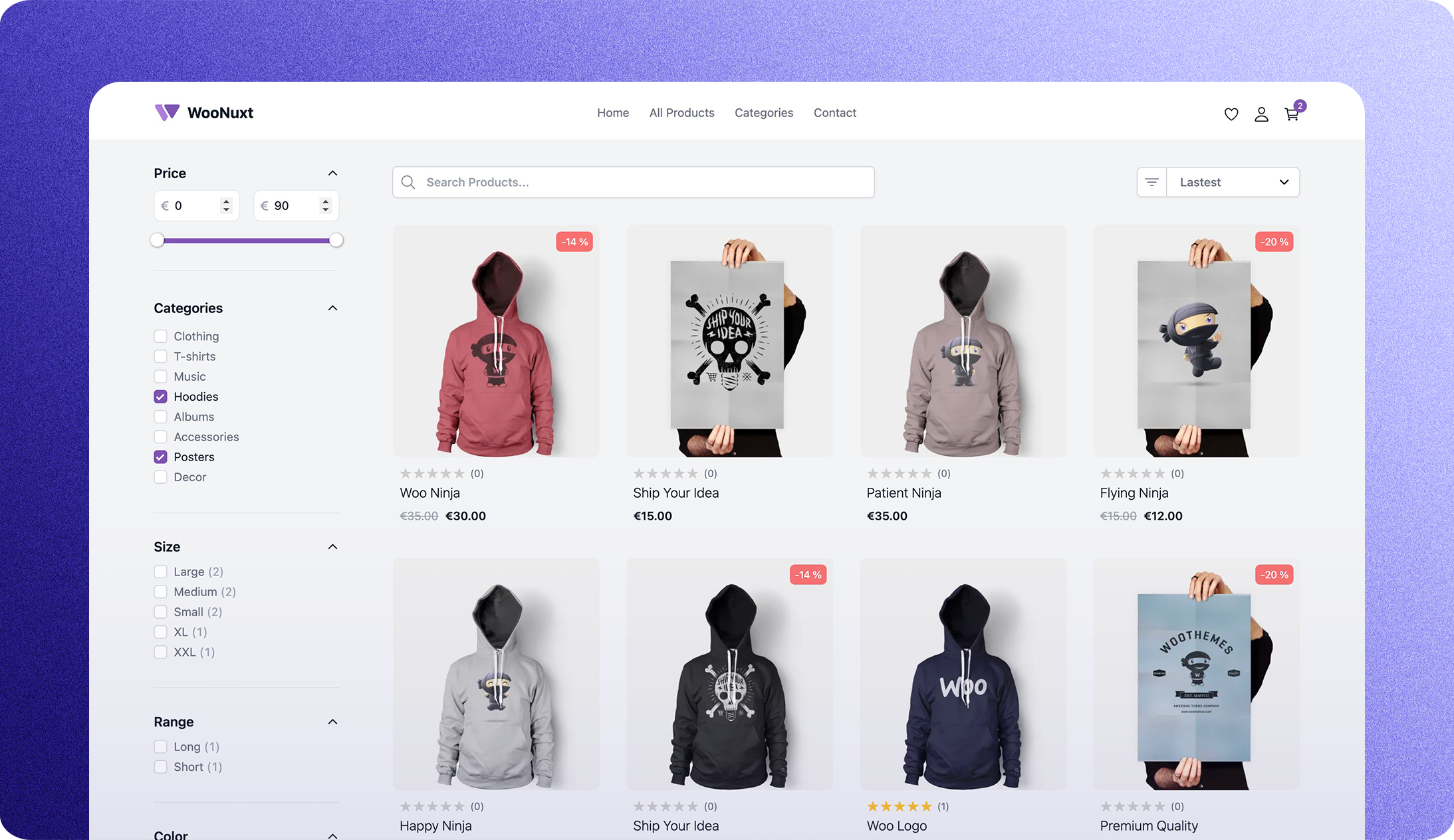
WooNuxt is a modern, fast, and SEO-friendly front-end for WooCommerce. Built on Nuxt 4 and WPGraphQL, it supports both fully static deployment and hybrid ISR rendering for large catalogs. It is fully customizable and can be extended with custom components and modules. You can see a live demo below.
The primary live demo is demo.woonuxt.com.
| Other live examples | URL |
|---|---|
| Vercel | https://woonuxt-v3.vercel.app/ |
| NuxtHub | https://woo.nuxt.dev/ |
| Customized store | https://myshop.woonuxt.com/ |
You can find some common errors and how to fix them here
Symptom: HTML loads, but every /_nuxt/*.js and /_nuxt/*.css request returns 404. The publish directory doesn't contain Nuxt's generated bundle — publish .output/public (not dist) with npm run generate as the build command. See Static Deployment below.
- Download the latest WooNuxt Settings plugin from the woonuxt-settings releases.
- Install and activate the plugin on your WordPress site. This will install all the required plugins for WooNuxt, add some useful fields to the WPGraphQL schema, and automatically retrieve the WooCommerce payment gateway settings for Stripe and PayPal.
- Once the plugin is activated you are ready to deploy WooNuxt on whatever hosting you like or click one of the fast deploy buttons below.
- Once the plugin is activated, configure
GQL_HOSTandNUXT_IMAGE_DOMAINS. Check out the.env.examplefile for details.

Run all project commands from the repository root. Create .env from .env.example, set GQL_HOST and NUXT_IMAGE_DOMAINS, then run:
npm install
npm run dev
woonuxt_base/ is the parent Nuxt layer that provides WooNuxt's storefront; it is not a separately runnable package. Add custom pages, components, and configuration in the root project as a child layer.
Netlify uses a static Nuxt build and Netlify Image CDN. Vercel uses Nitro's Vercel server preset so Vercel Image Optimization and WooNuxt's ISR route rules run at request time. Publishing the dist folder instead of .output/public for a static build serves prerendered HTML without Nuxt's hashed /_nuxt JS/CSS bundle — the deploy loads a blank/broken page.
- Import the repository as a new Netlify site.
- Confirm
netlify.tomlbuild command isNUXT_IMAGE_PROVIDER=netlify NITRO_PRESET=static npm run generateand publish directory is.output/public(don't override these in the dashboard). - Set
GQL_HOSTandNUXT_IMAGE_DOMAINSin Site configuration → Environment variables. - Deploy.
- Import the repository as a Vercel project. Nuxt is detected automatically.
- Set
GQL_HOSTandNUXT_IMAGE_DOMAINSin Settings → Environment Variables. - Do not override the build command or output directory in the Vercel dashboard;
vercel.jsonbuilds withNUXT_IMAGE_PROVIDER=vercel NITRO_PRESET=vercel npm run buildand emits Vercel's server/function output. - Deploy.
::warning
Never set NUXT_IMAGE_PROVIDER=ipx on Netlify static hosting or any static export. IPX needs a running Nuxt server. Use netlify for Netlify, vercel for Vercel, and reserve ipx for a self-hosted Nuxt server. When unset, WooNuxt uses Nuxt Image's portable none provider.
::
WooNuxt deliberately has no .nvmrc or package.json#engines entry. Use the current Node.js version supported by your host rather than adding a pin unless your own customization has a documented compatibility requirement.
For large catalogs, an alternative to the default static deployment is Nuxt hybrid rendering with ISR.
- Build with
nuxt build(notnuxt generate). - Product catalog routes use Nitro
routeRuleswithisrinnuxt.config.ts. - Default revalidation window is 3600 seconds and can be overridden via
CATALOG_ISR_TTL.
How ISR gets triggered:
- The first request to a route (for example
/product/some-slug) generates the page and caches it. - Requests during the TTL are served from cache.
- After TTL, the next request serves stale content and triggers background regeneration.
Platform notes:
- Vercel: uses Nuxt/Nitro ISR route rules directly.
- Netlify: use server build mode (
nuxt build) so route rules can run on the serverless/edge runtime. Static generate mode (nuxt generate) bypasses ISR.
WooNuxt avoids loading the full WooCommerce session for every visitor on first paint. This keeps cached catalog pages fast, reduces unnecessary WPGraphQL traffic, and still gives returning customers a responsive account/cart header.
The default flow is:
- Anonymous first visit: no backend session/cart call is made until the visitor interacts with the page.
- Returning or logged-in user: WooNuxt detects existing auth/session cookies and makes a small immediate
getCartSummaryrequest so the avatar and cart badge can appear quickly. - Full cart accuracy: the full
getCartrequest is loaded only when the customer needs it, such as opening the cart drawer, visiting cart/checkout/account routes, or changing cart contents.
This is controlled by storeSettings.initStoreOnUserActionToReduceServerLoad in woonuxt_base/app/app.config.ts. Keep it enabled for high-traffic storefronts. Disable it if your store prefers immediate full cart hydration over reducing backend calls.
WooNuxt now uses the Nuxt layers feature to make it easy to customize any part of WooNuxt just like you would with a WordPress theme with its child theme.
Example: create app/pages/contact.vue to override the default contact page that comes with WooNuxt. You can do this with any page or component. Think of the woonuxt_base folder as the parent theme and the root folder as the child theme.
Here is a branch with an example of some basic customizations: And here is the live demo of the customized WooNuxt site: My Shop.
The root project is the child layer, and woonuxt_base/ is the parent layer. In nuxt.config.ts you should use a single extends property with an array of parent layers.
export default defineNuxtConfig({
  extends: ['./woonuxt_base'],
});
If you do have an extra custom layer folder, add it in the same array:
export default defineNuxtConfig({
  extends: ['./woonuxt_base', './my_theme'],
});
Do not add extends: twice in the same config file. A duplicate key will overwrite the first one and prevent the layer system from working correctly.
To override base files, add a file with the same public name to your root app. For example:
woonuxt_base/app/components/productElements/ProductCard.vue→app/components/ProductCard.vuewoonuxt_base/app/pages/contact.vue→app/pages/contact.vue
WooNuxt includes @vite-pwa/nuxt in the base layer by default. You do not need extra setup to get a working baseline PWA.
In other words, you get PWA support out of the box for free, and key defaults are automatically populated from your WordPress settings.
Default behavior:
- PWA module is enabled in
woonuxt_base/nuxt.config.ts. - Base defaults are assembled in
woonuxt_base/modules/woonuxt-bridge.ts. <NuxtPwaManifest />is mounted inwoonuxt_base/app/app.vue.
How PWA values are resolved:
- WordPress settings first
generalSettings.title→ manifestnameand app titlegeneralSettings.description→ manifest/head descriptionwoonuxtSettings.primary_color→ manifest/head theme color
- App config fallback
siteNameshortDescription(ordescription)
- Final fallback
- Name falls back to
WooNuxtif no title is available.
- Name falls back to
You can set app-config fallback values in woonuxt_base/app/app.config.ts (or override from your child layer):
export default defineAppConfig({
  siteName: 'My Store',
  shortDescription: 'Headless WooCommerce storefront',
});
To extend or override PWA behavior in your child layer, add a pwa block in your root nuxt.config.ts:
export default defineNuxtConfig({
  extends: ['./woonuxt_base'],
  pwa: {
    manifest: {
      short_name: 'MyStore',
      start_url: '/',
      display: 'standalone',
      // Optional custom icon set
      icons: [
        { src: '/pwa-192x192.png', sizes: '192x192', type: 'image/png' },
        { src: '/pwa-512x512.png', sizes: '512x512', type: 'image/png' },
      ],
    },
    workbox: {
      // Example: add runtime caching for API/media routes
      runtimeCaching: [
        {
          urlPattern: /^https:\/\/secure\.woonuxt\.com\/graphql/,
          handler: 'NetworkFirst',
          options: {
            cacheName: 'graphql-cache',
            networkTimeoutSeconds: 3,
          },
        },
      ],
    },
  },
});
Tip: PWA typically improves repeat-visit performance and resilience, not first-load speed.
Location Hooks are documented in the project docs — see the quick guide and examples here:
- Hooks documentation: https://github.com/scottyzen/WooNuxtGuide/blob/master/content/4.hooks/index.md
| Feature | Ongoing Enhancements | In the Pipeline | In Progress | Done |
|---|---|---|---|---|
| Performance | 🔷 | ✅ | ||
| SEO | 🔷 | ✅ | ||
| Cart | ✅ | |||
| Search | ✅ | |||
| Shipping | ✅ | |||
| Checkout (Stripe, PayPal, Cash on Delivery) | 🔷 | ✅ | ||
| Filtering | 🔷 | ✅ | ||
| Wishlists | ✅ | |||
| Account | ✅ | |||
| Coupons | ✅ | |||
| Product Reviews | ✅ | |||
| Product Category Pages | ✅ | |||
| WooNuxt Settings Module | 🔷 | ✅ | ||
| Better TypeScript Support | 🔷 | ✅ | ||
| Mobile layout | 🔷 | ✅ | ||
| Countries & States Enums | ✅ | |||
| Cookie Popup & GDPR Compliance | ✅ | |||
| Progressive Web App (PWA) | ✅ | |||
| Queuing System (for checking out when the server is busy) | ✅ | |||
| Language Support (i18n) | 🔷 | ✅ |
| Plugin Name | Description |
|---|---|
| WooCommerce | Core eCommerce plugin |
| WPGraphQL | A free, open-source plugin for WordPress |
| WooGraphQL | GraphQL API for WooCommerce |
| Headless Login for WPGraphQL | Enable headless login for WPGraphQL |
| woonuxt-settings.zip | WooNuxt Settings plugin |
Note The woonuxt-settings.zip plugin will help you install all the required plugins.
| Payment Method | Supported |
|---|---|
| Stripe | ✅ |
| PayPal / PayPal Payments | ✅ |
| Cash on Delivery | ✅ |
| Cheque payments | ✅ |
GQL_HOST- The GraphQL endpoint for your WordPress site, for examplehttps://wp.example.com/graphql.NUXT_IMAGE_DOMAINS- The WordPress/CDN hostnames used for optimized images, for examplewp.example.com,cdn.example.com.NUXT_IMAGE_PROVIDER- Optional override. Defaults to Nuxt Image's portablenoneprovider. Netlify and Vercel set their native providers through the committed build configuration; self-hosted Nuxt servers can opt intoipx.
The WooNuxt Settings plugin automatically provides the remaining storefront settings through GraphQL. APP_HOST is optional and only needed when your deployed storefront uses a different origin from WordPress; otherwise it is derived from GQL_HOST.
WooNuxt uses a WooNuxt-owned GraphQL layer built on graphql-request and GraphQL Code Generator's typescript-graphql-request SDK.
This keeps the existing .gql files, generated operation types, and imperative storefront calls while avoiding a dependency on a Nuxt-specific GraphQL wrapper. Apollo is too heavy for WooNuxt's optional ISR catalog flow, urql's cache provides little value for the current architecture, and gql.tada would require a high-churn migration away from the existing query files.
The SDK is regenerated automatically before dev, dev:ssl, build, generate, and typecheck, using the configured GQL_HOST. The generated woonuxt_base/app/gql/default.ts is ignored because it reflects each storefront's backend. Run npm run graphql:codegen directly when editing .gql files and you want immediate type updates without restarting Nuxt. Installation intentionally does not run codegen, so dependency installation stays independent of backend availability.
| Plugin/Software | Version |
|---|---|
| WordPress | 7.0.1 |
| WooCommerce | 10.9.4 |
| WPGraphQL | 2.18.0 |
| WooGraphQL | 1.0.3 |
| Headless Login for WPGraphQL | 0.4.4 |
| Node | 22.22.2 |
| PHP | 8.4 |
| Language | Code |
|---|---|
| English 🇺🇸 | en |
| German 🇩🇪 | de |
| Spanish 🇪🇸 | es |
| French 🇫🇷 | fr |
| Italian 🇮🇹 | it |
| Portuguese 🇵🇹 | pt |
| Korean 🇰🇷 | ko |
- Install mkcert on your machine.
- Run
mkcert localhostto generate a certificate for localhost. You should now have alocalhost.pemandlocalhost-key.pemfile in your current directory. See the image below for an example. - Then run
mkcert -installto install the certificate authority. - Finally, run
npm run dev:sslto start the dev server with SSL.
This is an ongoing project but it wouldn't be possible without the help of the following people: Jason Bahl & Geoffrey K Taylor for their ongoing work on WPGraphQL and WooGraphQL respectively. Also, a big thanks to the Nuxt team for all their hard work making Nuxt 3 a pleasure to build upon. And the WooCommerce team for making such a great e-commerce platform. Some other honorable mentions are Funkhaus for their work on the WPGraphQL Cors plugin. And the people who have contributed to making WooNuxt better every day, Alex Lykesas, Zack Hatlen, Galli, Guillaume Thank you all! 🙏
I don't know where this project will go, but I'm excited to see what the future holds. If you have any questions or would like to contribute to the project please feel free to reach out to me on X or GitHub.
We welcome contributions! Please see CONTRIBUTING.md for guidelines on how to get started.