Detect if an element is in the current viewport.
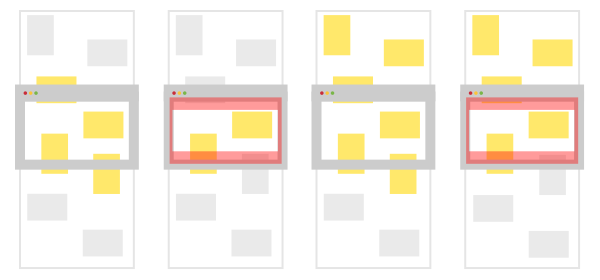
Since there is currently no way of listening to scroll events in Elm you'll have to hookup a port. Below is the bit of JS that gets you the scroll position and an example on how to set it all up.
port onScroll : ({x: Float, y: Float} -> msg) -> Sub msg


init : () -> ( Model, Cmd Msg )
init _ =
    let
        ( inViewModel, inViewCmds ) =
            InView.init ["1", "2", "3", "4", "5"]
    in
    ( { inView = inViewModel }
    , Cmd.map InViewMsg inViewCmds
    )


subscriptions : Model -> Sub Msg
subscriptions model =
    Sub.batch
       [ InView.subscriptions InViewMsg model.inView
       , onScroll OnScroll
       ]


type Msg
    = OnScroll { x: Float, y: Float }
    | InViewMsg InView.Msg


update : Msg -> Model -> ( Model, Cmd Msg )
update msg model =
    case msg of
        OnScroll offset ->
            ( { model | inView = InView.updateViewportOffset offset model.inView }
            , Cmd.none
            )

        InViewMsg inViewMsg ->
            let
                ( inView, inViewCmds ) =
                    InView.update InViewMsg inViewMsg model.inView
            in
            ( { model | inView = inView }
            , inViewCmds
)window.addEventListener("scroll", function() {
var offset = {x: window.pageXOffset, y: window.pageYOffset};
app.ports.onScroll.send(offset);
}, { passive: true });You might want to throttle or debounce this, listening to scroll events and getting positional information can cause some performance issues.