██████╗ ██╗███╗ ██╗ ██████╗ ██████╗ ████╗ ██╗ ██╗ █████╗ █████╗ ███╗ ██╗ ██╔══██╗██║████╗ ██║██╔════╝ ██╔══██╗██╔══██╗██║ ██║ ██╔══██╗██╔══██╗████╗ ██║ ██████╔╝██║██╔██╗██║██║ ██╗ ██████╦╝███████║██║ ██║ ██║ ██║██║ ██║██╔██╗██║ ██╔═══╝ ██║██║╚████║██║ ██╗ ██╔══██╗██╔══██║██║ ██║ ██║ ██║██║ ██║██║╚████║ ██║ ██║██║ ╚███║╚██████╔╝ ██████╦╝██║ ██║███████╗███████╗╚█████╔╝╚█████╔╝██║ ╚███║ ╚═╝ ╚═╝╚═╝ ╚══╝ ╚═════╝ ╚═════╝ ═╝ ╚═╝╚══════╝╚══════╝ ╚════╝ ╚════╝ ╚═╝ ╚══╝ |

|






Ping Balloon — desktop notification bubble for terminal coding agents.
A floating bubble that sits in the corner of your screen and tells you when Claude finishes a task or needs your approval. The bubble is hidden by default — it only appears when something actually requires your attention.
| State | Colour | Behaviour |
|---|---|---|
| complete | Green | Appears, plays a short sound, auto-hides after 6 s |
| permission | Amber | Appears, plays a sound, stays visible until you act |
| waiting | Blue | Hidden by default — debug/optional (see Environment Variables) |
Clicking the bubble brings your terminal or editor back into focus, then hides the bubble.
npm install -g @quantthieres/ping-balloon@latestVerify the installation:
ping-balloon help
ping-balloon doctorping-balloon startThis starts the app. The window opens but the bubble stays hidden until an event arrives — no visible clutter while you work. Keep this terminal open for as long as you want to receive notifications.
In a second terminal:
ping-balloon health                    # confirm the server is up
ping-balloon notify complete           # bubble appears, plays sound, auto-hides
ping-balloon notify permission # bubble appears, plays sound, stays visibleTerminal 1 — start Ping Balloon (keep running):
ping-balloon startTerminal 2 — inside your project:
cd path/to/your/project
ping-balloon hooks install
claude
hooks install needs to be run once per project. It writes to .claude/settings.local.json. If Ping Balloon is not running when Claude triggers a hook, the hook exits silently — it will never interrupt or block Claude Code.
ping-balloon hooks uninstallRemoves only Ping Balloon entries from .claude/settings.local.json. Other hooks are untouched.
npm install -g @quantthieres/ping-balloon@latestnpx --package=@quantthieres/ping-balloon ping-balloon help
npx --package=@quantthieres/ping-balloon ping-balloon startFor everyday use the global install (npm install -g) is simpler.
- Node.js >= 18
- macOS (10.15+), Windows (10+), or Ubuntu (22.04 / 24.04 with GNOME)
- Claude Code for hook integration (optional but recommended)
ping-balloon <command> [args]
| Command | Description |
|---|---|
start |
Start using the production build in dist/ |
dev |
Start in dev mode — Vite dev server + Electron (source clone only) |
health |
Check if the HTTP server is reachable |
notify <state> |
Send a state change to the bubble |
hooks install |
Wire Claude Code hooks in .claude/settings.local.json |
hooks uninstall |
Remove Ping Balloon hooks |
doctor |
Print a diagnostics report |
help |
Show usage and examples |
ping-balloon notify complete
ping-balloon notify permission --title "Approval needed" --message "Allow bash?" --meta "Bash"
ping-balloon notify waiting     # debug/optional — hidden by default from hooks
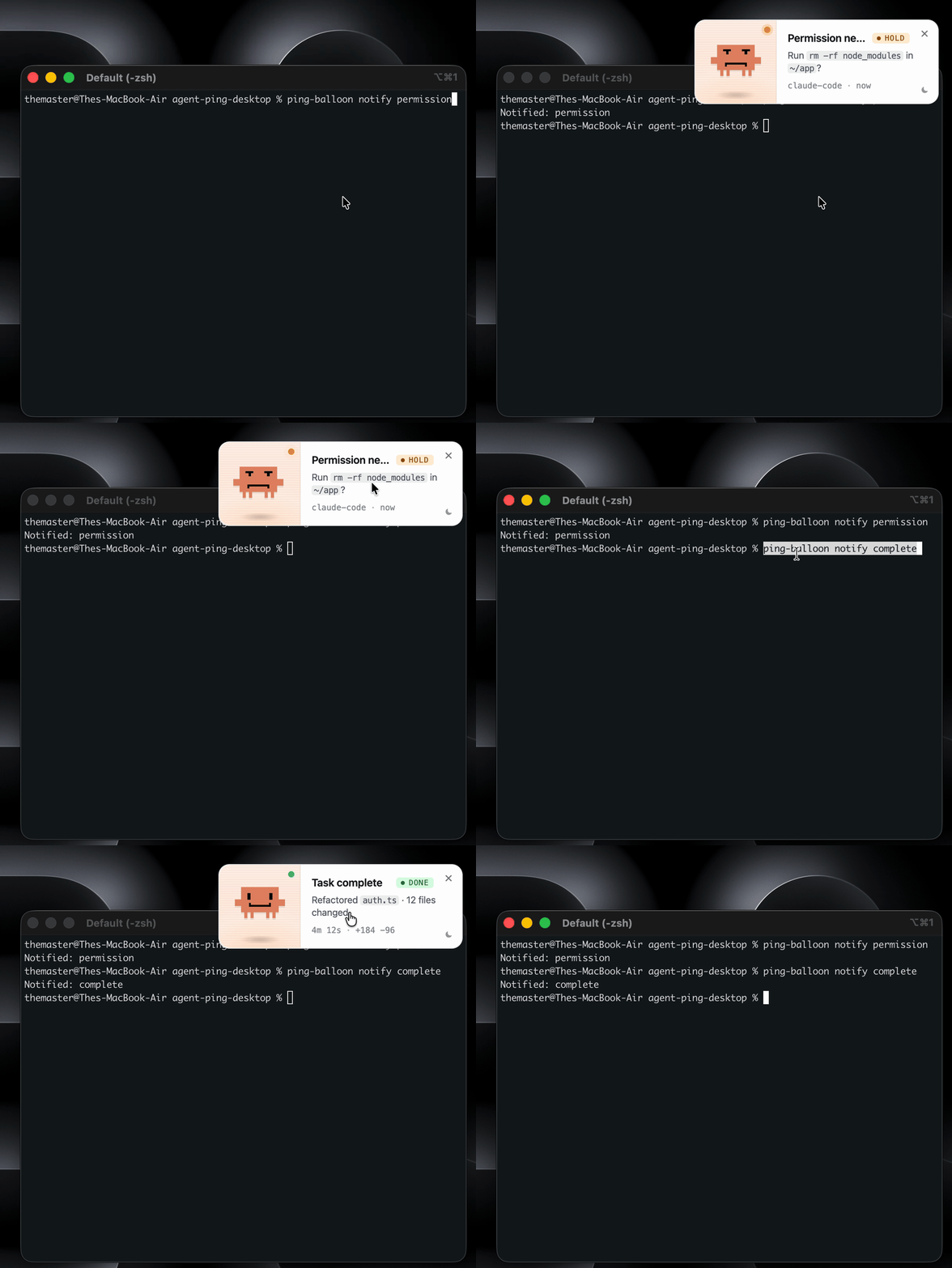
When Ping Balloon is running it exposes a local server on http://127.0.0.1:47321.
curl http://127.0.0.1:47321/health
# → {"ok":true,"app":"agent-ping"}
Note:
"app":"agent-ping"is an internal server identifier kept for compatibility.
curl -X POST http://127.0.0.1:47321/notify \
  -H 'Content-Type: application/json' \
-d '{"state":"complete"}'| Field | Type | Required |
|---|---|---|
state |
"complete" | "waiting" | "permission" |
✓ |
title |
string | — |
message |
string | — |
meta |
string | — |
Ping Balloon hooks into Claude Code to update the bubble automatically as Claude works.
# Terminal 1 — Ping Balloon must be running
ping-balloon start

# Terminal 2 — inside your project
ping-balloon hooks install
This writes to .claude/settings.local.json (project-scoped, typically git-ignored). Existing hooks from other tools are preserved.
| Claude Code event | Condition | Bubble behaviour |
|---|---|---|
Stop (task done) |
always | complete — plays sound, auto-hides after 6 s |
Notification |
message contains a permission keyword | permission — plays sound, stays until dismissed |
Notification |
generic / idle | ignored by default — set PING_BALLOON_SHOW_WAITING=1 to re-enable |
Permission keywords (case-insensitive): permission, allow, approve, authorize, grant, blocked, requires approval, do you want to, confirm
Generic idle notifications are suppressed so the bubble does not flash every time Claude is just thinking. Only task completion and permission requests produce a visible notification.
AGENT_PING_HOOK_DEBUG=1 node scripts/claude-hook-notify.js Stop
cat .claude/agent-ping-hook-debug.log
Each hook invocation appends a JSON line with timestamp, event, payload, chosen state (or skip), and HTTP result.
ping-balloon hooks uninstallOnly Ping Balloon entries are removed. Other hooks in the same file are preserved.
Set these before starting Ping Balloon or before running a hook.
| Variable | Default | Effect |
|---|---|---|
PING_BALLOON_SOUND=0 |
sound on | Silence all notification sounds |
PING_BALLOON_SHOW_WAITING=1 |
suppressed | Show the waiting bubble for generic Claude Code notifications |
AGENT_PING_HOOK_DEBUG=1 |
off | Append debug JSON to .claude/agent-ping-hook-debug.log |
PING_BALLOON_FOCUS_CMD |
— | Custom shell command used instead of built-in focus logic on Ubuntu/Linux |
PING_BALLOON_SOUND=0 ping-balloon startBy default, generic Notification events from Claude Code (idle, thinking) are silently ignored. To restore the previous behaviour:
PING_BALLOON_SHOW_WAITING=1 ping-balloon start
PING_BALLOON_SHOW_WAITINGis read byclaude-hook-notify.jsat hook invocation time. Set it as a shell environment variable or in your shell profile.
Clicking the notification bubble tries to bring your terminal or editor to the front.
- If focus succeeds, the bubble hides automatically.
- If focus fails (no supported app found, permission not granted), the bubble stays visible — dismiss it manually with ×.
Apps tried in order:
| Priority | App |
|---|---|
| 1 | Warp |
| 2 | iTerm2 |
| 3 | Terminal |
| 4 | Visual Studio Code |
Uses AppleScript tell application X to activate. On first use macOS may show an Automation permission dialog — approve it for focus to work.
Apps tried in order:
| Priority | App |
|---|---|
| 1 | Windows Terminal |
| 2 | PowerShell (pwsh, powershell) |
| 3 | cmd |
| 4 | Visual Studio Code |
Uses PowerShell AppActivate by PID. The Windows foreground lock may cause the app to flash in the taskbar rather than fully focus.
Ubuntu 22.04 and 24.04 with GNOME are the initial targets. Other distributions may work but are not tested.
npm install -g @quantthieres/ping-balloon@latestping-balloon start
ping-balloon notify complete
ping-balloon notify permissionWithout these tools the bubble will still appear and can be dismissed manually, but clicking it will not focus your terminal.
sudo apt update
sudo apt install -y wmctrl xdotool
Focus is attempted in this order:
PING_BALLOON_FOCUS_CMD(if set) — run as a custom shell commandwmctrl -a <name>— tries GNOME Terminal, Terminal, Visual Studio Code, Codexdotool search --class <class>+windowactivate— tries gnome-terminal, org.gnome.Terminal, code, Code- Returns
ok: falsewith guidance if nothing works
Use PING_BALLOON_FOCUS_CMD to override the built-in logic with any shell command you prefer:
PING_BALLOON_FOCUS_CMD='wmctrl -a Terminal' ping-balloon startWayland restricts which applications can raise windows belonging to other processes. If focus does not work on Wayland, install wmctrl or xdotool, or set PING_BALLOON_FOCUS_CMD. Notifications will still appear and sounds will still play regardless of whether focus succeeds.
doctor shows Ubuntu-specific checks:
✓  Platform: linux x64  6.8.0-57-generic
✓  XDG_SESSION_TYPE: x11
✓  wmctrl: available
✗  xdotool: missing  optional — sudo apt install -y xdotool
✓  PING_BALLOON_FOCUS_CMD: not set (optional)
Optional checks (wmctrl, xdotool, PING_BALLOON_FOCUS_CMD) are shown but do not cause doctor to exit with an error.
| Command | Description |
|---|---|
npm run dev |
Start Vite + Electron in development mode |
npm run build |
Build the React app into dist/ |
npm start |
Start Electron loading dist/ (production) |
npm run doctor |
Run ping-balloon doctor |
npm run health |
Check if the server is up |
npm run notify:complete |
Send complete state |
npm run notify:waiting |
Send waiting state (debug) |
npm run notify:permission |
Send permission state |
npm run hooks:install |
Install Claude Code hooks |
npm run hooks:uninstall |
Remove Claude Code hooks |
Use this checklist before tagging a release.
App startup
-
npm run buildcompletes without errors -
ping-balloon startstarts the process — no bubble visible on launch -
ping-balloon healthreturns{"ok":true,"app":"agent-ping"} -
ping-balloon doctorreports all ✓
Bubble states and timing
-
ping-balloon notify complete→ green bubble, DONE label, sound plays, auto-hides after ~6 s -
ping-balloon notify permission→ amber bubble, HOLD label, sound plays, stays visible -
ping-balloon notify waiting→ blue bubble, IDLE label, sound plays, auto-hides after ~8 s - Dismiss (×) hides the bubble immediately (cancels any auto-hide timer)
- Any
notifycall re-shows the bubble regardless of current visibility
Sound
- Sound plays on
complete,permission,waitingevents - Theme toggle (☾/☀) produces no sound
-
PING_BALLOON_SOUND=0 ping-balloon start→ bubble appears but no sound
Theme
- ☾/☀ button toggles light/dark theme
- Clicking the theme button does not dismiss the bubble or focus the terminal
Bubble click — terminal focus (macOS)
- Single click on the bubble body attempts terminal focus
- If focus succeeds → terminal comes to front, bubble hides
- If focus fails → bubble stays visible
- Double-click does not trigger two focus calls (guard active)
Claude Code hook routing
-
echo '{"hook_event_name":"Stop"}' | node scripts/claude-hook-notify.js Stop→ complete bubble appears -
echo '{"hook_event_name":"Notification","message":"Permission required"}' | node scripts/claude-hook-notify.js Notification→ permission bubble -
echo '{"hook_event_name":"Notification","message":"Waiting for input"}' | node scripts/claude-hook-notify.js Notification→ no bubble (suppressed) -
PING_BALLOON_SHOW_WAITING=1 echo '...' | node scripts/claude-hook-notify.js Notification→ waiting bubble -
ping-balloon hooks installwrites to.claude/settings.local.json - Claude Code
Stophook → complete bubble -
ping-balloon hooks uninstallremoves entries cleanly
Bubble click — terminal focus (Ubuntu, manual — requires Ubuntu machine)
-
wmctrland/orxdotoolinstalled - Single click on the bubble body attempts terminal focus
- If wmctrl or xdotool finds a window → terminal comes to front, bubble hides
- If neither tool is available → bubble stays visible, error logged
-
PING_BALLOON_FOCUS_CMD='wmctrl -a Terminal' ping-balloon start→ custom command used on click -
ping-balloon doctoron Ubuntu shows XDG_SESSION_TYPE, wmctrl, xdotool, PING_BALLOON_FOCUS_CMD - On Wayland (
XDG_SESSION_TYPE=wayland), doctor shows Wayland note
CLI edge cases
-
ping-balloon notify invalid→ error, exit 1 -
ping-balloon foobar→ "Unknown command", exit 1 -
ping-balloon healthwhen not running → clear error, exit 1 -
ping-balloon startwhendist/is missing → clear error, exit 1
Package
-
npm pack --dry-runlists only expected files (nosrc/,node_modules/,.claude/) - Version shown is
0.3.0
ping-balloon devis only available when running from a source clone (requiressrc/and Vite). Shows a clear error from an installed package.- Hook routing (
permissionvs ignored) depends on Claude Code's Notification payload text. If Claude Code changes its message format, keywords inscripts/claude-hook-notify.jsmay need updating. Stophook cannot distinguish a completed task from a cancelled one — always showscomplete.- Rapid notifications overwrite each other; the bubble shows the last state received.
- macOS Automation permission must be granted to Ping Balloon on first use for terminal focus to work. macOS will show a permission dialog automatically.
- Windows terminal focus is best-effort — the foreground lock may cause the app to flash in the taskbar rather than fully focus.
- Notification sound depends on OS audio output being available and not muted at the system level.
- Ubuntu terminal focus is best-effort — requires
wmctrlorxdotool, or a customPING_BALLOON_FOCUS_CMD. Wayland may restrict focus further. See Ubuntu. - Other Linux distributions are not tested. The Electron window may open but terminal focus is not implemented beyond Ubuntu.
- Fixed port — the server runs on 47321. If that port is in use, the server will fail silently.
- Internal identifiers (
"app":"agent-ping"in the HTTP response,agent-ping-hook-debug.log,AGENT_PING_HOOK_DEBUG) are legacy names kept for backward compatibility.
The vscode-extension/ folder contains a companion VS Code extension (local/dev only — not published to the Marketplace).
- Shows a status bar item (bottom-right) reflecting Ping Balloon's running/offline state, refreshed every 30 s
- Exposes six Command Palette commands: Start, Check Status, Install Claude Code Hooks, Test Complete, Test Permission, Doctor
- Clicking the status bar opens a quick-pick menu with all commands
- All invocations pass
PING_BALLOON_FOCUS_TARGET=vscodeso the bubble click focuses VS Code first
When PING_BALLOON_FOCUS_TARGET=vscode is set, clicking the bubble promotes VS Code to the top of the focus order on macOS, Windows, and Ubuntu/Linux.
You can also set this from the CLI without the extension:
ping-balloon start --focus vscode
# or
PING_BALLOON_FOCUS_TARGET=vscode ping-balloon startcd vscode-extension
npm install
npm run compile
# Then open the folder in VS Code and press F5 to launch an Extension Development Host.git clone https://github.com/quantthieres/ping-claude-balloon.git
cd ping-claude-balloon/agent-ping-desktop
npm install # install all dependencies
npm run dev # Vite hot-reload + Electronagent-ping-desktop/
├── bin/
│ └── agent-ping.js ← CLI entry point (ping-balloon command)
├── electron/
│ ├── main.js ← Electron main process + HTTP server
│ ├── preload.js ← IPC bridge (contextBridge)
│ └── focus-terminal.js ← macOS / Windows / Ubuntu terminal focus
├── scripts/
│ ├── claude-hook-notify.js ← Hook entry point (reads stdin, routes state)
│ ├── electron-dev.js ← Cross-platform Electron dev launcher
│ ├── notify.js ← HTTP helper for npm scripts
│ ├── install-claude-hooks.js
│ └── uninstall-claude-hooks.js
├── src/
│ ├── App.jsx ← State switcher, IPC listener, sound, timers
│ ├── main.jsx
│ └── components/
│ ├── BubbleNotification.jsx
│ ├── BubbleNotification.css
│ ├── state-config.js
│ └── mascots/ ← complete.png, waiting.png, permission.png
├── dist/ ← Production build (generated by npm run build)
├── package.json
├── README.md
├── CHANGELOG.md
└── LICENSE
npm run build           # build React app into dist/
npm pack                # creates .tgz (runs build first via prepack)
npm pack --dry-run # preview contents without writing the fileMIT — © 2026 quantthieres