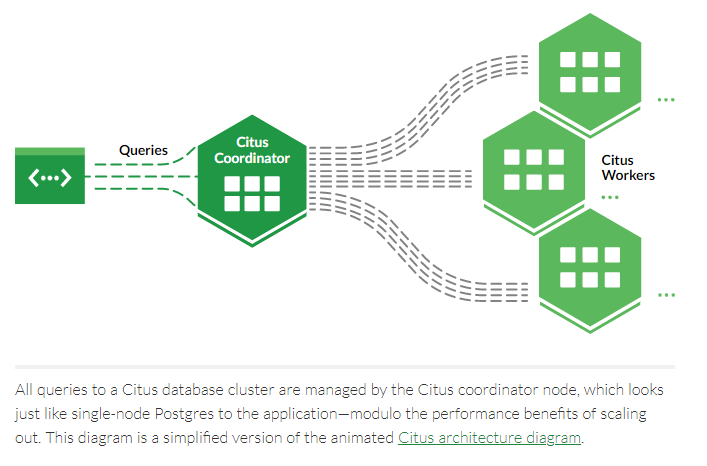
Citus is an open source extension that transforms Postgres into a distributed database. The docker image is based on the official PostgreSQL image. Here will use citusdata/citus:10.1 which uses PostgreSQL 13.4 as an example, and create a cluster with one coordinator node and two worker nodes in different machines:
(The benefit of using Citus docker image is that it already has the Citus extention and configuration in Postgre, you don't need to install it, configure the postgresql.conf(shared_preload_libraries ='citus') or create extension(CREATE EXTENSION citus;) for more information: https://www.digitalocean.com/community/tutorials/how-to-set-up-continuous-archiving-and-perform-point-in-time-recovery-with-postgresql-12-on-ubuntu-20-04)
docker run -d --name citus_master -p 5432:5432 -e POSTGRES_PASSWORD=mypass citusdata/citus:10.1
docker run -d --name citus_slave_1 -p 5432:5432 -e POSTGRES_PASSWORD=mypass citusdata/citus:10.1 (10.100.100.33)
docker run -d --name citus_slave_2 -p 5432:5432 -e POSTGRES_PASSWORD=mypass citusdata/citus:10.1 (10.100.100.32)
Enter to every container and do the following commands:
docker exec citus_master bash -c "head -n -1 var/lib/postgresql/data/pg_hba.conf > var/lib/postgresql/data/temp.conf; mv var/lib/postgresql/data/temp.conf var/lib/postgresql/data/pg_hba.conf"
docker exec citus_master bash -c "echo -e \"host all all all trust\" >> var/lib/postgresql/data/pg_hba.conf"
must restart docker with docker restart container_name
After the restart process, just go to the coordinator node to add the worker nodes, create tables and shard the data:
docker exec citus_master bash -c "psql -U postgres -c \"SELECT citus_add_node('10.100.100.33', 5432);\""
docker exec citus_master bash -c "psql -U postgres -c \"SELECT citus_add_node('10.100.100.32', 5432);\""
docker exec citus_master bash -c "psql -U postgres -c 'CREATE TABLE tb1(id int primary key, c1 int);'"
docker exec citus_master bash -c "psql -U postgres -c \"SELECT create_distributed_table('tb1','id');\"" (this function will shard the data to the worker nodes, it informs Citus that the tb1 table should be distributed on the id column. By default the number of replica is 1, you can change by SET citus.shard_replication_factor = xx; command; by default the distribute table will be 32, you can change by SET citus.shard_count = xx; command)
docker exec citus_master bash -c "psql -U postgres -c 'INSERT INTO tb1 select id,random()*1000 from generate_series(1,100)id;'"
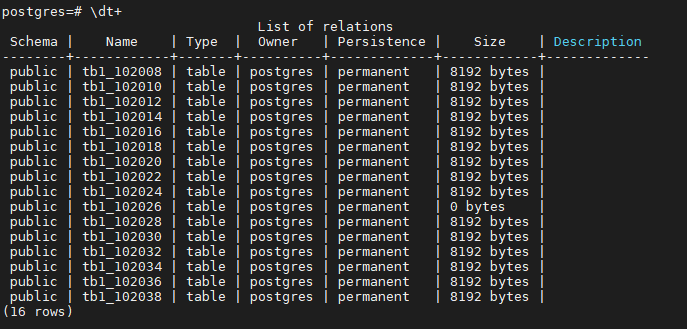
In the coordinator node, you can see the following result:

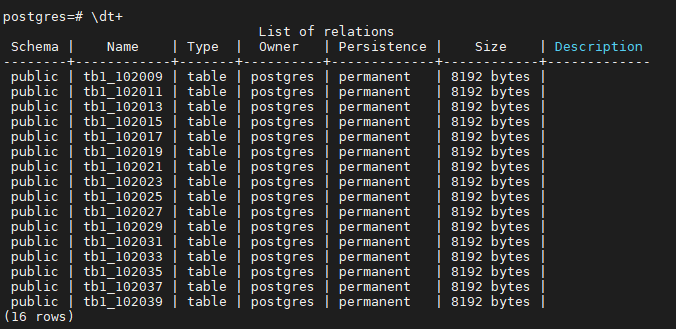
In the worker nodes, you can see the following result:
In every machine do the following command for a cluster physical backup, using pg_basebackup (for backup):
docker exec citus_master bash -c "pg_basebackup -U postgres -Xs -P -D /backup/'date +"%Y%m%d%H%M%S"'"
docker exec citus_master bash -c "tar -czf $containerName.Backup.tar.gz backup/*"
docker cp citus_master:$containerName.Backup.tar.gz .
In every machine that will have the physical backup, do the following commands:
docker cp $containerName.Backup.tar.gz citus_master:.
docker exec citus_master bash -c "tar -xzf $containerName.Backup.tar.gz"
Enter to database:
docker exec citus_master bash -c "chown -R postgres:postgres backup/"
docker exec citus_master bash -c "rm -rf /var/lib/postgresql/data/*"
docker exec citus_master bash -c "cp -r backup/$restoreTime/* /var/lib/postgresql/data/"
docker exec citus_master bash -c "chown -R postgres:postgres /var/lib/postgresql/data/"
sleep 60
docker restart citus_master
⚠If the container shuts down immediately after deleting the "data" file, add the configuration to the daemon configuration file. On Linux, this defaults to /etc/docker/daemon.json:
{ "live-restore": true }
and systemctl reload docker
⚠
For backup, don't forget the following commands to save the WAL files:
docker exec citus_master bash -c "mkdir /wal_archive; chown postgres.postgres /wal_archive"
docker exec citus_master bash -c "psql -U postgres -c 'ALTER SYSTEM SET archive_mode = on;'"
docker exec citus_master bash -c "psql -U postgres -c \"ALTER SYSTEM SET archive_command = 'test ! -f /wal_archive/%f && cp %p /wal_archive/%f';\""
docker exec citus_master bash -c "psql -U postgres -c 'ALTER SYSTEM SET wal_level = replica;'"
For restore, add restore_command and recovery.signal for tringger and use the command in the normal backup process:
docker exec citus_master bash -c "psql -U postgres -c \"ALTER SYSTEM SET restore_command = 'cp /wal_archive/%f %p';\""
docker exec citus_master bash -c "psql -U postgres -c \"ALTER SYSTEM SET recovery_target_timeline = 'latest';\""
docker exec citus_master bash -c "touch /var/lib/postgresql/data/recovery.signal; chown -R postgres:postgres /var/lib/postgresql/data; chmod 700 /var/lib/postgresql/data/recovery.signal"