Repository navigation
Theme Type: Library
The library type allows you to define a control that will enable/disable stylesheet and script files. When enabled the files will be appended to the head of the document, when disabled the files will be removed.
Please note, that when a script file is included and the setting is toggled off, the user will be prompted to reload the window. This is because script files can't be dynamically removed from the page once they are loaded and their effects will persist until the window is reloaded.

A short user-friendly title that gives the user an idea of this setting. This value is localized.
A long user-friendly description that details what this setting is used for. This value is localized.
Set type to library to generate this control.
The default option of the library control is a Boolean value to indicate if the libraries should or shouldn't be loaded.
This property is an array of objects that defines the files and their file types that should be loaded into foundry if the setting is enabled.
"files": [{
	"name": "./modules/lib-themer/themes/assets/styles/tidy-hud.css",
	"type": "text/css"
},{
	"name": "./modules/lib-themer/themes/assets/scripts/tidy-hud.js",
	"type": "text/javscript"
}]
A settings property is a special property for the library control that when enabled will allow you to define controls that will be displayed when the library is enabled. This property accepts a object of Theme Types.
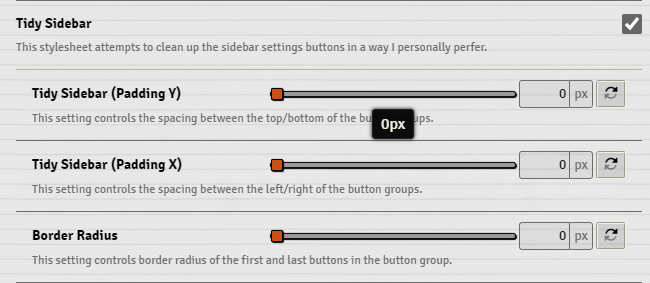
"cssTidySidebar": {
	"name": "lib-themer.cssTidySidebar.name",
	"hint": "lib-themer.cssTidySidebar.hint",
	"type": "library",
	"default": false,
	"files": [{
		"name": "./modules/lib-themer/themes/assets/styles/tidy-sidebar.css",
		"type": "text/css"
	}],
	"settings": {
		"--tidy-sidebar-padding-y": {
			"name": "lib-themer.cssTidySidebar.settings.tidySidebarPaddingY.name",
			"hint": "lib-themer.cssTidySidebar.settings.tidySidebarPaddingY.hint",
			"type": "number",
			"default": "16px",
			"range": {
				"min": 0,
				"max": 24
			}
		},
		"--tidy-sidebar-padding-x": {
			"name": "lib-themer.cssTidySidebar.settings.tidySidebarPaddingX.name",
			"hint": "lib-themer.cssTidySidebar.settings.tidySidebarPaddingX.hint",
			"type": "number",
			"default": "20px",
			"range": {
				"min": 0,
				"max": 24
			}
		},
		"--tidy-sidebar-border-radius": {
			"name": "lib-themer.cssTidySidebar.settings.tidySidebarBorderRadius.name",
			"hint": "lib-themer.cssTidySidebar.settings.tidySidebarBorderRadius.hint",
			"type": "number",
			"default": "3px",
			"range": {
				"min": 0,
				"max": 30
			}
		}
	}
},