

A small, layered, broker-agnostic algorithmic-trading research engine — and an honest one, which mostly means it's very good at telling you your brilliant strategy is actually noise. It scans markets, tests strategies, validates them out-of-sample, allocates portfolios, and exposes the whole research surface to AI agents without ever handing them order-execution authority. It ships with an Alpaca adapter, but everything above the broker layer is vendor-neutral. It scans a universe of symbols, runs a strategy over them, and either backtests on history or trades live (paper by default) — with optional parameter optimization, walk-forward validation, and constraint-solver portfolio allocation.
Full docs — usage guide, engineering wiki, and changelog — live at tradeflow.mk-dir.com.
Making money in markets is genuinely hard. This project won't change that — but it will at least stop you from fooling yourself quite so quickly, which is most of the battle.
Designed to be easy to try and easy to read:
- No TA-Lib / no native build step — indicators are pure pandas/numpy, so
uv syncis all you need and the Docker image carries no compiler toolchain. - Broker-agnostic — everything is written against a
Broker/MarketDataProviderinterface. Alpaca is the first implementation; dropping in another venue means writing one adapter, nothing else. - Strict separation of concerns — each layer does one job (see below).
⚠️ Educational software. Trading is risky; use paper trading. No warranty.
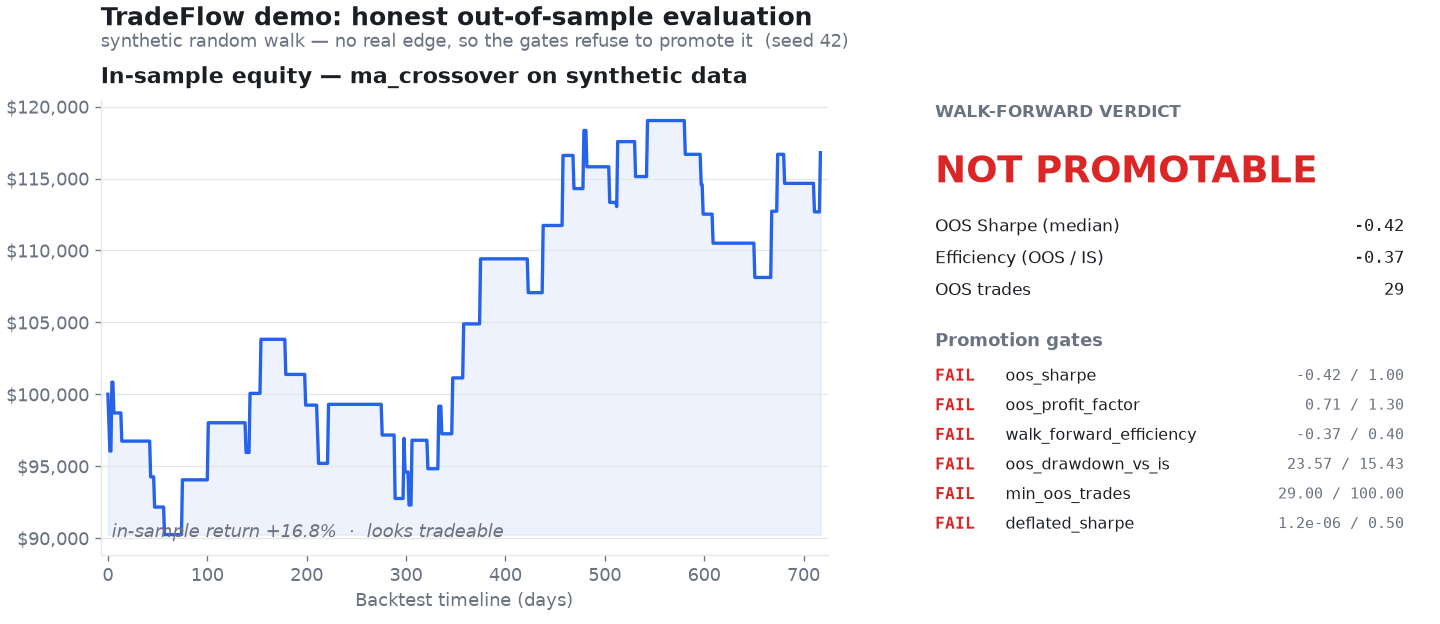
make demo runs the whole pipeline on synthetic data (no keys, no network) and
renders this: a strategy that looks profitable in-sample, and the out-of-sample
verdict that calls it noise. The refusal is the product. The same panels render
for any run — pass --chart PATH to backtest or walkforward.
The one idea that explains everything else — TradeFlow runs on two clocks that never touch:
- Research clock (offline, slow, exploratory): backtest → optimize → walk-forward, plus the optional AI agent. Non-determinism and LLMs are allowed here. It only ever proposes — writing provenance-stamped configs to disk.
- Trade clock (live, deterministic, LLM-free):
live bar → signal → order. No model sits in the order path, so there's nothing to prompt-inject and nothing non-deterministic to debug when real money is at stake.
Promotion is a manual human step — automation never flips PAPER_TRADE or
places an order. The MCP server enforces this
structurally: it builds only a data client, so it physically cannot trade. See
the architecture docs
for the full picture.
You need either of these — not both:
- uv — the Python package manager used to run everything locally, or
- Docker — to build and run the app in a container (no local Python or uv needed).
The Makefile targets run through uv (e.g. make backtest → uv run …), and
there are separate Docker targets (make docker-build, make docker-run).
Pick whichever you prefer.
Either way you'll need free Alpaca paper-trading API keys from the Alpaca dashboard → Paper Account → API Keys.
No clone needed — install the command and run the offline demo:
uv tool install tradeflow-engine        # or: pipx install tradeflow-engine
tradeflow demo                          # full pipeline on synthetic data, no keys
tradeflow init                        # add your free Alpaca paper keys when ready
tradeflow verdict --symbols NVDA,AAPL,META --start 2024-01-01 --end 2024-12-31
Optional capabilities are extras: uv tool install "tradeflow-engine[viz,store]".
→ Getting started walks the whole path: install → keys → your first real result → Claude connected. Six steps, the first two with no keys and no network.
The distribution is tradeflow-engine (the bare tradeflow on PyPI is an
unrelated package); the command and the importable package are both tradeflow.
State (the research journal, trial store, bar cache, promoted configs) lives in
~/.tradeflow for an installed copy, or in the repo when you run from a checkout.
tradeflow --version prints which copy is running and where its state is; override
with TRADEFLOW_HOME.
# 1. Install uv:  https://docs.astral.sh/uv/
# 2. Install dependencies
make install                          # uv sync

# 3. See it work — no keys, no network
make demo                             # full pipeline on synthetic data + verdict

# 4. Point it at real data: guided setup for your free Alpaca paper keys
make init                             # writes .env, checks the keys, says what's next
                                      # (make check re-runs the diagnostics any time)

# 5. Try it (preconfigured combos)
make scan                             # which symbols are flagged right now?
make backtest                         # scan -> demo strategy -> report
make live                             # paper-trade the scanned universe
Docker is itself a prerequisite, so uv tool install above is the simpler way to
just try this. What compose adds is a long-running MCP server and docs site with
state on named volumes that survives container replacement:
make up                               # MCP + persistent state. Never starts trading.
make down                             # stop; your trial history survives

docker compose run --rm demo          # offline, no keys
docker compose run --rm verdict --symbols NVDA,META --start 2024-01-02 --end 2024-04-01
live is profile-gated and is never started by up — turning the machine on must
not turn trading on. See Running in Docker.
Run make help to see every target. Anything is overridable inline:
make backtest SYMBOLS=AAPL,MSFT,NVDA START=2024-06-01 END=2024-09-01 CAPITAL=50000Or call the CLI directly:
uv run python main.py backtest --strategy demo_trend --scanner demo_volume \
--symbols NVDA,META,TSLA --start 2024-01-02 --end 2024-04-01make demo runs the entire pipeline on a seeded random walk — no keys, no
network — and ends in a promotion verdict. The point isn't a winning strategy;
it's that the refusal to promote a noise strategy is the product:
$ make demo

======================================================================
  TradeFlow demo — synthetic data, no API keys, no network
  (a seeded random walk: realistic-looking, no actual edge)
======================================================================

1) In-sample backtest of every registered strategy
   In-sample, almost anything looks tradeable. That's the trap.

   STRATEGY        RETURN   SHARPE  TRADES
   ---------------------------------------
   demo_trend      14.74%     0.48      45

2) Walk-forward validation of 'demo_trend' (the honest scorecard)
   Optimize in-sample, score out-of-sample across folds, then gate it.

   OOS Sharpe (median): -0.26   efficiency (OOS/IS): -0.17   OOS trades: 25

   Promotion gates:
     [FAIL] oos_sharpe:                  -0.26  (threshold 1.20)
     [FAIL] oos_profit_factor:            0.74  (threshold 1.30)
     [FAIL] walk_forward_efficiency:     -0.17  (threshold 0.40)
     [PASS] oos_drawdown_vs_is:          10.59  (threshold 13.94)
     [FAIL] min_oos_trades:                 25  (threshold 100)
     [FAIL] deflated_sharpe:              0.00  (threshold 0.50)

   Verdict: NOT promotable

   No edge in a random walk → the gates refuse to promote it. That refusal
   is the product. Point TradeFlow at real data:
     tradeflow init       add your free Alpaca paper keys
     tradeflow verdict    then run the whole pipeline on real market data
That is one strategy because a bare install ships one. Anything you install alongside it appears in the same table, scored the same way.
Notice the arc: demo_trend looks tradeable in-sample (+14.7%, Sharpe 0.48), but
once it's optimized in-sample and scored out-of-sample the edge evaporates
(median OOS Sharpe −0.26) and all but one promotion gate fails. That's
walk-forward validation
doing its job.
make demo makes the point on synthetic data, where the refusal is easy — there
was never any edge to find. The harder and more useful question is what happens
when a proposal does look good. make demo-agent runs one full research
session on real market data and narrates every guardrail as it fires:
$ make demo-agent

  ── Round 1 ────────────────────────────────────────────────────
     Hypothesis  Caching the processed universe to local disk lets the
                 strategy reuse warm state across sessions...
     Sandbox     REJECTED — generated code may not import 'os'
                 ↳ no bars loaded, no backtest run, no trial consumed

  ── Round 2 ────────────────────────────────────────────────────
     Sandbox     REJECTED — MultiFactorConfluenceStrategy has 8 searchable params (cap 5)

  ── Round 4 ────────────────────────────────────────────────────
     Proposal    [code] new strategy implementation
     Sandbox     ADMITTED — imports clean, contract valid, params within cap
     Walk-forward  in-sample Sharpe   2.04   →   out-of-sample   1.39   (efficiency 0.76)
     Multiple-testing correction applied over 37 trials
     Promotion gates:
       [PASS] oos_sharpe                     1.39   threshold 1.00
       [PASS] oos_profit_factor              1.92   threshold 1.30
       [PASS] walk_forward_efficiency        0.76   threshold 0.40
       [FAIL] oos_drawdown_vs_is             0.18   threshold 0.09
       [FAIL] min_oos_trades                   52   threshold 100
       [PASS] deflated_sharpe                0.58   threshold 0.50
     Verdict     NOT promotable — discarded
That last round is the one worth dwelling on. The strategy is not noise: it survives out-of-sample with a Sharpe of 1.39 and clears four of six gates. It is refused anyway, because 52 out-of-sample trades is too small a sample to distinguish skill from luck and its drawdown degraded relative to in-sample. A research engine that only rejects obvious garbage is not doing anything for you; the interesting behavior is rejecting things that look good.
By default the proposals are replayed from a fixed set, so the run is deterministic and needs no LLM API key — only Alpaca market-data keys. Point it at a live model to watch it improvise instead:
make demo-agent                            # replayed proposals, deterministic
make demo-agent-live                       # live Claude proposer (needs ANTHROPIC_API_KEY)

uv run python main.py demo-agent --symbols NVDA,AAPL,META --provider ollama
Real market data means real variance: the exact Sharpes and which gates fail will differ with the universe and date range you point it at. The shape — proposals rejected before evaluation, survivors gated on out-of-sample evidence, nothing promoted automatically — is what stays constant.
| Command | What happens |
|---|---|
demo |
Run the whole pipeline on synthetic data — no keys, no network — ending in an honest promotion verdict |
demo-agent |
Narrate one AI research session on real market data: proposal → sandbox → walk-forward → gates → holdout |
init |
Guided first-run setup: write a valid .env with hidden prompts, validate the keys against Alpaca via the data-only client, confirm paper trading, optionally warm the cache. --check is a doctor that writes nothing |
scan |
Run the universe scanner and print flagged symbols |
verdict |
The whole cross-sectional pipeline in one command — scan → alphas → portfolio → information over one universe, one window, one cost model — ending in one gate-derived verdict (read-only) |
backtest |
Scan → run a strategy over history → performance report |
live |
Scan → warm up indicators → stream bars → place paper/live orders. Bar-quality guards (staleness, spikes, inconsistent OHLC, out-of-order) veto bad bars — rejecting, never repairing — and a position ledger records intent vs. observed fills |
live --dry-run |
What this contract would try to do right now: the orders it would send, the caps that would bind, the signals it would skip. The broker has no order methods that work, so trading is a capability it does not have rather than a rule it was told. No credentials, no fills, nothing journaled |
small-real |
Places real orders. Trades a validated config at reduced capital to measure fills, slippage and fees — the caps scaled with the book rather than shrunk by hand, since a ceiling small enough to force fills biases the sample toward low-priced names. Mandatory preflight, paper by default, telemetry to its own ledger, and no trial journaled |
reconcile |
Check the position ledger against the broker's actual account state. Reports divergence; never corrects it (read-only) |
halt / resume / halts |
Stop opening new positions, and say so durably — a running engine sees it on the next bar. Blocks entries, never exits, so it can't trap the book |
flatten |
Emergency: halt, cancel every order, close every position. Goes straight to the broker, so it works when the engine is wedged |
backtest --causality |
Probe whether each decision could have been made when it was made: the execution clock, same-bar ranking, benchmark alignment, and the scanner's as-of clock. A different class from the leakage probe, which tests for future data and cannot see a one-bar look-ahead at all |
screen |
Sweep a parameter space cheaply to ask whether a family holds anything at all — one process, one data fetch, N evaluations, and nothing journaled. Leads with the distribution and what the best of N draws is worth under the null, because the best of N is the maximum of N draws; --confirm records exactly one point as a real trial |
optimize |
Search strategy parameters by backtest objective (grid / random / Bayesian); --workers N evaluates candidates in parallel — wall-clock only, same trials and same winner |
allocate |
Weight a portfolio: scalar-score sizing (OR-Tools), or --objective utility for mean-variance construction from alpha + Σ |
alphas |
Rank a universe by continuous alpha — a comparable, annualized residual-return forecast per name; --combine blends several signals, --neutralize-factors regresses out the risk model's factor exposures (read-only) |
risk |
Estimate the universe covariance Σ (Ledoit–Wolf shrinkage) and summarize its risk structure (read-only) |
info |
Information report: measure IC, breadth, and predicted-vs-realized IR — skill vs luck (read-only) |
--html PATH |
On verdict/backtest/walkforward/info: write a self-contained HTML report of the run — inline charts, zero external requests, provenance and honesty warnings first-class |
horizon |
Measure alpha decay / half-life; recommend rebalance cadence + current/lagged blend (read-only) |
walkforward |
Out-of-sample validation: optimize in-sample, score out-of-sample across folds, with a sacred holdout and promotion gates |
trials |
Browse the campaign's memory: list (filters, sorting, paging), show (one trial in full), best (a DSR-ranked leaderboard that always shows the family's n_trials) — read-only; archive retires a whole era by moving the journal and its index aside together (a store left beside a fresh journal keeps reporting a trial count for evidence that is gone); mark-contaminated quarantines a suspect subset with an appended event — history intact, reason on the record |
mcp |
Serve TradeFlow over MCP so an agent (Claude Code / Desktop) can drive verdict/scan/backtest/optimize/walk-forward/alphas/risk/portfolio/info — read-only, no live trading |
One strategy ships, and it is a demonstration rather than a candidate:
demo_trend— long-only EMA trend follower: the normalized fast−slow gap, whose sign crossings are the golden / death cross (daily). Paired with thedemo_volumescanner.
It exists so tradeflow demo has something to run and so the interface has a
worked example, not because it is an edge — the demo above spends its whole output
showing that it is not. The strategies you would actually trade go in your own
package, installed beside the engine and discovered by entry point, which keeps
them out of this repository entirely.
Each strategy defines a single continuous score (its conviction); the trade
clock's BUY/SELL/HOLD and the
continuous alpha are both
derived from it — one source of truth.
example is a complete working pack to copy — tradeflow init --example-pack ./my-signals writes it out. See
Your own strategies
and Extending.
tradeflow.services.* is the supported surface — the same JSON-returning functions
the CLI renders and the MCP server exposes, so you get identical numbers by
construction:
from tradeflow.services.analysis import run_verdict
from tradeflow.services.data import build_data_client

result = run_verdict(build_data_client(), "demo_trend", ["NVDA", "AAPL"], start, end)
print(result["verdict"]["summary"])
Everything outside services/ is internal and moves without notice. See
Using TradeFlow as a library.
Capabilities are optional extras so the base install stays lean:
make install-optimize     # scikit-learn, for `optimize --method bayesian`
make install-portfolio    # Google OR-Tools, for `allocate`
uv sync --extra mcp # the MCP SDK, for `python main.py mcp`This is an evolving research project, not a production trading platform. To keep that honest, here's what's load-bearing versus what's still maturing:
| Capability | Status |
|---|---|
| Broker / market-data abstractions | ✅ Stable |
| Offline backtesting + analytics | ✅ Stable |
| Pure pandas/numpy indicators | ✅ Stable |
| Universe scanning | ✅ Stable |
| Offline test suite (in-memory fakes) | ✅ Stable |
| Parameter optimization — grid / random | ✅ Stable |
| Walk-forward validation + promotion gates | 🧪 Experimental |
| Parameter optimization — Bayesian | 🧪 Experimental |
| Portfolio allocation (OR-Tools) | 🧪 Experimental |
| Live paper trading | 🧪 Experimental |
| Bar-quality guards + position reconciliation | 🧪 Experimental |
| MCP server | 🧪 Experimental |
| Research agent | 🧪 Experimental |
"Experimental" means the interfaces and gate thresholds may still change — not that the code is untested. Everything ships with offline tests.
AI-assisted research without AI-controlled trading.
python main.py mcp exposes TradeFlow's deterministic capabilities to any MCP
client (Claude Code / Claude Desktop) as tools: discovery, run_verdict,
run_scan, run_backtest, run_optimization, run_walk_forward, the research
chain (compute_alphas, construct_portfolio, compute_information, ...),
render_report, read-only trial-store access (list_trials, get_trial,
best_trials), get_metrics_glossary, and save_config/load_config/
list_configs. Every call is logged to logs/mcp_audit.jsonl for replay.
The safety model is structural. The server constructs only a data client —
no trading client, no broker — so it is incapable of placing an order. There is
no place_order, start_live, cancel, or set_paper_trade tool; promoting a
config to live is a manual human step outside MCP. The capability simply isn't
wired in, so it can't be prompt-injected around. The agent works on the
research clock (offline, exploratory); the live order path stays LLM-free.
Register it with a client. Installed (uv tool install --force "tradeflow-engine[mcp]"):
claude mcp add tradeflow -- tradeflow mcp # Claude Code{ "mcpServers": { "tradeflow": { "command": "tradeflow", "args": ["mcp"] } } }From a checkout, point it at the script instead:
{ "mcpServers": { "tradeflow": {
    "command": "uv",
    "args": ["run", "--extra", "mcp", "python", "main.py", "mcp"],
    "cwd": "/path/to/tradeflow" } } }
Note the two resolve different state roots (~/.tradeflow vs. the checkout), so
point an agent and yourself at the same one — or set TRADEFLOW_HOME — if they
should share a campaign's history.
python main.py research runs a bounded, offline loop that proposes hypotheses,
validates them out-of-sample with walk-forward, and writes a shortlist of
provenance-stamped candidate configs to configs/ for a human to review. It never
promotes anything to live trading.
The proposer is provider-agnostic — choose with --provider:
| Provider | Install | Default model | Credential |
|---|---|---|---|
anthropic (default) |
uv sync --extra ai |
claude-opus-4-8 |
ANTHROPIC_API_KEY |
openai |
uv sync --extra openai |
gpt-4o |
OPENAI_API_KEY |
ollama (local) |
none | llama3.1 |
none |
Set the credential in .env (alongside your Alpaca keys — see .env.example)
or as the standard environment variable. Ollama runs locally and needs no key.
uv run python main.py research --provider ollama --model llama3.1 \
  --symbols NVDA,AAPL --start 2024-01-01 --end 2025-12-31 \
  --goal "improve OOS Sharpe without raising max drawdown" --holdout-days 60
See the docs (Usage → AI agents) for the full tool surface, guardrails, and provider setup.
The codebase is organized into single-responsibility layers. Nothing above the broker layer imports a vendor SDK. The two clocks never touch — automation only ever proposes a config; a human promotes it:
flowchart LR
    subgraph research["Research clock — offline · LLM-allowed"]
        direction TB
        H[hypothesis] --> B[backtest] --> O[optimize] --> W[walk-forward]
        W --> C[(provenance-stamped<br/>config)]
    end
    subgraph trade["Trade clock — live · deterministic · LLM-free"]
        direction TB
        Bar[live bar] --> Sig[signal] --> Ord[broker order]
    end
    C -. "human promotes<br/>(nothing auto-flips)" .-> Bar
The layers themselves:
brokers/        Broker interface + domain types  ── alpaca/ (AlpacaBroker, AlpacaMarketData)
marketdata/     MarketDataProvider interface, Timeframe, MarketDataClient
indicators/     Pure pandas/numpy technical indicators
strategies/     Strategy base + signals (score -> BUY/SELL/HOLD, sizing, risk)
scanners/       ScannerStrategy base + SymbolScanner (universe resolution)
demo/           The one strategy + scanner a bare install ships, for `tradeflow demo`
execution/      LiveTrader (signals -> broker orders)
analytics/      Performance metrics + reporting
engine/         BacktestEngine + LiveEngine (orchestration only)
optimization/   ParameterSpace + ParameterOptimizer (tune params via backtest)
portfolio/      PortfolioAllocator (OR-Tools MIP position weighting)
utils/          logging, numeric, time helpers
Data flows the same way in both modes:
marketdata → strategy.process_data → strategy.generate_signals
           → engine (simulate fills | route to execution) → analytics
To work on them locally:
make docs # serve the Docusaurus site at http://localhost:3000make docker-build
make docker-run # paper live-trading; mounts your .envmake test # offline suite — no API keys or network requiredThe whole stack is testable offline because every layer depends on the broker/data abstractions; tests inject in-memory fakes.
Lint and format with ruff (what CI runs):
uv run ruff check .          # lint
uv run ruff format --check . # formatContributions and ideas are very welcome — whether it's a bug fix, a new strategy or scanner, an additional broker/data adapter, an LLM provider, docs, or just a feature request or suggestion. If you have an idea, open an issue to start the conversation; if you have a fix, open a PR. No contribution is too small, and feedback on what would make TradeFlow more useful is always appreciated.
And hey — don't be greedy: share your algos, let's make money together. 📈 (Worst case, we lose money together, which is basically friendship.)
See CONTRIBUTING.md for setup, the pre-push checks, and the coding standards (layering rules, separation of concerns, no vendor SDK above the broker layer). CI runs ruff lint + format + the test suite on every PR.
Ctrl-C stops the process but records nothing — restart the engine and it trades
again. To stop in a way that sticks:
make halt REASON="feed looks wrong"   # refuse new entries; exits still allowed
make halts                            # what is currently halted
make resume                           # lift it
make flatten REASON="why"             # halt, cancel everything, close everything
Halt state is a file under the state root, not a database — the order path holds no connection to anything that can be down, so the switch still works when the engine does not. See Stopping trading.
make cancel-orders         # cancel all open orders
make close-positions # liquidate all positions (and cancel orders)If this code somehow makes you money, I'd genuinely love to hear about it. If it loses you money — we've never met, and this is the first you're hearing of it.
Either way, if it saved you some time, you can buy me a coffee: