The same code is in all three backends, so this is filed here rather than changed in one of them. Any fix changes rendered output for existing users.
What happens
In the metallic workflow (SetUseSpecularWorkflow(false)) a metal's reflection is tinted by its own colour, because F = Kd. As roughness falls, that tint drains away and the metal reflects a neutral room almost neutrally.
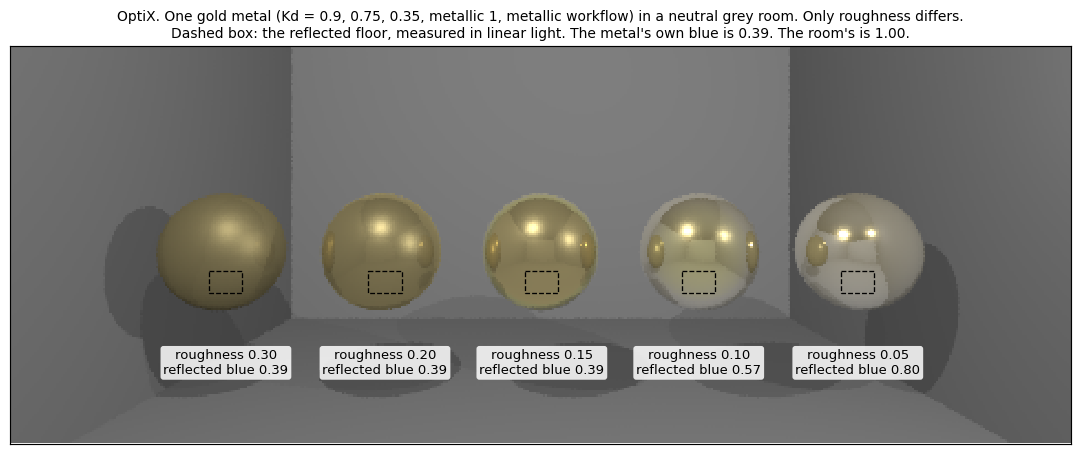
One material at five roughnesses, in a closed neutral grey room so the only colour a reflection can carry is the metal's own. Colour of the reflected floor inside the dashed boxes, in linear light, normalised to the strongest channel:
|
R |
G |
B |
| roughness 0.30 |
1.00 |
0.83 |
0.39 |
| roughness 0.20 |
1.00 |
0.83 |
0.39 |
| roughness 0.15 |
1.00 |
0.83 |
0.39 |
| roughness 0.10 |
1.00 |
0.95 |
0.57 |
| roughness 0.05 |
1.00 |
0.95 |
0.80 |
Kd, what F = Kd asks for |
1.00 |
0.83 |
0.39 |
| the floor itself |
1.00 |
1.00 |
1.00 |
Down to roughness 0.15 the reflection carries the metal's colour exactly. Below that it drifts toward the room's own neutral. No pixel in these patches is clipped.
Cause
camera_legacy_shader.cuh, in CalculateContributionToPixel:
float3 partial_contrib = mirror_correction * weight * f_ct * NdL / (4 * CUDART_PI_F);
partial_contrib = clamp(partial_contrib, make_float3(0), make_float3(1));
f_ct = F * D * G. In the mirror direction the halfway vector equals the normal, so NormalDist returns 1/roughness^2: 400 at roughness 0.05 against 11 at 0.3. The weight is then several times F, and the clamp cuts each channel on its own. Blue is the smallest channel of a gold F and the last to reach 1, while red and green are already pinned there, so the ratios between the channels collapse and the colour goes with them. Where the weight stays below 1, which here is roughness 0.15 and above, nothing clamps and the colour is exact.
The loss is strongest where the weight is largest. On the roughness 0.05 ball the dimmer areas keep more of the gold (blue over red 0.60) than the bright ones (0.78).
Scope
It needs a coloured F. In the default specular workflow F comes from Ks (F0 = 0.08 * Ks), so the usual white Ks reflects grey and is unaffected. That includes the chrome ball in demo_SEN_camera.
| backend |
site |
| OptiX |
camera_legacy_shader.cuh, CalculateContributionToPixel |
| Vulkan RT |
chrono_sensor_vkrt.rgen, clamp(mirror_scale * reflect_f, vec3(0.0), vec3(1.0)) |
| Metal RT |
ChMetalRTShaderMSL.h, the mirrorCorr block |
Reproducing
Scene 35_metal_tint_l15 in src/demos/sensor/demo_SEN_parity.cpp, on this fork's tmp/parity branch:
demo_SEN_parity <outdir> optix 35_metal_tint
The third argument filters scenes by name. Buffers store row 0 at the world bottom, so flip them vertically for display.
Possible fix
Scale the three channels by one common factor instead of clamping each on its own, so the weight stays at most 1 but keeps its ratios. Where F is grey this gives exactly the current result, so only coloured reflections would change. It still changes rendered output, so it wants its own PR covering all three backends. Not tested yet.
Note on earlier versions
This issue first used 06_brdf_sweep as its example. That scene is in the default specular workflow, where F is grey and a neutral reflection is correct, so it did not show this bug. The scene above replaces it.
The same code is in all three backends, so this is filed here rather than changed in one of them. Any fix changes rendered output for existing users.
What happens
In the metallic workflow (
SetUseSpecularWorkflow(false)) a metal's reflection is tinted by its own colour, becauseF = Kd. As roughness falls, that tint drains away and the metal reflects a neutral room almost neutrally.One material at five roughnesses, in a closed neutral grey room so the only colour a reflection can carry is the metal's own. Colour of the reflected floor inside the dashed boxes, in linear light, normalised to the strongest channel:
Kd, whatF = Kdasks forDown to roughness 0.15 the reflection carries the metal's colour exactly. Below that it drifts toward the room's own neutral. No pixel in these patches is clipped.
Cause
camera_legacy_shader.cuh, inCalculateContributionToPixel:f_ct = F * D * G. In the mirror direction the halfway vector equals the normal, soNormalDistreturns1/roughness^2: 400 at roughness 0.05 against 11 at 0.3. The weight is then several timesF, and the clamp cuts each channel on its own. Blue is the smallest channel of a goldFand the last to reach 1, while red and green are already pinned there, so the ratios between the channels collapse and the colour goes with them. Where the weight stays below 1, which here is roughness 0.15 and above, nothing clamps and the colour is exact.The loss is strongest where the weight is largest. On the roughness 0.05 ball the dimmer areas keep more of the gold (blue over red 0.60) than the bright ones (0.78).
Scope
It needs a coloured
F. In the default specular workflowFcomes fromKs(F0 = 0.08 * Ks), so the usual whiteKsreflects grey and is unaffected. That includes the chrome ball indemo_SEN_camera.camera_legacy_shader.cuh,CalculateContributionToPixelchrono_sensor_vkrt.rgen,clamp(mirror_scale * reflect_f, vec3(0.0), vec3(1.0))ChMetalRTShaderMSL.h, themirrorCorrblockReproducing
Scene
35_metal_tint_l15insrc/demos/sensor/demo_SEN_parity.cpp, on this fork'stmp/paritybranch:The third argument filters scenes by name. Buffers store row 0 at the world bottom, so flip them vertically for display.
Possible fix
Scale the three channels by one common factor instead of clamping each on its own, so the weight stays at most 1 but keeps its ratios. Where
Fis grey this gives exactly the current result, so only coloured reflections would change. It still changes rendered output, so it wants its own PR covering all three backends. Not tested yet.Note on earlier versions
This issue first used
06_brdf_sweepas its example. That scene is in the default specular workflow, whereFis grey and a neutral reflection is correct, so it did not show this bug. The scene above replaces it.