Open-source app hub for running AI-powered tools from a project or workspace folder you control.
- Install AppWeaver into a project or workspace folder and add the apps you want.
- Use focused tools through the web interface, web chat, local terminal input, or your favourite Nostr chat app.
- Use OpenCode by default for the richest model/provider options, or Cursor Agent if that fits your workflow better.
- Keep data local: configuration, sessions, app data, wallet data, and browser profiles live on your machine or server.
- Easy UI setup — Clone the repo, run
bun installandbun run start, then follow the web setup interface. - AI-powered apps — Install apps for todos, bookmarks, jobs, files, browser actions, publishing, journaling, and more.
- Multiple control surfaces — Use the web UI, Nostr DMs, terminal chat, or AI-agent tool calls.
- OpenCode-first backend — OpenCode supports richer model/provider selection and local provider configuration; Cursor Agent is also supported.
- Bitcoin-native paid AI — Optional Cashu/Routstr flow for pay-as-you-go model usage.
- Local-first data — AppWeaver stores state in folders you control.
Built with Bun, TypeScript, nostr-tools, OpenCode, Cursor Agent support, Solid, and SQLite.
Links: Nostr · NIP-17 encrypted DMs · OpenCode · Cursor · Cashu · Routstr · ngit
AppWeaver is meant to live inside the project or workspace you want it to operate on. The recommended folder name is appweaver.
You can install AppWeaver natively, or use Docker if you want the runtime dependencies packaged for you.
git clone https://github.com/getappweaver/core.git appweaver
cd appweaver
bun install
bun run start
On first start, AppWeaver prints a setup URL in the terminal:
Setup web: http://127.0.0.1:5551/setup?secret=...
Ctrl+Click the link if your terminal supports it, or copy and paste it into your browser. The setup page exchanges the boot secret for a temporary browser session and removes the secret from the address bar.
Follow the instructions in the setup interface, then click the restart button when setup says it is ready.
After restart, AppWeaver listens for Nostr DMs, serves the web UI, and accepts local terminal chat from the same terminal process.
The default workspace is parent. For example, if AppWeaver is installed at ~/Projects/my-project/appweaver, the default AI workspace is ~/Projects/my-project.
Setup checks the tools AppWeaver expects to find on the server PATH.
Required:
| Tool | Why it matters |
|---|---|
| Bun | Runtime, scripts, package install, web build |
| Node.js | Required by parts of the AI/backend toolchain |
| Git | Core and app updates |
| ngit | Nostr Git remotes, app installs, app updates |
Optional:
| Tool | Why it matters |
|---|---|
| OpenCode | Recommended AI backend with richer model/provider support |
Cursor Agent (agent) |
Alternative AI backend |
Python (python3) |
Useful if installing Piper via pip |
| Piper | Local text-to-speech support |
Common install links:
- Bun: https://bun.sh/docs/installation
- Node.js: https://nodejs.org/
- Git: https://git-scm.com/downloads
- ngit: https://gitworkshop.dev/ngit
- OpenCode: https://opencode.ai/
- Cursor Agent: https://docs.cursor.com/en/cli/installation
- Python: https://www.python.org/downloads/
- Piper: https://github.com/OHF-Voice/piper1-gpl
Piper is optional. When configured, AppWeaver can use local speech output without a hosted TTS service.
The setup page can:
- Detect
piperon yourPATH. - Save the detected binary path.
- Download a default voice model to
models/piper/inside the AppWeaver folder. - Save the Piper model and library paths into
.env.
If you install Piper with Python, a common command is:
pip install piper-ttsAppWeaver apps add focused tools, commands, data models, widgets, and AI skills.
Install and update apps from the web UI. The app installer shows available apps, compatibility, author metadata, install progress, and restart status.
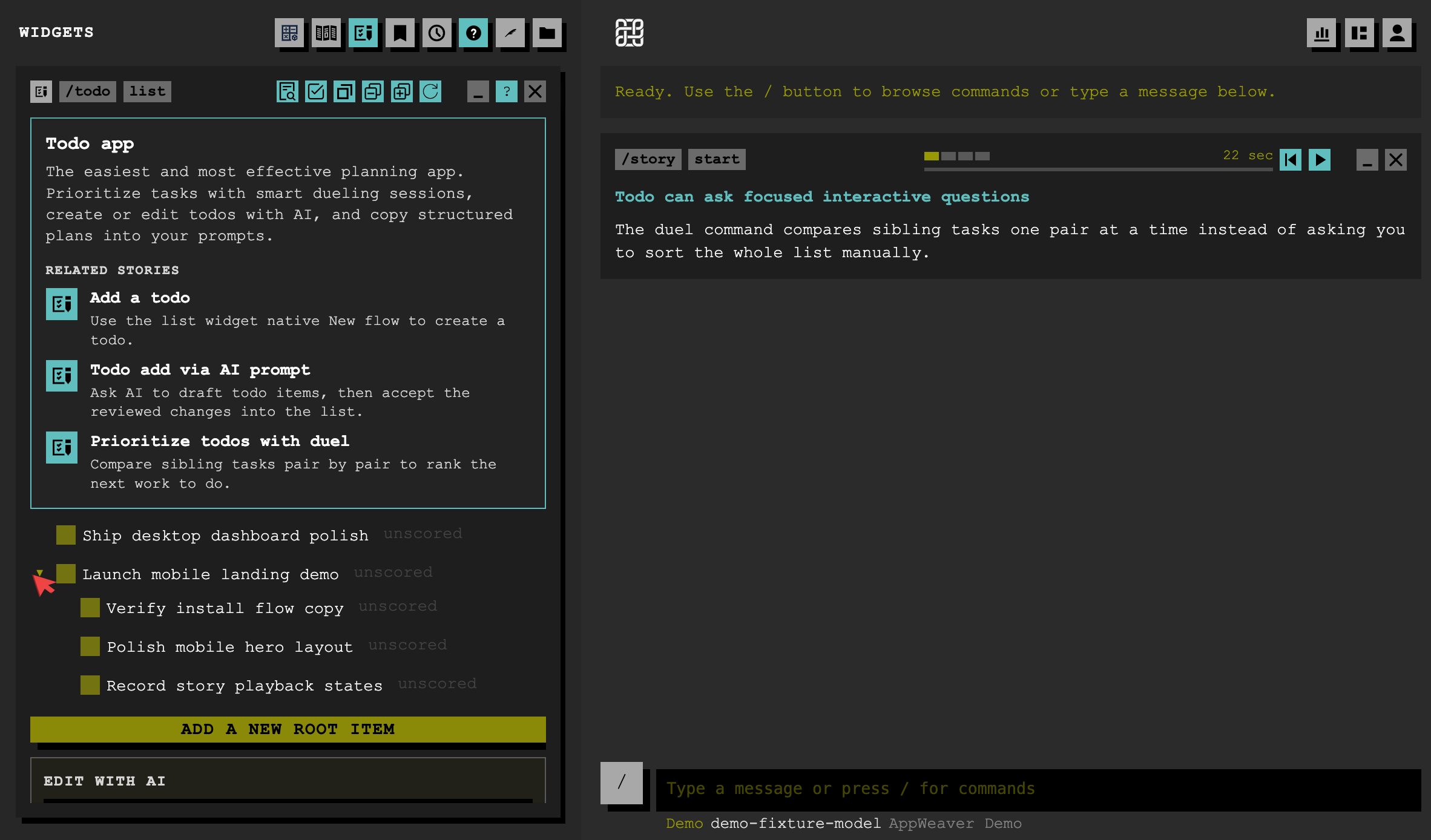
| App | Description |
|---|---|
| Todo app | Create, organize, and draft task updates with AI help. |
| File manager | Browse workspace trees, inspect files, and manage project content. |
| Job scheduler | Schedule one-off and recurring jobs for AppWeaver to run later. |
| Bookmark manager | Save, search, categorize, and publish bookmark collections. |
| Browser actions | Drive browser sessions for web automation and research tasks. |
| Captain's Log | Adds private journaling, searchable notes, drafts, and optional publishing to Nostr. |
Routstr is optional. Use it when you want pay-as-you-go AI model usage with sats instead of a separate subscription.
AppWeaver's built-in wallet stores Cashu eCash tokens. It does not mint via Lightning directly; use an external Cashu wallet such as cashu.me or Minibits to receive sats, then paste the Cashu token into AppWeaver.
Basic flow:
- Configure or generate a Cashu wallet in setup.
- Set a mint with
/wallet mint <mintURL>if needed. - Receive tokens with
/wallet receive <token>. - Switch to Routstr with
/ai provider set routstr. - Deposit with
/ai provider deposit <sats>or append a budget suffix to a prompt, such asfix this bug !!1000sats.
Useful commands:
| Command | Description |
|---|---|
/wallet mint [url] |
Show or set your Cashu mint URL |
/wallet balance |
Show local wallet balance |
/wallet receive <token> |
Receive a Cashu token |
/wallet history |
Show recent spend history |
/ai provider deposit <sats> |
Move sats to a Routstr session |
/ai provider refund |
Recover unspent Routstr balance |
/ai provider balance |
Check Routstr session balance |
/ai provider budget <sats> |
Set default budget |
/ai provider status |
Show provider, session, mint, model, and budget |
Docker is the recommended VPS deployment path. See DOCKER.md for the container setup, persistent volume layout, update flow, and secure setup access notes.
Use watch mode while changing AppWeaver itself:
bun run watchbun run watch runs AppWeaver under a small watcher that restarts only when restart.requested is created or touched. It does not restart on every save. AppWeaver deletes restart.requested on startup.
For contribution hooks:
bun run contrib:setupWhen changing AppWeaver core code, run targeted checks where possible or bun run lint for broad changes. See AGENTS.md and CONTRIBUTING.md for contributor and AI-agent workflow details.
If you want AppWeaver to work on its own core code, set the workspace to appweaver in setup or the web UI.
For app/plugin development, see PLUGINS.md.
- No setup page opens: Copy the full setup URL from the terminal or Docker logs into your browser. Confirm port
5551is reachable locally. - A dependency is missing: Install it, restart AppWeaver, then reload setup. Setup checks the server process
PATH. - Nostr DMs do not arrive: Confirm
BOT_RELAYSmatches the relay URLs your Nostr client uses for encrypted DMs. Some relays require NIP-42 AUTH. - No ready DM: Check relay connectivity and your master pubkey. You can disable ready DMs with
READY_ENABLED=0. - Wallet not available: Configure a Cashu mnemonic in setup before using wallet or Routstr commands.
- More visibility: Run with
DEBUG=1to see subscription filters, incoming events, publish targets, and AUTH challenges.