


A tree view with no dependencies: one minified script (3.4 kB gzipped) and a stylesheet. Keyboard and screen reader support, a dark theme, TypeScript types. Runs in every current browser and in Internet Explorer 10 and 11.
npm install vanillatreeimport VanillaTree from 'vanillatree';
import 'vanillatree/vanillatree.css';CommonJS works too: const VanillaTree = require('vanillatree');. The types come with the package, for both.
<link rel="stylesheet" href="https://cdn.jsdelivr.net/npm/vanillatree@1/dist/vanillatree.css">
<script src="https://cdn.jsdelivr.net/npm/vanillatree@1/dist/vanillatree.min.js"></script>
<script>
  var tree = new VanillaTree('#tree');
</script>
The script defines a VanillaTree global. It also works with AMD loaders.
<link rel="stylesheet" href="https://cdn.jsdelivr.net/npm/vanillatree@1/dist/vanillatree.css">
<script type="module">
  import VanillaTree from 'https://cdn.jsdelivr.net/npm/vanillatree@1/dist/vanillatree.min.mjs';

  const tree = new VanillaTree('#tree');
</script>| Build | Browsers |
|---|---|
vanillatree.min.js (script tag, CommonJS, AMD) |
Chrome, Edge, Firefox, Safari, iOS Safari, Chrome for Android, Internet Explorer 10 and 11 |
vanillatree.min.mjs (ES module) |
Browsers that run ES modules: Chrome 61+, Edge 16+, Firefox 60+, Safari 10.1+ |
In IE 10 and 11 the stylesheet uses plain colors, so the CSS variables below have no effect there.
const tree = new VanillaTree('#tree', {
  placeholder: 'Nothing here yet',
  contextmenu: [
    { label: 'Rename', action(id) { /* … */ } },
    { label: 'Remove', action(id) { tree.remove(id); } }
  ]
});

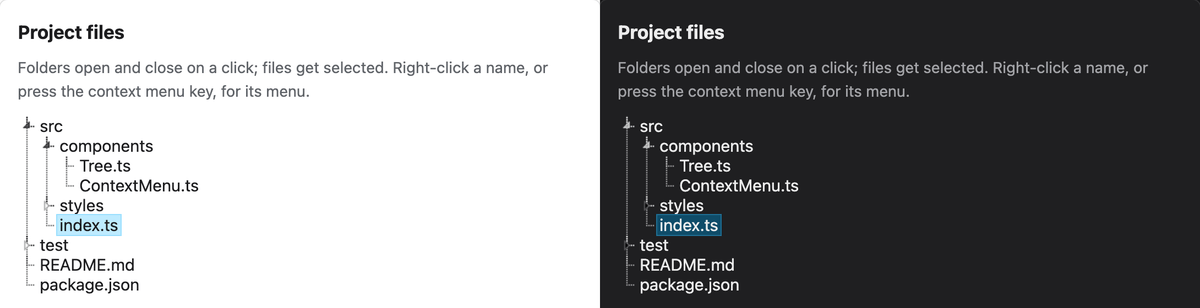
tree.add({ label: 'src', id: 'src', opened: true, selectable: false });
tree.add({ label: 'index.ts', id: 'index', parent: 'src', selected: true });
tree.add({ label: 'README.md' });placeholder(string): text shown while the tree has no leaves.contextmenu(array): a menu that opens on a right click on a label, on the context menu key, or on Shift+F10. Each item is{ label, action(id), html? }.actiongets the leaf's id, andthisis the item.theme('light','dark'or'auto'):'dark'adds thevtree-darkclass to the tree, and'auto'follows the system'sprefers-color-scheme. The default is light. You can also putvtree-darkon any ancestor, such as<html>.
The first argument is a selector, an element, or an array-like of elements (the first one is used).
add(options) takes:
label(string, required): the text of the leaf.id(string or number): unique. When omitted, it is generated (vtree-1,vtree-2, …). An id that is already there throws.parent(id): the parent leaf. Without it, the leaf is a root leaf.opened(boolean): show the children. Leaves are closed by default.selected(boolean): select the leaf once it is added.selectable(boolean):falsefor a leaf that can't be selected, like a folder in a file picker. A click on its label opens or closes it.html(boolean): writelabelas HTML. Labels are text by default.
Each method that changes the tree returns the tree, so calls chain. A method that gets an unknown id throws.
add(options): adds a leaf.move(id, parentId): moves a leaf under another parent, or to the root withoutparentId. Moving a leaf under itself or its own child throws.remove(id): removes a leaf and its children.open(id),close(id),toggle(id): show or hide the children.select(id): selects a leaf. Does nothing for a leaf added withselectable: false.getSelected(): the id of the selected leaf, ornull.getParent(id): the parent's id, ornullfor a root leaf.getPath(id): ids from the root leaf down to this one, as an array.hasChildren(id): whether the leaf has children.getLeaf(id, notThrow): the leaf'slielement. WithnotThrow, an unknown id givesundefined.getChildList(id): theulwith the leaf's children, made when missing. Without an id, the root list.destroy(): removes the tree from the page and every listener it added, including the one ondocumentfor the context menu. Call it before you drop a tree that has a context menu, or the listener stays.
Properties: container (the element you passed), tree (the root ul.vtree), leafs (the options each leaf was added with, by id).
Events are dispatched on the leaf, or on the root list for vtree-remove, and bubble. The leaf's id is in evt.detail.id.
vtree-addvtree-movevtree-removevtree-openvtree-closevtree-select
const container = document.querySelector('#tree');
container.addEventListener('vtree-select', (evt) => {
  console.log(`${evt.detail.id} is selected`);
});The tree follows the WAI-ARIA tree view pattern: role="tree", treeitem and group, with aria-expanded and aria-selected. One leaf is in the tab order at a time.
| Key | Action |
|---|---|
| Tab | Into the tree: to the selected leaf, or the first one |
| ↓ ↑ | Next and previous visible leaf |
| → | Open a closed leaf; on an open one, go to its first child |
| ← | Close an open leaf; otherwise go to its parent |
| Home, End | First and last visible leaf |
| Enter, Space | Select; open or close a leaf that can't be selected |
| Shift+F10, context menu key | Open the context menu; arrows, Home, End, Enter, Space and Esc work inside it |
Give the tree an accessible name, for example tree.tree.setAttribute('aria-label', 'Project files').
Every color is a CSS variable, set on .vtree or any ancestor:
.vtree {
  --vtree-hover-background: #e7f4f9;
  --vtree-hover-outline: #d8f0fa;
  --vtree-selected-background: #beebff;
  --vtree-selected-outline: #99defd;
  --vtree-focus: #0b6bcb;
  --vtree-menu-background: #eee;
  --vtree-menu-border: #ccc;
  --vtree-menu-color: #333;
  --vtree-menu-active-background: #3399ff;
  --vtree-menu-active-color: #fff;
}
A variable set this way applies to both themes; set it inside .vtree-dark for the dark one only. The class names (vtree-leaf, vtree-leaf-label, vtree-toggle, vtree-selected, closed, vtree-has-children, vtree-contextmenu) are stable.
1.0.0 changes:
- A label is text. Pass
html: truefor a label written as HTML. The same goes forplaceholder(always text) and context menu items. - Adding a leaf with an id that is already there throws.
addno longer firesvtree-closefor each closed leaf it adds.- The files moved to
dist/:vanillatree/vanillatree.cssstill resolves through the package's exports; on a CDN usedist/vanillatree.min.jsanddist/vanillatree.css. - The root list has no padding of its own now.
The CHANGELOG has the full list.
MIT. The image sprite comes from the jsTree project.