


Inspect Shopify Liquid sections, blocks, and snippets from the official Vite DevTools dock. Pick a rendered component, understand its Liquid/DOM hierarchy, and open its source in your editor without changing production builds.
Vite 8.3 or newer is required and must be a direct project dependency.
npm install -D vite@^8.3 @display-studio/vite-plugin-shopify-devtoolsConfigure the DevTools preset and plugin:
// vite.config.ts
import { defineConfig } from 'vite'
import shopify from 'vite-plugin-shopify'
import shopifyDevtools, { shopifyDevtoolsConfig } from '@display-studio/vite-plugin-shopify-devtools'

export default defineConfig({
  devtools: shopifyDevtoolsConfig,
  plugins: [
    shopify(),
    shopifyDevtools({
      // Optional: override editor detection.
      editor: 'zed',
    }),
  ],
})
Run Vite alongside shopify theme dev as usual. The plugin works with vite-plugin-shopify and vite-plugin-shopify-theme. It runs only during vite serve; production builds and source Liquid files are unchanged in the default mode.
Shopify preview hosts and configured store domains are allowed automatically. Custom domains or tunnels must be added through the Vite DevTools allowedOrigins setting.
The browser client must be injected through a JavaScript entry. The plugin normally discovers one from Vite's build.input. If your theme has only CSS entries or discovery fails, add a small JavaScript/TypeScript entry or set shopifyDevtools({ entry: 'frontend/theme.ts' }).
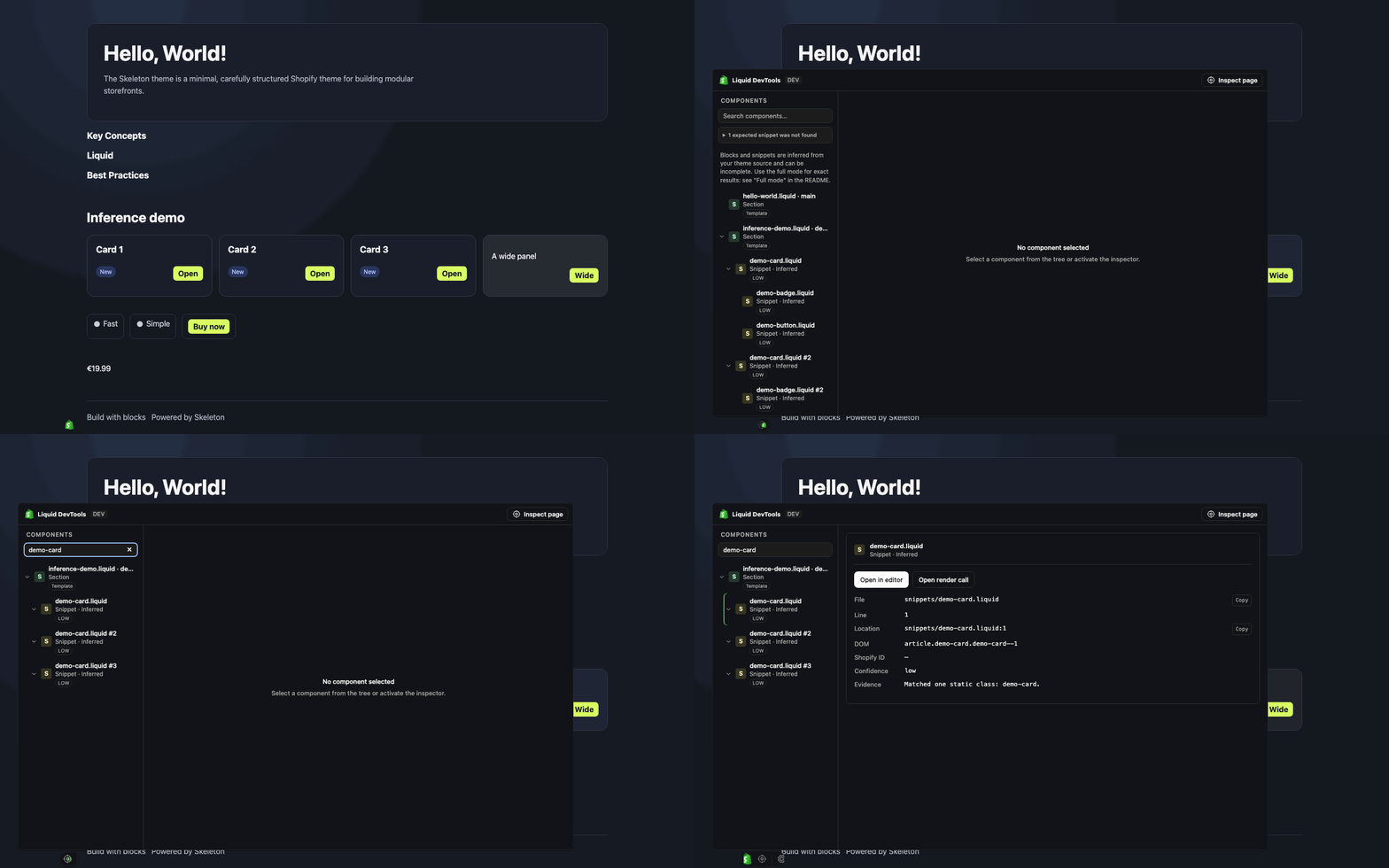
Open Shopify Liquid in the Vite DevTools dock, then choose Inspect page to select a rendered component. The tree can be searched by component name, path, kind, or template metadata. Select an entry to inspect it; press Enter or use the details action to open its source. Paths, locations, and available Shopify IDs can also be copied.
On first connection, Vite DevTools may show Unauthorized while Vite prints a one-time code and authorization link. Authorize the browser, then reload the storefront if it does not reconnect. Trust is stored in that browser and may need to be renewed after clearing site data, changing hostname, updating DevTools, or revoking trust.
For controlled automation, configure clientAuthTokens and provide the same secret to the browser:
devtools: {
  ...shopifyDevtoolsConfig,
  clientAuthTokens: [process.env.VITE_DEVTOOLS_AUTH_TOKEN!],
}
Keep tokens out of source control and logs. Setting clientAuth: false disables authentication and gives any browser that can reach Vite access to DevTools server and filesystem capabilities; use it only in a fully trusted local environment.
| Mode | Setup | Result |
|---|---|---|
| Default | None | Exact sections and section groups; inferred blocks and static snippets. |
| Full | instrument: 'copy' (recommended), 'in-place', or the CLI wrapper |
Exact sections, theme blocks, static snippets, and nesting from markers. |
Shopify's rendered HTML does not preserve the source identity of most blocks and snippets. Default mode therefore matches distinctive static output such as tags, classes, IDs, and data-* attributes. Inferred entries include a confidence rating, and ambiguous or invisible components are omitted rather than guessed. Dynamic markup or DOM rewritten by JavaScript may not match. Use full mode when the exact tree matters.
The recommended option creates and maintains an ignored, instrumented theme mirror while leaving source files untouched:
shopifyDevtools({ instrument: 'copy' })Add .shopify-devtools/ to .gitignore, start Vite first, and point Shopify CLI at the mirror:
SHOPIFY_FLAG_PATH=.shopify-devtools/theme shopify theme devYou may instead configure that path in shopify.theme.toml, though an explicit --path or SHOPIFY_FLAG_PATH is more reliable across Shopify CLI versions.
Use instrument: 'in-place' only when Shopify CLI must serve the source directory. It temporarily rewrites Liquid and uses .shopify-devtools/in-place-journal.json to restore originals and recover after crashes. Do not delete that journal while recovery is pending; startup stops rather than overwriting a file changed independently.
The compatibility wrapper shopify-devtools dev is also available. It creates a temporary instrumented mirror, starts Shopify CLI and Vite, and forwards Shopify flags. For example: shopify-devtools dev --environment development.
Editor selection uses, in order: the editor plugin option, SHOPIFY_DEVTOOLS_EDITOR, EDITOR, then macOS detection of Zed, Cursor, or VS Code. Editors supported by launch-editor open at the component line. Terminal editors take over the Vite terminal until you quit them.
The plugin inspects Shopify Liquid, not Vue components. @vitejs/plugin-vue works normally. With Vue DevTools 8, set appendTo to the theme's JavaScript entry because Shopify serves the HTML:
vueDevTools({ appendTo: 'frontend/entrypoints/theme.ts' })Before 1.0, the supported package surface is deliberately small:
- default export:
shopifyDevtools - runtime presets:
shopifyDevtoolsConfigandshopifyDevtoolsBranding - type export:
ShopifyDevtoolsOptions
Other shipped helpers and renderer files are implementation details and may change without notice.
Confirm vite --version is 8.3 or newer, devtools: shopifyDevtoolsConfig is at the top level of defineConfig, and the storefront entry loads from the Vite origin shown in the error. Restart Vite and Shopify CLI after configuration changes.
Check the browser console for a failed entry script or RPC request. Confirm the page contains Shopify section wrappers, the active template JSON and matching Liquid files are under the resolved theme root, and a JavaScript entry exists in build.input or is set with entry. Default inference needs distinctive static output; switch to full mode for exact markers.
Use the one-time authorization link or code printed by Vite and reload. Repeat after hostname or trust changes. Never paste codes or tokens into issues; use matching clientAuthTokens only for controlled automation.