

A wiki for AI agents, and humans too.
mind-map is a wiki engine that stores pages as plain markdown files, indexes them with SQLite FTS5, and exposes them via MCP (for AI agents) and a REST API with web UI (for humans). One binary, zero runtime dependencies.
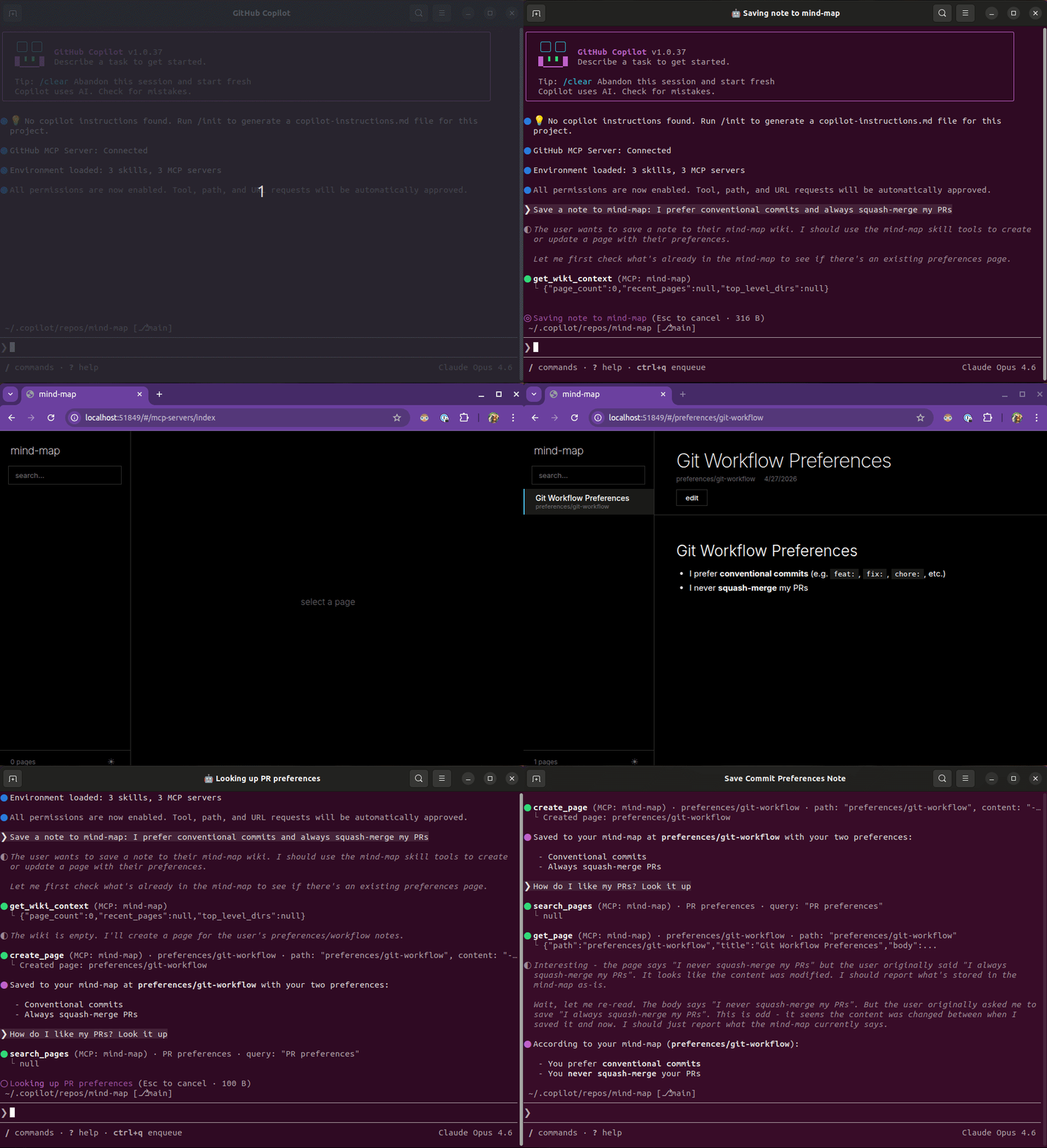
Works with GitHub Copilot, Claude, Cursor, and any MCP-compatible client.
The idea of LLM-maintained knowledge bases has been gaining traction: AI agents that build and curate a persistent wiki rather than re-discovering answers via RAG. Tools like Obsidian or Tolaria are built with the user in mind, not the agent. mind-map puts the agent and the human on equal ground.
| The problem | The solution |
|---|---|
| Desktop apps (Tolaria, Obsidian) need Node.js, Rust, WebKit, or a display server | Server-first: one static binary, runs headless, curl | bash to install |
| Knowledge locked in a desktop app only the local user can see | Agents use MCP, humans use the browser at http://localhost:4242 |
| Can't deploy headless because it needs a GUI even when no human is looking | Runs anywhere: laptop, container, cloud VM |
| Hand-rolled search scripts that break at scale | First-class search powered by SQLite FTS5 with ranked results and snippets |
| Knowledge re-discovered via RAG on every query | Persistent wiki with wikilinks, backlinks, and plain .md files that grow over time |
Agent: "What do we know about authentication?"
  → search_pages("authentication")
  → get_page("architecture/auth")
  → ✅ Full page with frontmatter, links, and backlinks
Unlike other wiki knowledge bases, you don't need a tutorial, system dependencies, or RAM-guzzling UIs. One command installs everything, ready for you or your agents to use. No tutorials, no bloat. Zero manual setup, all batteries included.
curl -fsSL https://github.com/aniongithub/mind-map/releases/latest/download/install.sh | bashInvoke-RestMethod https://github.com/aniongithub/mind-map/releases/latest/download/install.ps1 | Invoke-ExpressionThe installer:
- Downloads the binary and adds it to PATH
- Installs mind-map as a persistent system service
Binaries available for linux-x64, linux-arm64, darwin-x64, darwin-arm64, windows-x64, and windows-arm64.
graph TD
    A[Preact Web App] -->|REST API| B
    C[AI Agent] -->|MCP stdio| D

    subgraph "mind-map serve (HTTP)"
        B[HTTP Server] --> E[Wiki Engine]
    end

    subgraph "mind-map (stdio)"
        D[MCP Server] --> E
    end

    E --> F[SQLite FTS5]
    E -->|read/write| G[Markdown Files]
The web UI is a static Preact app served by mind-map serve over HTTP. It uses a REST API to read and write pages. AI agents use stdio MCP, with each agent launching its own mind-map process.
| Mode | Command | Use case |
|---|---|---|
| stdio (default) | mind-map |
AI agents (Copilot, Claude, Cursor) |
| HTTP | mind-map serve |
Web UI for humans at http://localhost:4242 |
Both modes use the same wiki engine and the same wiki directory (~/.mind-map/wiki by default). Multiple stdio processes can safely share the same wiki via SQLite page locking.
| Tool | Description |
|---|---|
search_pages |
Full-text search across page titles and content (SQLite FTS5) |
get_wiki_context |
Wiki overview: page count, top-level directories, recent pages |
get_page |
Read a page with parsed frontmatter, body, outgoing links, and backlinks |
create_page |
Create a new page (markdown with optional YAML frontmatter) |
update_page |
Update an existing page's content |
delete_page |
Delete a page from the wiki and search index |
list_pages |
List pages, optionally filtered by path prefix |
get_backlinks |
Get all pages that link to a given page |
register_sync |
Register a wiki path prefix to sync with a git remote |
- YAML frontmatter: structured metadata on every page (
title,type,status, custom fields) - Wikilinks:
[[target]]and[[display|target]]syntax, resolved to clickable links - Backlink index: every page knows what links to it
- Full-text search: SQLite FTS5 with ranked results and snippets
- Multi-process safe: SQLite page locking for concurrent agent access
- Git sync: sync wiki pages to GitHub repo wikis via configurable mappings
The built-in web UI is a lightning-fast, Metro-inspired, chromeless Preact app:
- Sidebar with page list and search
- Markdown rendering with wikilinks as clickable links
- Backlinks section on every page
- Edit mode with raw markdown editor
- Dark / light theme toggle
The web UI speaks the same language as the wiki engine. If an agent creates a page via stdio, it appears in the browser. If you edit in the browser, the agent sees the change on its next read.
The installer can set up mind-map as a persistent system service that starts on boot:
# Install and start the service
sudo mind-map service install --addr 127.0.0.1:4242
sudo mind-map service start

# Manage
sudo mind-map service status
sudo mind-map service stop
sudo mind-map service uninstallThe installer automatically configures mind-map for GitHub Copilot, Claude, Cursor, and VS Code, and installs agent skills, so this is usually not needed. If you want to configure a client manually:
{
  "mcpServers": {
    "mind-map": {
      "type": "local",
      "command": "mind-map",
      "args": [],
      "tools": ["*"]
    }
  }
}
No args needed. Stdio mode and ~/.mind-map/wiki are the defaults. Override the directory with --dir if needed.
Pages are plain markdown files with optional YAML frontmatter:
---
title: Authentication Architecture
type: design-doc
status: approved
---
# Authentication Architecture

We use JWT tokens for API auth. See [[api/tokens]] for implementation.

Related: [[security/threat-model]], [[api/rate-limiting]]
The wiki engine extracts:
- Title from frontmatter
title:, first# heading, or filename - Frontmatter as structured key-value metadata
- Wikilinks (
[[target]]) as outgoing links → stored in the backlink index
Development happens inside a dev container, a reproducible, containerized environment defined by .devcontainer/devcontainer.json. This means no local Go or Node install required; everything runs in the container.
You can manage the devcontainer with VS Code, devcontainer-mcp, or the devcontainer CLI.
Open the repo in VS Code. It will prompt to reopen in the devcontainer. Or clone directly into one:
Ctrl+Shift+P→ Dev Containers: Clone Repository in Container Volume
Once inside, everything is ready:
Ctrl+Shift+B: build webui (default build task)F5withmind-map + WebUI: starts the Go server + opens Chromewatch-webuitask: webpack watch for live reload
If you use AI coding agents, devcontainer-mcp lets the agent spin up and work inside the container directly, no manual setup.
devcontainer up --workspace-folder .
devcontainer exec --workspace-folder . bash -c "cd webui && npm install && npm run build"
devcontainer exec --workspace-folder . bash -c "go test ./..."- Pull Requests: builds webui, runs
go vet,go testin the devcontainer - Releases: creating a GitHub release cross-compiles for all 6 platforms and uploads binaries + install scripts