Image Metadata Viewer is a fast, professional and privacy-focused web application built with vanilla JavaScript, HTML5, and CSS3 that allows users to view and remove EXIF metadata from images in their browser.


- Sub-second processing - Most images analyzed in <1 second
- Real-time processing timer displayed
- Instant preview and metadata extraction
- Optimized for large images (up to 50MB+)
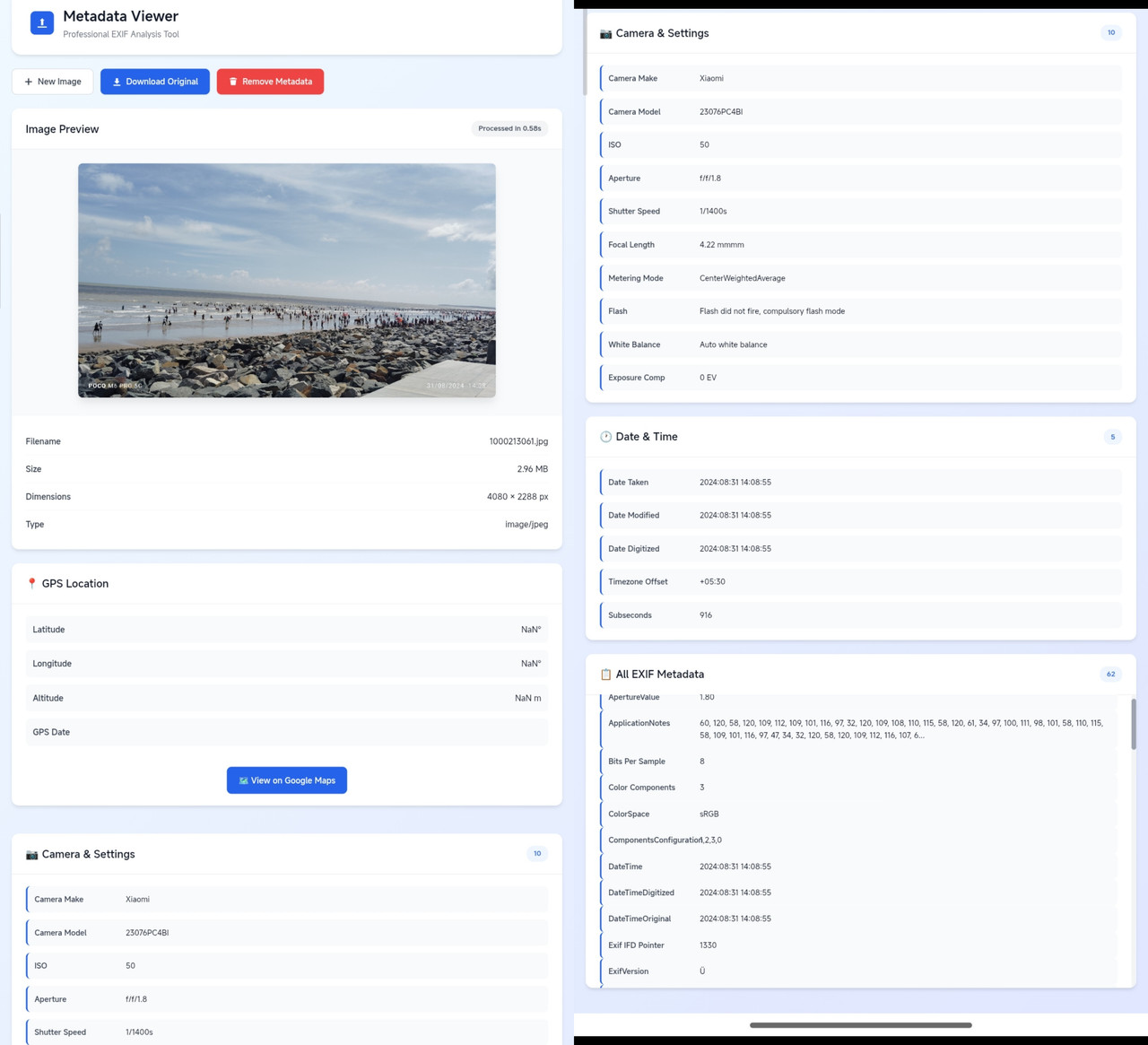
- Camera Information - Make, model, lens details
- Camera Settings - ISO, aperture, shutter speed, focal length
- GPS Location - Latitude, longitude, altitude with Google Maps integration
- Date & Time - Original, modified, digitized timestamps
- All EXIF Data - Complete list of every available metadata field
- Field Counters - See exactly how many metadata fields are available
- 100% Local Processing - No server uploads, ever
- No Data Collection - Your images never leave your browser
- Offline Capable - Works without internet after first load
- Open Source - Fully transparent code you can inspect
- Modern blue gradient theme
- Clean card-based layout
- Responsive design for all devices
- Smooth animations and transitions
- Intuitive drag-and-drop interface
- Upload Images - Drag & drop or click to browse
- View Metadata - Organized into categories
- GPS Mapping - Direct link to location on Google Maps
- Download Original - Keep your original file
- Remove Metadata - Strip all EXIF data
- Download Clean - Get metadata-free version
🔗 https://akash098p.github.io/Image-Metadata-Viewer/
- ✅ JPEG / JPG
- ✅ PNG
- ✅ WebP
- ✅ TIFF
- ✅ HEIC (browser dependent)
-
Upload Image
- Drag and drop your image onto the upload area
- Or click to browse and select a file
-
View Metadata
- Camera settings appear instantly
- Browse organized categories
- See processing time
-
Check Location (if available)
- GPS coordinates displayed
- Click to view on Google Maps
-
Download Options
- Download original with metadata
- Remove all metadata and download clean version
Quick Actions Bar:
- 🔄 New Image - Upload a different image
- ⬇️ Download Original - Save the original file
- 🗑️ Remove Metadata - Strip EXIF and download
Left Column:
- Image preview with zoom
- Basic file information
- GPS location (if available)
Right Column:
- Camera & settings details
- Date & time information
- Complete EXIF metadata list
- Camera make and model
- Lens make and model
- ISO speed rating
- Aperture (f-number)
- Shutter speed
- Focal length
- Exposure program/mode
- Metering mode
- Flash status
- White balance
- Exposure compensation
- Latitude coordinates
- Longitude coordinates
- Altitude (if available)
- GPS timestamp
- Direct Google Maps link
- Date taken (original)
- Date modified
- Date digitized
- Timezone offset
- Subsecond precision
- Software used
- Artist/Creator
- Copyright information
- Color space
- Resolution (DPI)
- Image orientation
- Image description
- User comments
- And much more...
- HTML5 - Structure and semantics
- CSS3 - Modern styling with CSS Grid and Flexbox
- Vanilla JavaScript - Zero dependencies for core functionality
- ExifReader v4.14.0 - Fast and reliable EXIF extraction
- Chrome 90+
- Firefox 88+
- Safari 14+
- Edge 90+
- Average processing time: 0.3 - 0.8 seconds
- Handles images up to 50MB+
- Memory efficient processing
- Async/await for smooth UX
- No Server Communication - Everything runs in your browser
- No Cookies - We don't store anything
- No Tracking - Zero analytics or monitoring
- No Third-Party APIs - Except optional Google Maps links
- You upload an image (stays in browser memory)
- JavaScript reads the EXIF data locally
- Metadata is displayed on your screen
- When you close the page, everything is deleted
- Some images (especially from social media) have metadata stripped
- PNG images often don't contain EXIF data
- Try with a photo directly from a camera or smartphone
- Check file format (must be image/*)
- Ensure file isn't corrupted
- Try a different browser
- Check browser console for errors
- Very large images (>20MB) may take 2-3 seconds
- Close other browser tabs to free memory
- Try a different browser
- Photo must be taken with location services enabled
- Some apps strip GPS data for privacy
- Check "All EXIF Metadata" section for GPSLatitude field
Planned features:
- Batch processing (multiple images)
- Export metadata to JSON/CSV
- Edit specific EXIF fields
- Compare metadata between images
- Dark mode theme
- RAW image format support
- Metadata visualization charts
- Print metadata report
- Analyze camera settings of professional photos
- Learn from other photographers
- Verify image authenticity
- Remove GPS data before sharing photos
- Strip personal information from images
- Clean metadata for public posting
- Verify image origin and authenticity
- Analyze manipulation evidence
- Track image history
- Teach photography settings
- Study exposure relationships
- Understand EXIF standards
This project is licensed under the MIT License - see the LICENSE file for details.
✅ Commercial use
✅ Modification
✅ Distribution
✅ Private use
- ExifReader - Excellent EXIF parsing library by Mattiaz Wallander
- Icons - Inline SVG for better performance
- Color scheme inspired by modern design systems
When reporting bugs, please include:
- Browser name and version
- Operating system
- Image format and size
- Steps to reproduce
- Error messages (if any)
If you find this tool useful, please consider giving it a star on GitHub!
Made with ❤️ for photographers, privacy advocates, and metadata enthusiasts
Version 2.0.0 - Last updated: February 2026
⭐ Star this repo if you find it useful! ⭐