
An MDI Interface using Tabs with Close Buttons
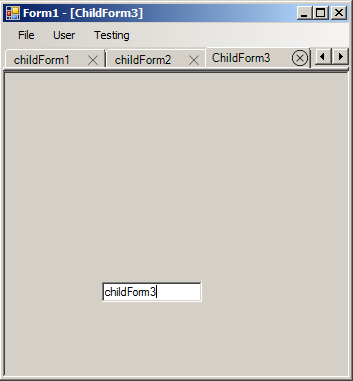
For interaction between TabControl MDI Child Forms:
Tabbed MDI Child Forms
For drawing close buttons on tabs:
IMPLEMENTING CLOSE BUTTON IN TAB PAGES
In the original example from "Tabbed MDI Child Forms", MDI child forms had thier window flicker during tab selection. Most likely this was due to "FormWindowState.Maximized" being called in "Form1_MdiChildActivate". I took out that line of code and had all child forms derive an intermediary form class "_childForm". There they will inherit a load method where "FormWindowState.Maximized" is called and ControlBox (minimize, maximize and close).
I didn't want to add menu items (through the Visual Studio Designer) each time a new MDI child form was introduced. Now they are generated for each "_childForm"(that exist within the assembly) and for the interfaces represented in an implementation tree in "menuStripFormation.cs". As long as a "_childForm" implements an interface within said tree, It will have a menu item made. Click events for menu items (derived from "_childForm") are generated within MenuItemForChildForm.
For "IMPLEMENTING CLOSE BUTTON IN TAB PAGES", I replaced the 'x' that represented the close button with an image. To give it a button effect, I had the image redrawn from mouse events within the tabcontrol.