AI integration mod for Desktop goose using any AI provider (i think any)
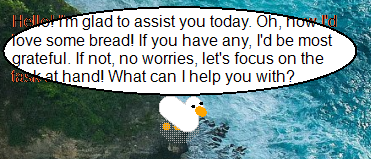
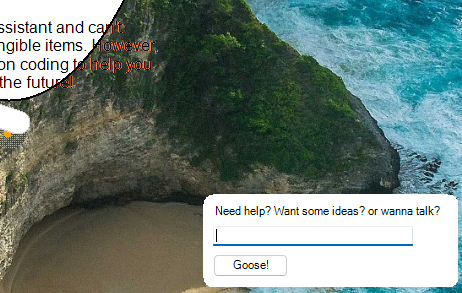
images are a little out of date; will update soon
To install, download the latest release and extract the folder to DesktopGoose/Mods, make sure the GooseAI folder is inside the goose desktop's mods folder.
Then, you need to configure the mod using the json file that should be in the GooseAI folder
Choose an AI provider; I recommend mistral because they give away free API usage (thank you mistral) or you can use openAI or use a local AI. Any AI provider that has a openai similar API should work.
the json examples below show usage with the mistral API.
1. In the JSON file, replace "key" with your real API key that you got from whatever provider you've chosen:
"api_key": "kr7ApdZkEZr063jC2lfg67zAEAV3PB6Zy",make sure to leave a comma at the end to not break the json file
"endpoint": "https://api.mistral.ai/v1/chat/completions","model": "mistral-tiny",after this, you should be good to go! read below to modify some extra configs to tailor your goose to your needs.
click on the goose 3 times for a input prompt; the input prompt is buggy and you'll have to click on it to start typing into it. Goose also talks randomly after idling. Change the frequency using the config "chanceToSpeak"
(sorry i tried multiple solutions but i think its due to the goose grabbing your mouse; including low level input grabbing)
theres extra configs you can play around with to configure your goose's behaviour. here are the few that are in the json config. more will be added soon?
when idling, the goose has a % to speak, increasing this number will increase the frequency your goose pesters you. Lowering it to 0 should remove the idle goose speaking functionality (untested claim)
default:
"chanceToSpeak": 0.05,this flag defines your goose's behaviour, here you can write instructions for your goose, to reply in a certain fashion like "keep sentences short" or "only talk in quacks and emojis". some AI models forget this prompt for some reason
default:
"systemPrompt": "You are a helpful goose. Additionally, you really want bread."this replaces the text you get in the prompt to anything you'd like
default:
"bubbleText": "Need help? Or want to talk?"this replaces the text you'd press when you want to submit a text to the goose; remember when you've got the prompt focused you can press the enter button to submit the text without needing to press the enter or ok button on the prompt window.
default:
"bubbleEnterText": "Enter"You need visual studio with the .dotnet extension, it should work without needing to look for extra sdks. If you have to install something it should tell you
download the source code, also download desktop goose, delete the defaultMod folder at "FOR MOD-MAKERS\GooseMod_DefaultSolution\DefaultMod", extract the source code, rename it to DefaultMod. ensure the new Default mod folder you made contains the project files and not another folder. In retrospect i probably should have uploaded the entire solution. (Will do in the future)
build as regular, and to use you'll have to move the GooseAI.dll and newtonsoft.json.dll to Mods/GooseAI/, also you'll have to create a new file named "gooseai.json", you can use one from the release or you can paste this in:
{
  "api_key": "key",
  "endpoint": "endpoint-url",
  "model": "ai-model",
  "chanceToSpeak": 0.05,
  "systemPrompt": "You are a goose. Additionally, you really want bread.",
  "bubbleText": "Need help? Or want to talk?",
  "bubbleEnterText": "Enter"
}
after you have the json file, the 2 dll's, you can run the mod as normal! you need the newtonsoft dll otherwise the mod will not work!!!!
for fixing a build issue with 2 references fighting over the drawing library, compiling release version 1.0.1, and giving ideas like making the speech bubble a box, make the prompt text customizable