Clear and customizable relation labels for Strapi v5
Display Strapi relations using readable labels built from your content fields instead of relying on the default relation name.



Ever wanted to display a relation as custom text or with nested field values? This plugin solves exactly that:
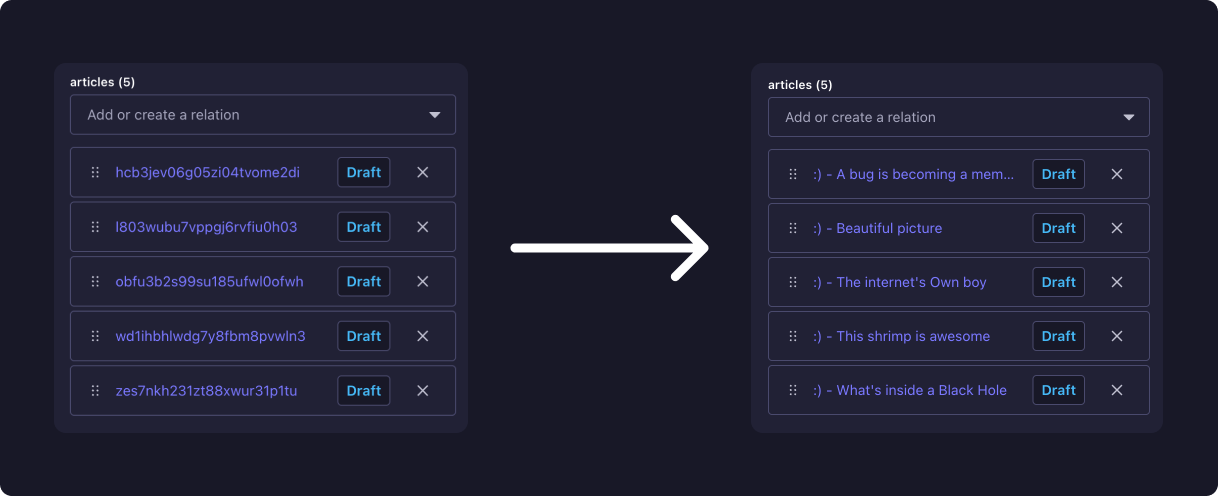
- 🏷️ Custom relation labels
- 🧩 Combine multiple fields in a single label
- ✏️ Add static text around field values
- 🔁 Supports repeated placeholders
- 📦 Supports scalar fields such as strings, numbers, booleans, and dates
- 🛡️ Falls back to Strapi's default relation label when necessary
- 🔎 Keeps Strapi's existing relation search and sorting behavior
- 🖥️ Admin-only — no changes to your Content API or stored data
Install via npm:
npm install strapi-relation-namesor yarn:
yarn add strapi-relation-namesor pnpm:
pnpm add strapi-relation-namesEnable the plugin:
// config/plugins.{js,ts}
'strapi-relation-names': {
  enabled: true,
},After installing and enabling the plugin, open the Strapi Admin settings panel:
Settings → Global → Relation Names
Each relation field is displayed together with the scalar fields available on its related content type or component.
Create a label using placeholders e.g.:
{firstName} {lastName}
You can also mix placeholders with static text:
Name: {firstName} {lastName}
It is also possible to transform a label's value using pipe syntax: {createdAt | toLocalDateTime}
Currently the following transformations exist:
toLocalDate— formats date values using the configured locale and time zone.toLocalDateTime— formats date-time values using the configured locale and time zone.
Possible configuration keys are listed below; omitted keys keep the plugin defaults.
| Key | Description | Possible values |
|---|---|---|
collections |
Limit relation names to the listed collection and single type UIDs. Leave empty to include all. | string[] (default: []) |
locale |
Locale used by date transformations. | string (default: runtime locale) |
timeZone |
IANA timezone used by date transformations. | string (default: runtime timezone) |
Example:
// config/plugins.{js,ts}
'strapi-relation-names': {
  enabled: true,
  config: {
    collections: ['api::article.article', 'api::author.author'],
    locale: 'de-AT',
    timeZone: 'Europe/Vienna',
  },
},At runtime, the server-side plugin decorates Strapi Content Manager relation responses and field metadata. It reads the configured template, validates each placeholder against the related content type schema, and renders the label from the returned relation data. If a value is not present, it performs a permission-aware hydration query; nested component paths are loaded by populating their component root. The rendered label is then exposed through Strapi's normal relation display mechanism. Missing field values are replaced with an empty string.
For example:
{firstName} {lastName}
with a missing lastName becomes:
John
If the complete rendered label is blank, Strapi automatically falls back to its default relation label.
The default label is also used when:
- No template is configured
- The configured template is invalid
- The rendered template contains no usable value
- Live label previews while editing templates
- Define default relation templates in plugin configuration
- Support nested field paths in templates
- Support nested relation fields in templates
- Import and export relation-label settings
- Conditional labels and configurable fallback rules
- Support label transformation functions
If you have any feature requests or suggestions, please open a dedicated issue.
If you encounter any issues, please feel free to open an issue on the GitHub repo.
Contributions are welcome! If you have suggestions or improvements, please open an issue or submit a pull request to the dev branch.