A lightweight form builder — create and manage dynamic forms directly from the Umbraco backoffice with no code required for everyday use. Render any form on the front-end with a single line, and extend it with custom field types without touching the package.
Works with Umbraco 16, 17 and 18 (multi-targeted net9.0 / net10.0).
Database-agnostic: runs on SQL Server, SQLite and PostgreSQL (v2.0.0+).





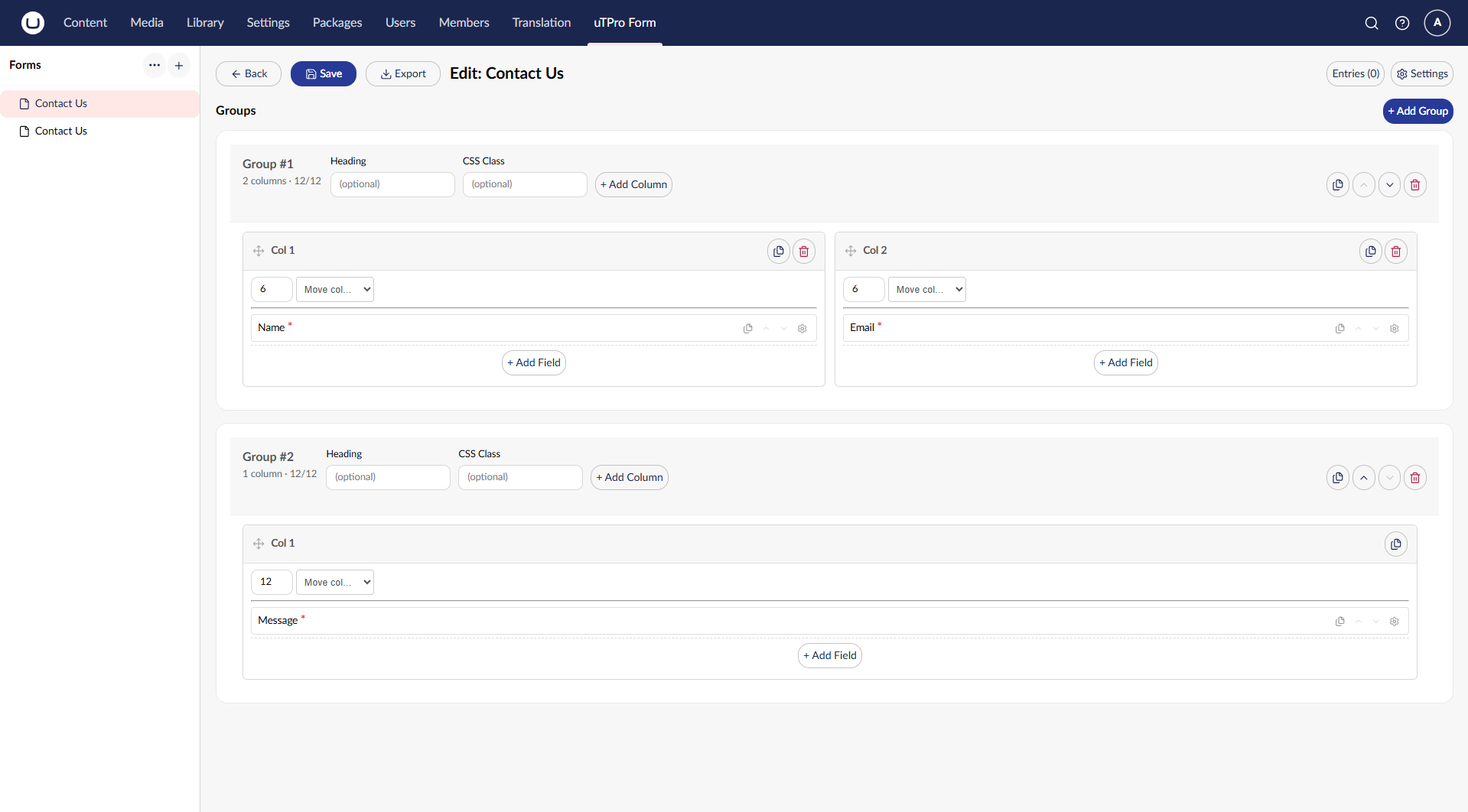
- Dedicated uTPro Form section with a left Forms tree (like Dictionary)
- Visual builder: groups → 12-column layout → fields, with live settings
- Copy / paste groups, columns and fields across forms (browser
localStorage) - Import / Export form definitions as JSON (layout only — no entries)
- 19 built-in field types + a custom field type extension point (custom types can declare their own labelled settings)
- Client-side validation with multi-language (Umbraco Dictionary) messages, backed by server-side validation on submit (field type / pattern / length) plus a mass-assignment guard so only declared form fields are stored
- Sensitive fields encrypted at rest (ASP.NET Data Protection), masked in the UI
- Secret field attributes redacted from public output — secrets such as a Cloudflare Turnstile
secretKeyare stripped from the public render API and the backoffice list/get responses, so only public attributes (e.g.siteKey) are exposed - File uploads stored outside
wwwroot, served only via an authenticated download endpoint (v2.1.0+); storage location configurable viauTPro:Feature:Form:FileUploadsPathfor shared/load-balanced deployments (v2.3.1+). File-upload fields without an explicitacceptlist fall back to a safe deny-list (executable/script/svg/html extensions rejected) and a default max size - Entry storage with search, date-range filters, paging, and export as CSV (data only) or ZIP (per-entry folders with data + uploaded files); CSV and ZIP exports neutralize spreadsheet formula-injection (cells starting with
=,+,-,@, tab or CR are quoted as text) - Form Picker property editor (+ ready-made data type) to choose a form from content, with server-side publish validation
- Public REST APIs for submit / render / entries (opt-in per form)
- Anti-spam & rate limiting — built-in per-IP + per-form rate limit on the public submit endpoint (configurable), plus a pluggable submission pipeline (
IFormSubmissionHandler) for captcha verification, custom validation, or your own gatekeepers (v2.3.0+) - Backoffice read endpoints (forms / entries / files / export) require forms-management (Settings-section) permission
- Role-aware UI driven by Umbraco user groups
Install:
dotnet add package uTPro.Feature.SimpleFormBuilderOn first run it creates its tables and seeds a sample Contact Us form. Grant the uTPro Form section to your user group, build a form, then render it anywhere:
@await Component.InvokeAsync("uTProSimpleForm", new { alias = "contact-us" })| Umbraco | .NET | Target |
|---|---|---|
| 16 | .NET 9 | net9.0 |
| 17 & 18 | .NET 10 | net10.0 |
Most settings are managed in the backoffice, but a few live under uTPro:Feature:Form in appsettings.json:
FileUploadsPath(string, optional): folder for stored upload files, kept outsidewwwroot. A relative path resolves underContentRoot; leaving it empty falls back to<ContentRoot>/umbraco/Data/uTProSimpleFormUploads. Point it at shared storage for load-balanced / multi-node deployments.MaxExportEntries(int, default10000): caps how many entries a single ZIP export materialises, bounding memory use. Values<= 0fall back to the default.
{
  "uTPro": {
    "Feature": {
      "Form": {
        "RateLimit": {
          "Enabled": true,
          "PermitLimit": 5,
          "WindowSeconds": 60
        },
        "FileUploadsPath": "",
        "MaxExportEntries": 10000
      }
    }
  }
}
See Security & Permissions for the full rate-limit options.
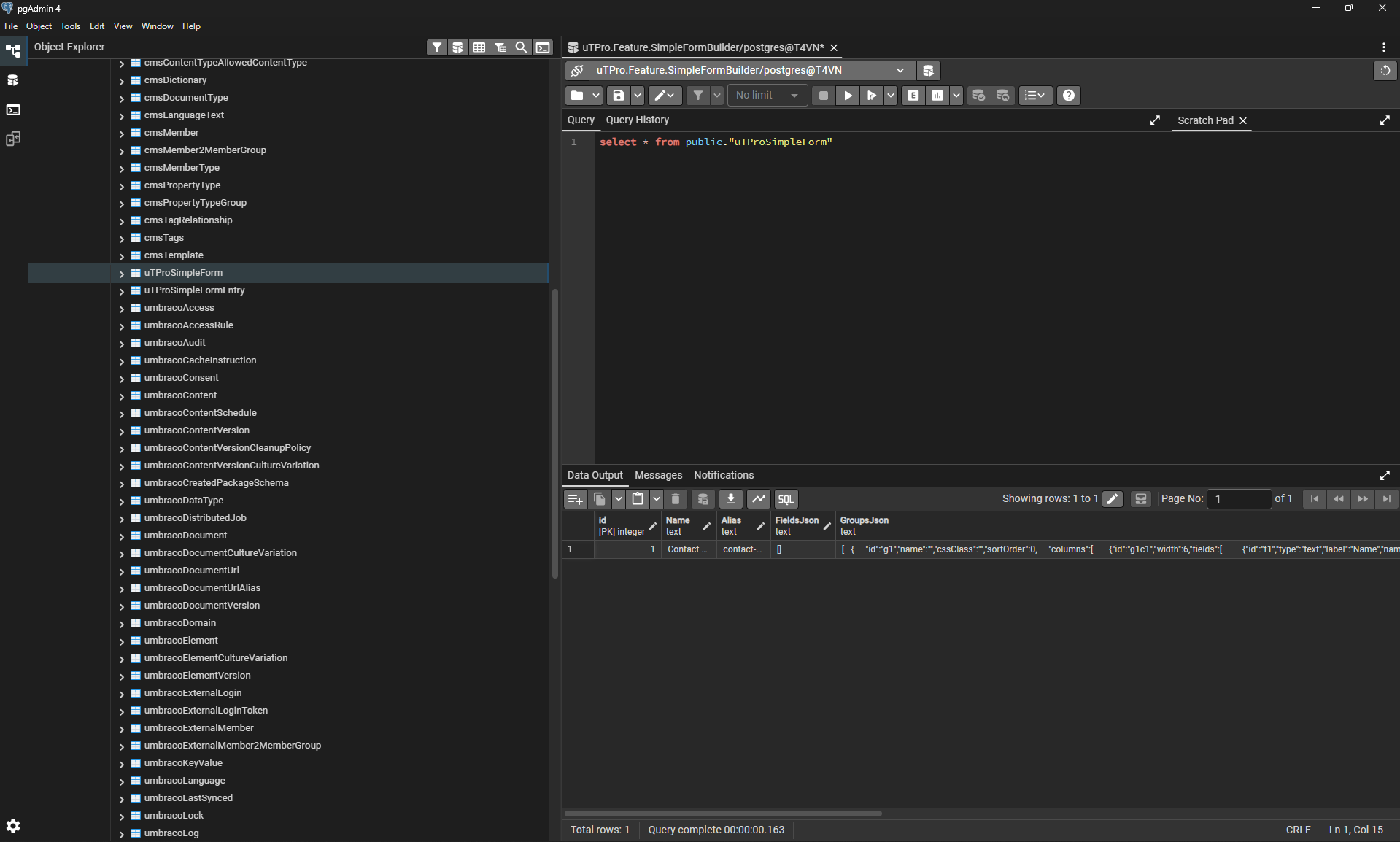
Runs on SQL Server, SQLite and PostgreSQL. All data access uses NPoco strongly-typed queries and provider-agnostic migrations (large JSON columns use SpecialDbTypes.NVARCHARMAX, which maps to nvarchar(max) on SQL Server and text on SQLite / PostgreSQL), so table/column identifiers and types are handled correctly on every database.
For PostgreSQL, install the community provider Our.Umbraco.PostgreSql, enable it in Program.cs with .AddUmbracoPostgreSqlSupport(), and set provider name Npgsql2 in the connection string. The form builder then runs with full functionality — verified end-to-end (unattended install, migration, seed, form submit, and encrypted sensitive fields):
| Guide | What's inside |
|---|---|
| Getting Started | Install, compatibility, backoffice layout, building a form, copy/paste |
| Rendering a Form | ViewComponent, parameters, template resolution, overriding views, JS hooks |
| Form Picker | Choose a form from content, Allowed-forms setting, publish validation |
| Field Types | Built-in types, custom field types + custom settings, FieldHelper, Star Rating example |
| Public APIs & Import/Export | submit / render / entries endpoints, submission pipeline (IFormSubmissionHandler), JSON import/export |
| Security & Permissions | Roles, sensitive-data encryption (encode/decode), rate limiting, test accounts |
| Reference | Project structure, static assets, database tables, migrations |
MIT © T4VN. Issues and contributions welcome on the GitHub repository.