



GraveDiggerX is a Paper/Folia plugin (API 1.21) that creates a grave when a player dies, stores inventory + XP, and lets the owner recover items via GUI or quick collect (sneak + click).
Przejdź do pełnej wiki po polsku · Pobierz GraveDiggerX
Na start: pierwsze kroki, instalacja, komendy, uprawnienia i konfiguracja.
| In game |
|---|
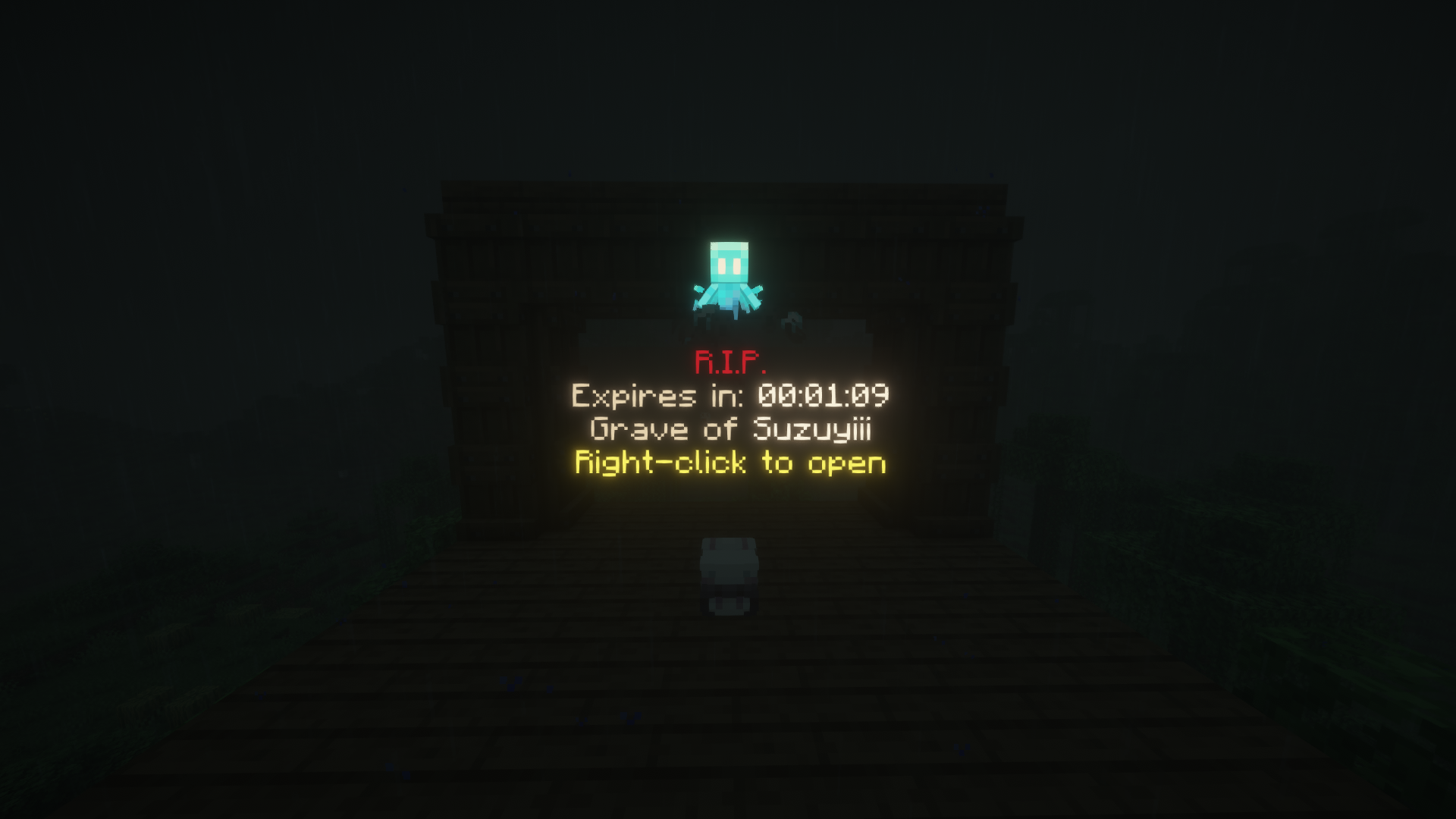 |
- Creates a player-head grave and stores main inventory (slots 0-35), armor, offhand, XP, location, and owner metadata.
- Spawns a hologram with countdown and optionally a ghost spirit (Allay) above the grave.
- Protects grave blocks against explosions, fluids, mobs, pistons, and hoppers (config-controlled).
- Enforces grave access rules: foreign players are blocked/repelled, owner can recover items using GUI or quick collect.
- Supports expiration behavior:
DISAPPEAR,DROP_ITEMS, orBECOME_PUBLIC. - Keeps grave backups with admin list/restore commands.
- Provides orphan cleanup commands for holograms, spirits, and leftover grave blocks.
- Integrates with WorldGuard: if a region has explicit owners/members, grave placement requires player ownership/membership.
- Java 21.
- Paper/Folia 1.21.7-26.2 server (project currently built/tested against 26.2 API).
- Optional WorldGuard 7.x (soft dependency; plugin can run without it).
- Download the latest release JAR.
- Place it in your
plugins/directory. - Start the server to generate
config.yml,data.json, and language files. - Adjust configuration and restart the server or run
/gravediggerx reload.
| Path | Description |
|---|---|
graves.grave-despawn |
Grave lifetime in seconds. |
graves.max-per-player |
Maximum active graves per player. |
graves.expiration-action |
Action on expiration: DISAPPEAR / DROP_ITEMS / BECOME_PUBLIC. |
graves.collection.claim-ttl-ms |
Collection transaction claim TTL (anti-race-condition protection). |
graves.backups.* |
Backup toggle and backup limits (per player / global). |
graves.worlds.* |
Enable graves per dimension (overworld, nether, end). |
graves.protection.* |
Grave block protections (explosions, fluids, mobs, pistons, hoppers). |
spirits.enabled |
Enables/disables grave spirit (Allay). |
teleport.enabled |
Enables or disables the grave teleportation feature. |
teleport.cost |
Cost required to teleport to a grave (integrated with Vault). |
database.type |
Data backend: json, mariadb, mysql, postgresql, sqlite, h2. |
database.sql.* |
SQL connection settings for SQL backends. |
language |
Message locale selection (EN, PL; also includes messages_ru.yml and messages_uk.yml). |
update.* |
Update check and auto-download sources (Hangar/GitHub/Modrinth). |
stats.enabled |
Anonymous usage statistics toggle. |
performance.cleanup.limit-per-tick |
Tick limit for admin orphan cleanup processing. |
Main command: /gravediggerx (alias: /gdx).
| Command | Description | Permission |
|---|---|---|
/gravediggerx help |
Show help and command syntax. | gdx.cmd.help |
/gravediggerx reload |
Reload configuration and messages. | gdx.cmd.reload |
/gravediggerx list |
Show player's active graves with coordinates. | gdx.cmd.list |
/gravediggerx tp |
Opens the graphical interface to view and teleport to active graves. | gdx.cmd.tp |
/gravediggerx admin list <player> |
List active graves for selected player. | gdx.cmd.admin |
/gravediggerx admin remove <player> <id> |
Remove one grave by list index. | gdx.cmd.admin |
/gravediggerx admin backup list <player> |
List saved grave backups for selected player. | gdx.cmd.admin |
/gravediggerx admin backup restore <player> <id> |
Restore one backup as active grave. | gdx.cmd.admin |
/gravediggerx admin cleanupholograms |
Remove orphan grave holograms. | gdx.cmd.admin |
/gravediggerx admin cleanupghosts |
Remove orphan ghost spirits (Allays). | gdx.cmd.admin |
/gravediggerx admin cleanupgraves |
Remove orphan grave blocks. | gdx.cmd.admin |
| Permission | Description |
|---|---|
gdx.opengrave |
Allows opening and collecting items from graves. |
gdx.cmd.tp |
Allows viewing the tp GUI. |
gdx.cmd.help |
Allows viewing the help command. |
gdx.cmd.reload |
Allows reloading the GraveDiggerX configuration. |
gdx.cmd.list |
Allows listing active graves. |
gdx.cmd.admin |
Allows using administrative commands. |
gdx.owner |
Allows using all GraveDiggerX commands. |
gdx.* |
Wildcard that provides access to all plugin permissions. |
OP players are allowed by the runtime permission checker.
❤️ Like the plugin? If GraveDiggerX helps you out, a quick heart/like on Modrinth would mean the world to us and help the plugin reach a wider audience! Thank you for your support!
chmod +x gradlew
./gradlew clean build
./gradlew test --console=plainPlease use GitHub Issues or the SyntaxDevTeam Discord to report bugs, request improvements, or propose new features.
| SyntaxDevTeam |
|---|
 |