


On-device anti-scam shield for USDT sends. Before a transfer is signed, Custos analyzes the destination address and the pasted scam-chat context entirely on the user's device — no chat content, no address, no screenshot ever leaves the phone for inference — and warns or blocks the send when it matches a known fraud pattern. Risk addresses are optionally shared peer-to-peer, with no central server to trust or censor.
Built for the Decentralized AI Hackathon (ISD Summit, Panama, Sept 9–11 2026).
| ▶ Demo video | https://youtu.be/3LAOwk1f-Oo |
| 🌐 Live demo | https://custos-one-sand.vercel.app |
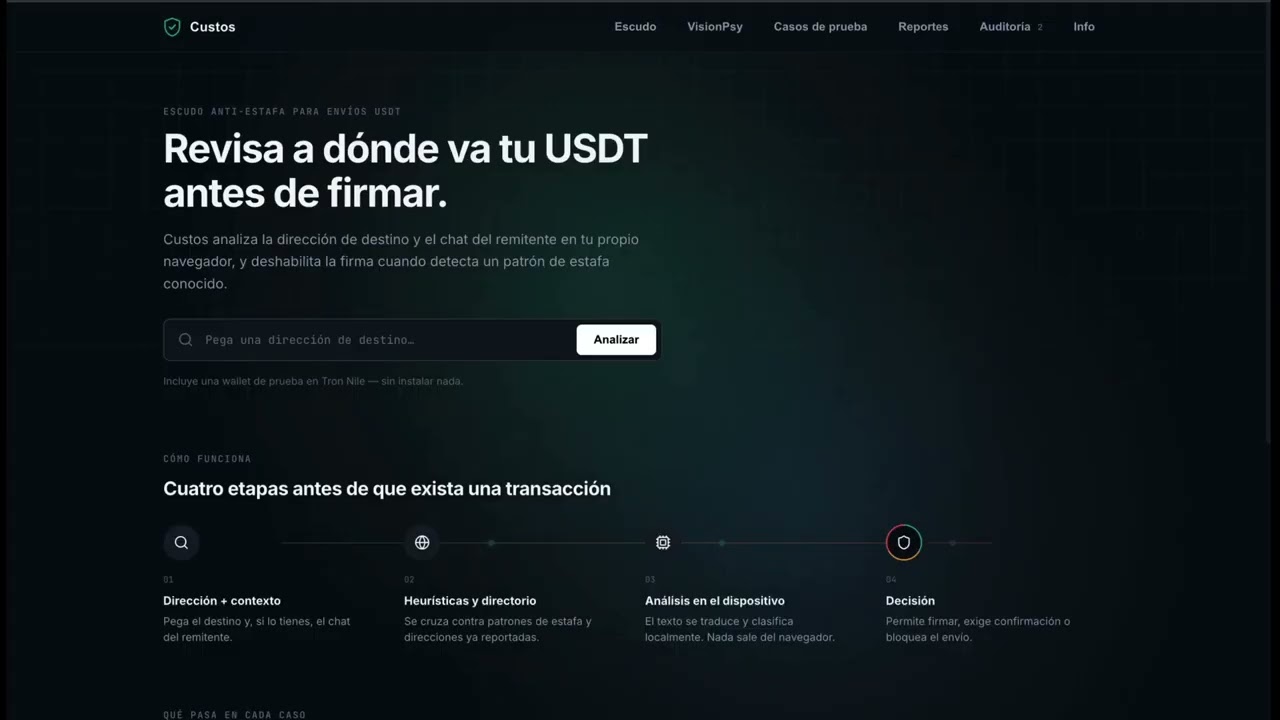
The live demo runs on Tron Nile testnet and creates its own wallet in your browser, so there is nothing to install. Approved transfers are really signed and broadcast, and return a transaction hash you can open on Tronscan. To sign, the wallet needs testnet TRX (gas) and testnet USDT: copy its address from the Escudo tab and top it up at the Nile faucet.
Pig butchering, wallet-drainer phishing, and fake-support scams move billions in USDT every year. Exchanges, wallets, and PSPs want to protect users, but they can't ship a cloud-based fraud detector: the chat context and transaction intent are exactly the kind of sensitive user data compliance teams won't let leave the device. And centralized risk-address lists are a single point of failure and censorship. Nobody is solving this with on-device AI + P2P today.
Many of these scams are also run by non-native-language scripts against non-native-language victims — a Spanish-speaking victim reading a scam script copy-pasted from a Chinese or English playbook is exactly where translation quality determines whether the pattern-matcher ever sees the real signal. That's why translation isn't a side feature here — it's in the critical path.
| Track | Fit | Rationale |
|---|---|---|
| 03 — Sovereign Intelligence at the Edge ($6,000) | ✅ Primary | Fraud detection on sensitive transaction and chat data, analyzed entirely on the user's device. Nothing is sent to a cloud API, and the settlement path is self-custodial. |
| 02 — Tether QVAC Psy ($1,500) | ✅ Primary | The cross-language problem is load-bearing, not cosmetic: the detector ships its phrase list in Spanish and English because scam scripts are translated between languages. VisionPsy's OCR path is implemented and working in the browser. |
| 01 — Philips Installed-Base Intelligence ($1,500) | ❌ Not pursued | Different domain (hospital field-service equipment tracking) — no honest way to bridge it to a payments-fraud product without faking relevance. Deliberately skipped rather than bolted on. |
- VisionPsy (OCR) — working in the deployed build. Upload a screenshot of
a chat or a fake trading dashboard and the text and any destination address are
extracted on device, then run through the same scam detector. It is backed by
tesseract.jsin a Web Worker rather than QVAC's native model, because@qvac/sdkcannot load in a browser bundle. The privacy claim is unchanged: the image never leaves the machine. - TranslatePsy — the adapter is written against
TranslationPort, and it is what runs when the app is hosted on Bare or Node. In the browser build the cross-language problem is solved differently: the phrase list itself is bilingual and accent-insensitive, so a Spanish scam script is caught without a translation pass. - MedPsy — not used; out of domain.
This is the flow the deployed web build actually runs:
- You paste the destination address, the amount, and optionally the scammer's chat message.
- Everything is analyzed in the browser. Three independent signals run: scam-phrase matching over 12 fraud families (195 phrases, Spanish and English, accent-insensitive), an address-poisoning check against your send history, and a lookup in the local directory of reported addresses.
- The strongest signal sets the risk level (see the table below).
- If the send is not blocked, the transfer is quoted against a Tron node with a constant call. This reads the real energy cost and never signs anything.
- The risk level decides the friction: proceed, demand an explicit confirmation, or refuse to prepare a transaction at all.
- On confirmation, the transfer is signed in the browser and broadcast to Tron Nile, returning a transaction hash you can open on Tronscan.
- The assessment and the decision are written to a local audit log. The chat text never is.
Signals are independent and the strongest one wins, so any single signal can raise the level on its own.
| Signal | Confidence | Resulting level | What the app does |
|---|---|---|---|
| Address already reported | forced | Critical | No transaction is prepared. There is nothing to sign. |
| Address poisoning (same first and last 6 chars as a past recipient) | 0.90 | Critical | Same hard block. |
| Scam phrase matched in the chat | 0.60 | High | Shows the exact phrase that matched and demands an explicit confirmation. |
| Nothing matched | 0 | None | Signing proceeds without friction. |
Thresholds: >= 0.85 critical, >= 0.6 high, >= 0.35 elevated, below that low
or none. A hard block is enforced twice: the proceed button is never rendered,
and RecordUserDecision throws if a critical assessment resolves to anything
other than cancelled.
flowchart TD
    subgraph Input["1 · Input — nothing leaves the device"]
        A["Destination address + amount"]
        B["Pasted chat text (optional)"]
    end

    subgraph Analysis["2 · On-device analysis"]
        E["Scam-phrase detector<br/>12 families · 195 phrases · ES + EN"]
        F["Reported-address directory<br/>local cache"]
        G["Address-poisoning check<br/>vs. recent recipients"]
    end

    subgraph Decision["3 · Risk decision"]
        H{"Strongest signal"}
        Pr["Quote against the node<br/>constant call, never signs"]
        I["None / Low<br/>proceeds without interruption"]
        J["Elevated / High<br/>explicit confirmation required"]
        K["Critical<br/>no transaction is prepared"]
    end

    subgraph Settlement["4 · Settlement"]
        M{"User confirms?"}
        N["Sign + broadcast on Tron Nile<br/>returns a tx hash"]
        O["Cancelled — nothing signed"]
        Q["Assessment + decision<br/>logged locally"]
    end

    A --> E
    B --> E
    E --> F --> G --> H
    H --> Pr
    H -- "None / Low" --> I
    H -- "Elevated / High" --> J
    H -- Critical --> K
    I --> M
    J --> M
    K --> O
    M -- confirm --> N --> Q
    M -- cancel --> O --> Q

    classDef ok fill:#eafaf1,stroke:#1e8449,color:#1e8449;
    classDef warn fill:#fef5e7,stroke:#d68910,color:#9c640c;
    classDef block fill:#fdedec,stroke:#c0392b,color:#c0392b;
    class I ok
    class J warn
    class K,O block
See ARCHITECTURE.md for the full sequence diagram (every port/adapter involved) and the risk-level state machine.
Everything below is checkable in a browser in about two minutes.
- Open the live demo and go to Escudo. The wallet address and balances are read live from a Tron Nile node. Nothing is installed and no extension is required.
- Open Casos de prueba, load Pago normal a billetera verificada, and run the analysis. It clears, the transfer is signed and broadcast, and you get a hash. Open it on Tronscan: the transaction exists on chain.
- Load Mentor de inversiones y falso retiro. The verdict is high risk and the app shows the exact phrase that triggered it with its confidence. The send button now demands an explicit confirmation.
- Go to Reportes, report that address with a reason, then analyze it again in Escudo. It is now critical and no transaction is prepared at all.
- Open VisionPsy and upload a screenshot of a chat. The text and any address are extracted in a Web Worker on your machine.
To sign in step 2 the demo wallet needs testnet TRX for gas and testnet USDT. Copy its address from Escudo and top it up at the Nile faucet.
The core is hexagonal: packages/core holds the domain and use cases and imports
no SDK. Everything below is an adapter behind a port, which is why the same core
runs unchanged in a browser, on Bare, or on Node.
| Piece | Technology | Status in the deployed web build |
|---|---|---|
| Scam detection | Seed phrase dataset behind ScamDetectionPort |
Working. 12 families, 195 phrases, Spanish and English, accent-insensitive. |
| On-device LLM pass | QVAC SDK (@qvac/sdk) |
Adapter written, not active in the browser: @qvac/sdk cannot load in a Vite bundle. Runs on Bare or Node. |
| Cross-language detection | TranslatePsy (QVAC Psy) | Adapter written, same constraint. The web build compensates by carrying the phrase list in both languages. |
| Screenshot OCR | tesseract.js behind OcrPort |
Working. Runs in a Web Worker; the image never leaves the browser. |
| Wallet / settlement | tronweb behind WalletPort |
Working. Real USDT TRC-20 transfers on Tron Nile testnet, with fees simulated against the node. A WDK adapter (adapters-wdk) implements the same port for Node. |
| Risk-address directory | RiskListPort, local cache |
Working, local only. Reports carry the reason they were made. |
| P2P sync | Pears Stack (Hyperswarm) | Adapter written, not active in the browser: gossip needs raw UDP/DHT, which browsers do not expose. Runs on Bare or Node. |
| App shell | TypeScript, Vite + React | Deployed on Vercel. |
No inference call in this app is ever routed to a cloud API. The only network calls the deployed build makes are to a public Tron Nile node, to read balances and broadcast the transfers you approve.
79 automated tests across the domain and the adapters, including regressions for the bugs that mattered: that Spanish scam text is actually detected, that matching survives missing accents, that a flagged address keeps its original base58 casing, and that the demo's poisoning address is a genuine lookalike.
pnpm testSee ARCHITECTURE.md for the full breakdown. Summary:
packages/
  core/             domain entities + use cases, zero I/O, zero SDK imports
  adapters-qvac/    @qvac/sdk: scam detection, TranslatePsy, VisionPsy
  adapters-wdk/     WDK wallet integration (send flow, pre-sign hook)
  adapters-p2p/     Hyperswarm risk-address list sync (stretch)
  adapters-storage/ local audit-log trail (assessments + decisions only)
  shared/           seed scam-pattern dataset, shared types
apps/
  web/             demo UI: paste chat/address → analyze → warn/block → send
docs/
  demo-script.md          shot list for the ≤5 min submission video
  compliance-checklist.md live checklist against the official rules
  performance-log.md      QVAC model load / prompts / token count / TTFT / throughput (Track 02 deliverable)
Requirements: Node 20+, pnpm 9+, and the QVAC SDK runtime for
your platform (see qvac.tether.io for device/hardware
requirements — document the exact hardware used for testing in
docs/performance-log.md).
pnpm install
pnpm build
pnpm dev:web
adapters-wdk is wired to Tether WDK for Tron USDT (prepare quotes, commit signs and broadcasts) and is gated behind apps/web's friction/block screen — see "How it works" below. adapters-qvac has scam detection, TranslatePsy, and VisionPsy all wired to @qvac/sdk; each still degrades gracefully (heuristics-only / untranslated / empty OCR) when constructed without a real model client. adapters-p2p gossips confirmed reports over Hyperswarm behind the same optional-client pattern. None of the QVAC or Hyperswarm clients are constructed in apps/web's browser build — they need a Node/Bare/Expo host; see each package README.
(Required disclosure per hackathon rules — keep this list current.)
Wired on-device SDKs (in package.json today):
@qvac/sdk0.19.0: Tether QVAC SDK, on-device inference (scam detection, TranslatePsy, and VisionPsy all wired). Classification/translation use Llama 3.2 1B Instruct Q4_0; VisionPsy uses the EasyOCR Latin registry model.@tetherto/wdk-wallet-tron1.0.0-beta.13: Tether WDK Tron wallet module. Self-custodial USDT TRC-20 transfers. Local signing. Tron RPC is used only to quote and broadcast, never for inference.hyperswarm^4.17.1: Pears Stack P2P discovery/gossip for the risk-address list — no central server, direct peer connections only. Stretch goal, now wired behindHyperswarmRiskListAdapter's injectable client (seeadapters-p2p).
None of @qvac/sdk, WDK, or hyperswarm are constructed in apps/web's
browser bundle — see apps/web/src/compositionRoot.ts — since a real signing
key must never ship in a browser build and Hyperswarm needs raw UDP/DHT
access a browser doesn't have. They're wired and unit-tested at the adapter
level, ready for a Node/Bare/Expo host.
Build & UI tooling (already in package.json, dev-time/build-time only —
none of these run inference, call a remote API, or collect analytics):
- React / ReactDOM —
apps/webUI. - Vite (
@vitejs/plugin-react) — dev server and build forapps/web. - TypeScript — compilation across all packages.
- Vitest — test runner for
packages/*.
No cloud inference APIs, no analytics SDKs, no third-party trackers. Any additional library added during the hackathon must be listed here before submission.
See docs/compliance-checklist.md for the live, checkable version. Deadline: 2026-09-11, 08:00 Panama time.
Deployed and working: custos-one-sand.vercel.app. The send flow performs real USDT transfers on Tron Nile testnet, screenshot OCR runs on device, and scam detection works in Spanish and English. 79 tests pass.
Not active in the browser build, by constraint rather than by omission: the QVAC on-device LLM pass and Hyperswarm P2P sync. Both are written against the same ports and run when the app is hosted on Bare or Node.
MIT — see LICENSE.