
Please install all the requirements with the following command:
pip3 install -r requirements.txtThe default model is run with the command:
python3 RunSimulation.pyThis will open a webbrowser tab and show you a GUI of the model as depicted below:
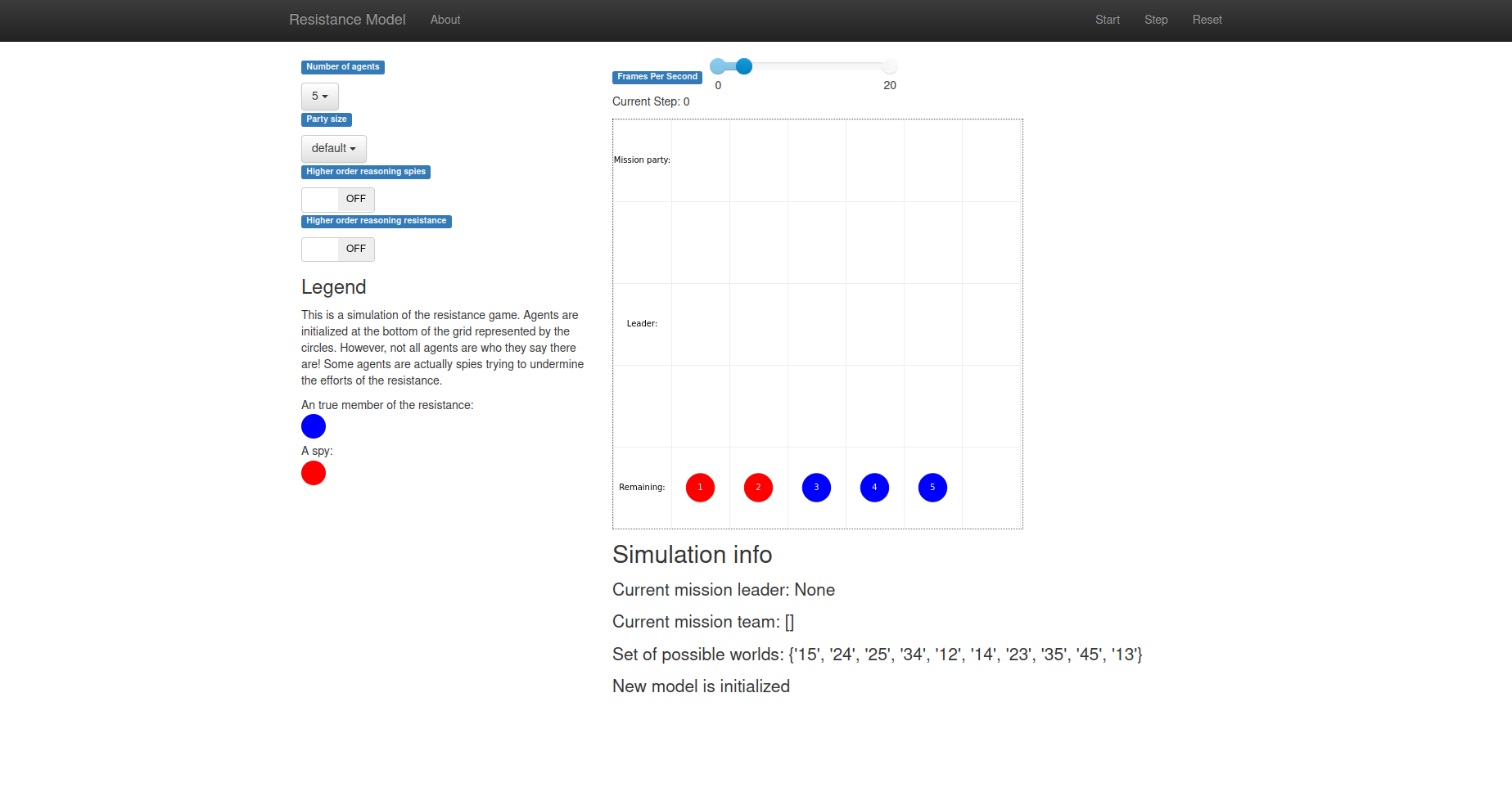
In this model, you can see the typical run through of a game of Resistance.
- A Mission Leader is chosen. The first Mission Leader is chosen randomly - after that, the next player in line becomes the new mission leader.
- The Mission Leader selects a team to send on the mission. The number of people on the team differs per mission.
- All players vote on the team composition. If at least half of the players agree with the team composition, the team is sent on a mission. If more than half of the players disagree with the team composition, a new player becomes the Mission Leader and step two and three are repeated. If there are 5 failed attempts to create a mission team, the government spies automatically get one point, and the next round starts.
- On the mission, each player on the mission team places a card face-down. This card is either a “pass”-card or a “fail”-card. Resistance-players must always play a “pass”-card, whereas spies can choose to play either a “pass”- or “fail”-card. The Resistance wins the mission if all the cards played are “pass”-cards, whereas the spies win if one or more “fail”-cards are played. The faction who wins the mission gets one point.
Within this GUI, there are several parameters that can be altered in order to change the working of the model:
- Number of agents [5,6]: Choose the number of agents within the model.
- Party size [2,default,3]: Choose how many agents are sent on a mission. Setting this to either 2 or 3 will make the party size constant over all the missions. Using the default setting will select the variable party sizes as defined in the official rules of the game.
- Higher order reasoning spies [ON, OFF]: Select whether the spies should use higher order knowledge when deciding on playing a fail card.
- Higher order reasoning resistance [ON, OFF]: Select whether the spies should use higher order knowledge when analysing the results of voting for a mission party.
Note that setting N=6 in combination with any form of higher order reasoning substantially increases the computation complexity of our simulation. This results in a slight delay in the step function. Therefore, please have a little patience if you use these parameter settings.
Another way of changing these parameters is using flags when running the 'RunSimulation.py'. The parameters discussed above can be set with the following flags:
-N, --number_of_agents [5, 6]
-ps, --party_size ['2', 'default', '3']
-sphok, --spies_higher_order_knowledge [True, False]
-rhok, --resistance_higher_order_knowledge [True, False]
The same mechanism of using flags is also used to activate the Batchrunner and set the number of iterations for each parameter setting:
-rm, --run_mode ['gui', 'batch']
-iter, --iterations [5, 10, 15, 20, 50, 100]
The Batchrunner runs different variations of parameter settings for N=5 and N=6. This is due to the increased computational complexity when running with N=6. We decided skip varying the party size as this reduces the total number of iterations needed for N=6 by two-thirds, substantially reducing the time required to finish running the Batchrunner.
Finally, there is also a flag which can be used for further debugging:
-debug, --debugging [True, False]Activating the debugging statement causes the simulation to print additional print statements within the terminal in which the simulation was started. It has no effect on the functioning of the simulation.
For more information on how to use these flags, run the command:
python3 RunSimulation.py -hTo get the graphs as in the report, move to the results-folder and run python3 graph.py. This will generate graphs based on the results from your run. You can see these graphs as pop-ups (one after the other), and all graphs will be saved to the results-folder.