
🚀 AI-powered Multi-Agent RAG system for intelligent document querying with fact verification
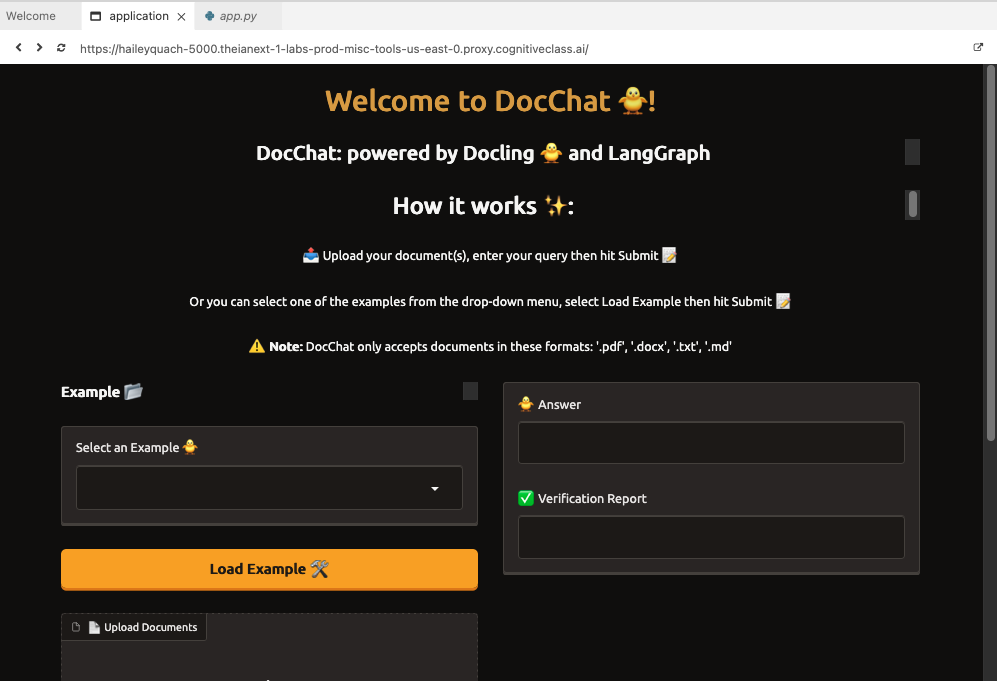
DocChat is a multi-agent Retrieval-Augmented Generation (RAG) system designed to help users query long, complex documents with accurate, fact-verified answers. Unlike traditional chatbots like ChatGPT or DeepSeek, which hallucinate responses and struggle with structured data, DocChat retrieves, verifies, and corrects answers before delivering them.
💡 Key Features:
- ✅ Multi-Agent System – A Research Agent generates answers, while a Verification Agent fact-checks responses.
- ✅ Hybrid Retrieval – Uses BM25 and vector search to find the most relevant content.
- ✅ Handles Multiple Documents – Selects the most relevant document even when multiple files are uploaded.
- ✅ Scope Detection – Prevents hallucinations by rejecting irrelevant queries.
- ✅ Fact Verification – Ensures responses are accurate before presenting them to the user.
- ✅ Web Interface with Gradio – Allowing seamless document upload and question-answering.
📹 Click here to watch the DocChat demo (Opens in a new tab)
- Users upload documents and ask a question.
- DocChat analyzes query relevance and determines if the question is within scope.
- If the query is irrelevant, DocChat rejects it instead of generating hallucinated responses.
- Docling parses documents into a structured format (Markdown, JSON).
- LangChain & ChromaDB handle hybrid retrieval (BM25 + vector embeddings).
- Even when multiple documents are uploaded, DocChat finds the most relevant sections dynamically.
- Research Agent generates an answer using retrieved content.
- Verification Agent cross-checks the response against the source document.
- If verification fails, a self-correction loop re-runs retrieval and research.
- If the answer passes verification, it is displayed to the user.
- If the question is out of scope, DocChat informs the user instead of hallucinating.
| Feature | ChatGPT/DeepSeek ❌ | DocChat ✅ |
|---|---|---|
| Retrieves from uploaded documents | ❌ No | ✅ Yes |
| Handles multiple documents | ❌ No | ✅ Yes |
| Extracts structured data from PDFs | ❌ No | ✅ Yes |
| Prevents hallucinations | ❌ No | ✅ Yes |
| Fact-checks answers | ❌ No | ✅ Yes |
| Detects out-of-scope queries | ❌ No | ✅ Yes |
🚀 DocChat is built for enterprise-grade document intelligence, research, and compliance workflows.
This version of DocChat has been fully migrated from IBM WatsonX to Hugging Face for all LLM inference and embeddings. No functionality has changed — the same agents, workflow, prompts, and UI remain intact.
The original project used IBM WatsonX's hosted API for all model inference, which required IBM Cloud credentials, a paid WatsonX project, and IBM-specific SDKs. This migration replaces all of that with Hugging Face's open serverless inference API, making the project accessible to anyone with a free Hugging Face account.
| Component | Old Model (WatsonX) | New Model (Hugging Face) | Notes |
|---|---|---|---|
| Research Agent | meta-llama/llama-3-2-90b-vision-instruct |
moonshotai/Kimi-K2.6 |
Vision model |
| Relevance Checker | ibm/granite-3-3-8b-instruct |
Qwen/Qwen2.5-7B-Instruct |
small open-source model |
| Verification Agent | ibm/granite-4-h-small |
deepseek-ai/DeepSeek-V4-Flash |
small Suited for structured output tasks. |
| Embeddings | ibm/slate-125m-english-rtrvr-v2 (remote API) |
sentence-transformers/all-MiniLM-L6-v2 (local) |
Runs locally — no API quota used. ~90MB one-time download on first run. |
Removed (IBM-specific):
ibm_watsonx_ai
ibm-cos-sdk / ibm-cos-sdk-core / ibm-cos-sdk-s3transfer
langchain-ibm
langchain-openai
openai
tiktoken
Added (Hugging Face):
langchain-huggingface>=0.1.0
sentence-transformers>=3.0.0
The requirements.txt was also rewritten from a Linux-specific pip freeze dump into a clean, cross-platform file using version bounds (>=) instead of exact pins, fixing build-from-source errors on Windows with Python 3.13+.
| Before | After |
|---|---|
OPENAI_API_KEY |
HUGGINGFACE_API_TOKEN |
The original code declared OPENAI_API_KEY in settings but never used it (WatsonX credentials were hardcoded separately). This has been consolidated into a single, correctly named variable.
WatsonX's ModelInference.chat() returned a plain Python dict:
response['choices'][0]['message']['content'] # WatsonX (old)Hugging Face InferenceClient.chat_completion() returns an object:
response.choices[0].message.content # HuggingFace (new)All three agent files were updated for this difference.
| File | Change |
|---|---|
config/settings.py |
OPENAI_API_KEY → HUGGINGFACE_API_TOKEN |
agents/research_agent.py |
WatsonX ModelInference → HF InferenceClient |
agents/relevance_checker.py |
WatsonX ModelInference → HF InferenceClient |
agents/verification_agent.py |
WatsonX ModelInference → HF InferenceClient |
retriever/builder.py |
WatsonxEmbeddings → HuggingFaceEmbeddings |
requirements.txt |
Removed IBM packages, added HF packages, made cross-platform |
.env.example |
New file added for easy setup |
Files NOT changed: app.py, agents/workflow.py, document_processor/file_handler.py, config/constants.py, utils/logging.py, all prompt strings.
git clone https://github.com/AIAshinze/docchat.git docchat
cd docchatUsing venv (recommended for Python 3.11):
python3.11 -m venv venv
source venv/bin/activate        # Linux/macOS
venv\Scripts\activate           # Windows
Or using conda (best for avoiding compiler issues on Windows):
conda create -n docchat python=3.11
conda activate docchatpip install -r requirements.txtNote: On first run, the embedding model (
all-MiniLM-L6-v2, ~90MB) will be downloaded automatically from Hugging Face and cached locally.
Copy the provided template and add your token:
cp .env.example .envOpen .env and fill in your Hugging Face API token:
HUGGINGFACE_API_TOKEN=hf_your_token_hereGet a free token at: huggingface.co/settings/tokens — a Read token is sufficient.
One-time step for Llama access: Visit meta-llama/Llama-3.1-8B-Instruct and click "Agree and access repository". Approval is typically instant OR change to any other model of your choice.
python app.pyDocChat will be accessible at http://0.0.0.0:7860.
1️⃣ Upload one or more documents (PDF, DOCX, TXT, Markdown).
2️⃣ Enter a question related to the document.
3️⃣ Click "Submit" – DocChat retrieves, analyzes, and verifies the response.
4️⃣ Review the answer & verification report for confidence.
5️⃣ If the question is out of scope, DocChat will inform you instead of fabricating an answer.
Want to improve DocChat? Feel free to:
- Fork the repo
- Create a new branch (
feature-xyz) - Commit your changes
- Submit a PR (Pull Request)
We welcome contributions from AI/NLP enthusiasts, researchers, and developers! 🚀
This project is licensed under a Custom Non-Commercial License — check LICENSE for more details.
📧 Email: [Ifechukwudeashinze.work@gmail.com]