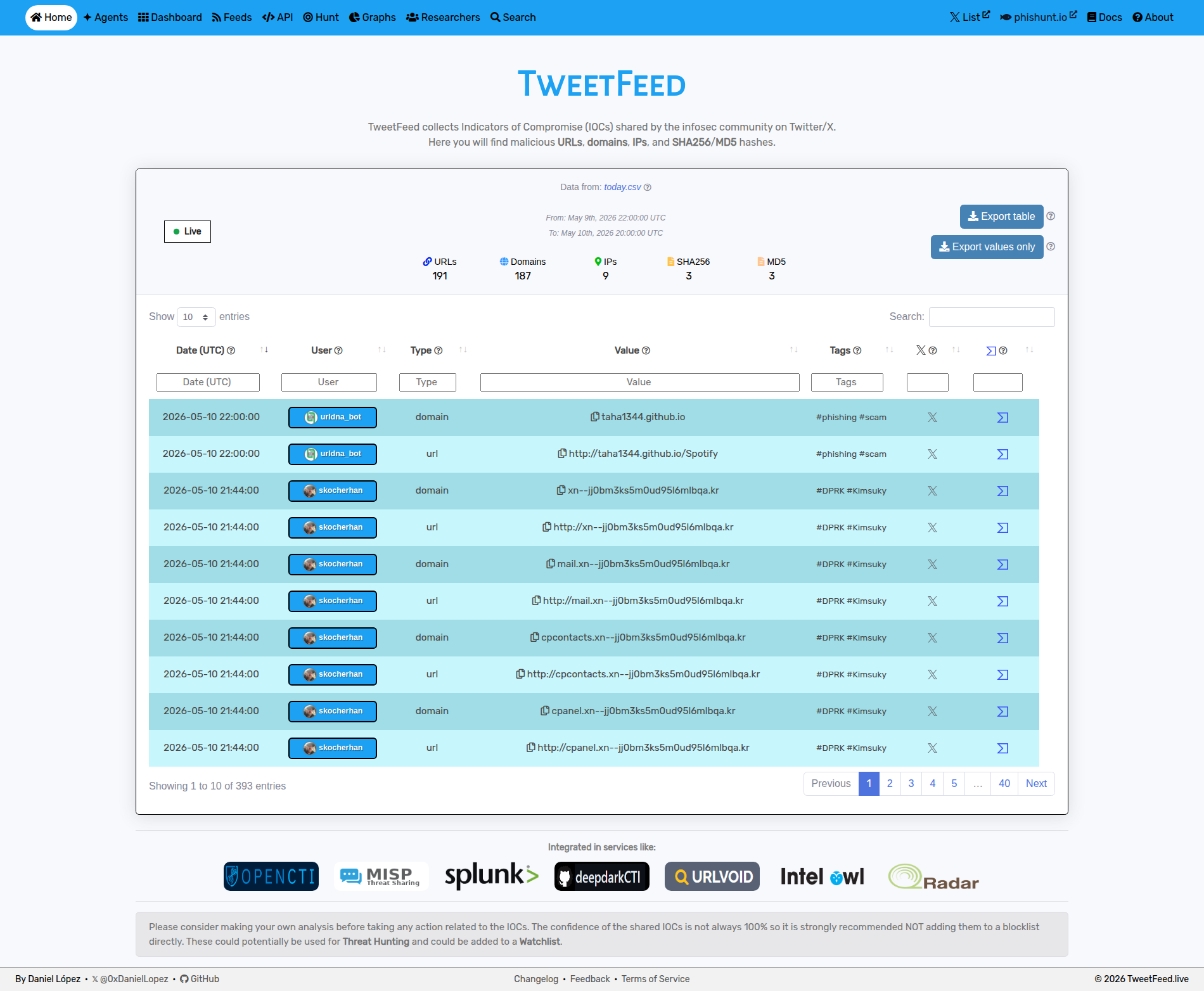
- Data collected
- Programmatic access
- Some statistics
- How it works
- Use TweetFeed in your stack
- Agent-ready surface
- License
- Author
- Disclaimer
The counters below (timestamp, per-type totals, tag count, top tags, top reporters) are regenerated by the pipeline every 15 minutes. Hand-written sections are stable.
If you like the project, please consider:
- Giving it a star ⭐
- Invite to a coffee ☕
| 2026-08-08 04:15:19 (UTC) | |||
|---|---|---|---|
| Today | Last 7 days | Last 30 days | Last 365 days |
| 📋 Today (raw) | 📋 Week (raw) | 📋 Month (raw) | 📋 Year (raw) |
| Format | URL | Notes |
|---|---|---|
| RSS 2.0 | rss.xml | Today's IOCs (regenerated every 15 min) |
| MISP | misp/manifest.json | One event per day, 365 days of history. Add as a feed in MISP via Sync Actions → Feeds → Add, using the directory https://tweetfeed.live/misp - MISP appends /manifest.json itself. |
| MISP hash cache | misp/hashes.csv | md5(value),event-uuid pairs for MISP's Cache feed correlation, last 31 days |
| STIX 2.1 | stix/manifest.json | Bundles for today / week / month. No year bundle on purpose - it would land north of 80 MB, close to GitHub's push limit. Use the diff endpoint below to stay in sync instead. |
| TAXII 2.1 | api.tweetfeed.live/taxii2/ | Read-only TAXII server, no auth. One collection, b7dc78af-1d12-5059-898c-3f0e77636204 (TweetFeed IOCs, rolling 31 days). Point any TAXII 2.1 client at the discovery URL. |
| Blocklists | v1/blocklist/<format> | Rolling 30 days, ready to drop into a resolver: domains.txt, hosts.txt, adguard.txt, rpz.txt, dnsmasq.txt, ips.txt, urls.txt. See DNS / network blocking below. |
| Scoped RSS | rss/{tag,type,user}/<name>.xml |
Narrower feeds than the firehose: per tag (any tag active in the last 7 days), per IOC type (always all five), and per reporter handle. |
CSV schema
date, user, type, value, tags, tweet_urlNo header row - the first line is already data, so do not set ignoreFirstRecord / skip_header or you will drop a real IOC. Dates are UTC, tags is space-separated. Live sample: today.csv
| Surface | URL | Use case |
|---|---|---|
| REST API | api.tweetfeed.live | JSON, no auth, CORS enabled. /v1/{today,week,month,year}[/filter][/filter] where a filter is an IOC type, a tag, or an @handle. Order does not matter: /v1/today/url/phishing and /v1/today/phishing/url are the same query. |
| Incremental sync | /v1/since/<ISO8601> |
Only what landed after a timestamp, same filter syntax. Poll this instead of re-downloading year.csv. Returns 410 past the 365-day horizon. |
| Single-IOC lookup | /v1/ioc?value=<ioc> |
Exact match across the full 365-day window, plus AI context, related infrastructure and network metadata when available. Backs tweetfeed.live/search/. |
| Campaigns / trends / counts | /v1/{campaigns,trends,counts} |
Campaign clusters from the last 7 days, 31-day trend series (movers, TLDs, novelty), and raw per-window counters. |
| MCP server | mcp.tweetfeed.live | JSON-RPC 2.0 endpoint exposing 10 tools (query_iocs, check_url, check_ip, check_hash, list_recent_iocs, get_tag_info, get_trending, enrich_ioc, get_campaigns, get_trends) for Claude / AI agents |
Full request/response shapes live in the OpenAPI spec; see tweetfeed.live/agents/ for the copy-paste MCP config and full tool reference.
| Type | Today | Week | Month | Year |
|---|---|---|---|---|
| 🔗 URLs | 1 | 919 | 6458 | 54710 |
| 🌐 Domains | 0 | 768 | 5545 | 41839 |
| 🚩 IPs | 2 | 219 | 866 | 10703 |
| 🔢 SHA256 | 0 | 136 | 522 | 2513 |
| 🔢 MD5 | 1 | 91 | 258 | 2548 |
| Tag | Today | Week | Month | Year |
|---|---|---|---|---|
| #phishing | 0 | 782 | 6024 | 38638 |
| #Kimsuky | 0 | 0 | 2082 | 15035 |
| #DPRK | 0 | 2 | 2081 | 13432 |
| #C2 | 0 | 48 | 412 | 11802 |
| #scam | 0 | 6 | 144 | 5869 |
| #CobaltStrike | 0 | 0 | 5 | 2753 |
| #malware | 0 | 100 | 515 | 2736 |
| #APT | 0 | 55 | 118 | 1678 |
| #Interactsh | 0 | 0 | 0 | 1408 |
| #Remcos | 0 | 0 | 85 | 1008 |
These are the busiest 10 of 93 tags being matched. Every one of them is queryable through the API and has its own RSS feed; the highest-volume ones also get a curated landing page at tweetfeed.live/tags/.
Search tweets that contain certain tags or that are posted by certain infosec people.
#phishing, #Kimsuky, #DPRK, #C2, #scam, #CobaltStrike, #malware,
#APT, #Interactsh, #Remcos
The 10 above are just the busiest. Curated landing pages for the highest-volume tags live at tweetfeed.live/tags/, and any tag can be queried directly via /v1/{window}/{tag}.
TweetFeed list
TweetFeed publishes the same data as CSV, JSON, RSS, MISP, STIX, TAXII and ready-made blocklists, so you can wire it into whichever SIEM, EDR, TIP or resolver you already run. Examples below default to year.csv (1-year window); swap to month.csv / week.csv / today.csv to keep the dataset smaller.
Microsoft Defender XDR / Sentinel (KQL via externaldata)
1. Match SHA256 hashes against the yearly feed
let MaxAge = ago(30d);
let SHA256_whitelist = pack_array(
'XXX' // Some SHA256 hash you want to whitelist.
);
let TweetFeed = materialize (
    (externaldata(report:string)
    [@"https://raw.githubusercontent.com/0xDanielLopez/TweetFeed/master/year.csv"]
    with (format = "txt"))
    | extend report = parse_csv(report)
    | extend Type = tostring(report[2])
    | where Type == 'sha256'
    | extend SHA256 = tostring(report[3])
    | where SHA256 !in(SHA256_whitelist)
    | extend Tag = tostring(report[4])
    | extend Tweet = tostring(report[5])
    | project SHA256, Tag, Tweet
);
union (
    TweetFeed
    | join (
        DeviceProcessEvents
        | where Timestamp > MaxAge
    ) on SHA256
), (
    TweetFeed
    | join (
        DeviceFileEvents
        | where Timestamp > MaxAge
    ) on SHA256
), (
    TweetFeed
    | join (
        DeviceImageLoadEvents
        | where Timestamp > MaxAge
    ) on SHA256
) | project Timestamp, DeviceName, FileName, FolderPath, SHA256, Tag, Tweet
2. Match IP addresses against the monthly feed
let MaxAge = ago(30d);
let IPaddress_whitelist = pack_array(
'XXX' // Some IP address you want to whitelist.
);
let TweetFeed = materialize (
    (externaldata(report:string)
    [@"https://raw.githubusercontent.com/0xDanielLopez/TweetFeed/master/month.csv"]
    with (format = "txt"))
    | extend report = parse_csv(report)
    | extend Type = tostring(report[2])
    | where Type == 'ip'
    | extend RemoteIP = tostring(report[3])
    | where RemoteIP !in(IPaddress_whitelist)
    | where not(ipv4_is_private(RemoteIP))
    | extend Tag = tostring(report[4])
    | extend Tweet = tostring(report[5])
    | project RemoteIP, Tag, Tweet
);
union (
TweetFeed
    | join (
        DeviceNetworkEvents
    | where Timestamp > MaxAge
    ) on RemoteIP
) | project Timestamp, DeviceName, RemoteIP, Tag, Tweet
3. Match URLs and domains against the weekly feed
let MaxAge = ago(30d);
let domain_whitelist = pack_array(
'XXX' // Some URL/Domain you want to whitelist.
);
let TweetFeed = materialize (
    (externaldata(report:string)
    [@"https://raw.githubusercontent.com/0xDanielLopez/TweetFeed/master/week.csv"]
    with (format = "txt"))
    | extend report = parse_csv(report)
    | extend Type = tostring(report[2])
    | where Type in('url','domain')
    | extend RemoteUrl = tostring(report[3])
    | where RemoteUrl !in(domain_whitelist)
    | extend Tag = tostring(report[4])
    | extend Tweet = tostring(report[5])
    | project RemoteUrl, Tag, Tweet
);
union (
TweetFeed
    | join (
        DeviceNetworkEvents
    | where Timestamp > MaxAge
    ) on RemoteUrl
) | project Timestamp, DeviceName, RemoteUrl, Tag, Tweet
The same KQL works in Microsoft Sentinel if you replace DeviceProcessEvents / DeviceNetworkEvents with the equivalent Sentinel tables (SecurityEvent, CommonSecurityLog, etc.).
Splunk (SPL with inputlookup after CSV import, or rest for ad-hoc fetch)
Schedule a recurring CSV import via the Add-on Builder or the inputs.conf REST modular input, and refresh it on the same 15-minute cadence the feed publishes on (savedsearches.conf):
[TweetFeed_lookup_refresh]
search = | inputlookup append=t external_lookup tweetfeed_iocs.csv \
         | outputlookup tweetfeed_iocs.csv
cron_schedule = */15 * * * *
dispatch.earliest_time = -15m
enableSched = 1
The CSV ships without a header row, so declare the field names in your lookup definition (
transforms.conf->fields_list = date, user, type, value, tags, tweet). The searches below assume those lowercase names.
Match firewall traffic against TweetFeed IPs:
index=firewall earliest=-30d
| join dest_ip [
    | inputlookup tweetfeed_iocs.csv
    | where type="ip"
    | rename value AS dest_ip
    | fields dest_ip, tags, tweet
]
| stats count by src_ip, dest_ip, tags
For proxy / DNS logs vs. URLs and domains:
index=proxy sourcetype=zscaler earliest=-7d
| join url [
    | inputlookup tweetfeed_iocs.csv
    | where type IN ("url","domain")
    | rename value AS url
    | fields url, tags, tweet
]
| table _time, src, dest, url, tags, tweet
For process-execution hashes:
index=endpoint sourcetype=Sysmon EventCode=1 earliest=-30d
| eval hash=lower(Hashes)
| join hash [
    | inputlookup tweetfeed_iocs.csv
    | where type IN ("sha256","md5")
    | rename value AS hash
    | fields hash, tags, tweet
]
| table _time, host, Image, hash, tags, tweet
Elastic Security / OpenSearch (Logstash ingest + ES|QL, or the TAXII 2.1 endpoint)
1. Pull the CSV into an index every 15 minutes with Logstash. document_id plus doc_as_upsert makes re-ingesting the same IOC idempotent, so overlapping windows never duplicate:
input {
  http_poller {
    urls => {
      tweetfeed => "https://raw.githubusercontent.com/0xDanielLopez/TweetFeed/master/today.csv"
    }
    schedule => { every => "15m" }
    codec => plain
  }
}
filter {
  split { field => "message" }
  csv {
    columns => ["date","user","type","value","tags","tweet"]
    separator => ","
  }
  date { match => ["date","ISO8601"] target => "@timestamp" }
  mutate { remove_field => ["message","event"] }
}
output {
  elasticsearch {
    hosts => ["https://es:9200"]
    index => "tweetfeed-iocs-%{+YYYY.MM.dd}"
    document_id => "%{type}-%{value}"
    action => "update"
    doc_as_upsert => true
  }
}
2. Join it against your telemetry with ES|QL, in Kibana Discover or Lens. DNS resolutions in the last 24h that hit a TweetFeed domain:
FROM logs-network-dns-*
| WHERE @timestamp > NOW() - 24h
| LOOKUP JOIN tweetfeed-iocs-* ON dns.question.name == value
| WHERE type == "domain"
| KEEP @timestamp, host.name, source.ip, dns.question.name, tags, tweet
| SORT @timestamp DESC
| LIMIT 1000
The resulting tweetfeed-iocs-* index doubles as a value list for Elastic Security detection rules, so the same data is alert-routable without a second pipeline.
Prefer a native threat-intel feed? Point Elastic's TAXII 2.1 input at https://api.tweetfeed.live/taxii2/ (collection b7dc78af-1d12-5059-898c-3f0e77636204, no auth) and the indicators arrive already mapped to threat.indicator.*.
For OpenSearch, the Security Analytics threat intel framework consumes either the STIX bundles at stix/manifest.json or the same TAXII endpoint.
More recipes, including a Watcher alert, live at tweetfeed.live/hunt/.
MISP / OpenCTI / TheHive (threat intel platforms)
| TIP | How to add TweetFeed |
|---|---|
| MISP | Sync Actions → Feeds → Add, source format MISP Feed, URL https://tweetfeed.live/misp - the directory, not the manifest. MISP appends /manifest.json itself, and pointing it straight at the file makes the feed fail to enumerate. One event per day, 365 days of history, regenerated every 15 min. Enable Cache feed to pick up hashes.csv for correlation. |
| OpenCTI | Use the official tweetfeed connector. |
| TheHive 5 | Import the STIX bundles at https://raw.githubusercontent.com/0xDanielLopez/TweetFeed/master/stix/manifest.json via the MISP-Hive connector or directly through the API. |
| Any TAXII 2.1 client | Discovery URL https://api.tweetfeed.live/taxii2/, no credentials. Single read-only collection b7dc78af-1d12-5059-898c-3f0e77636204 covering a rolling 31 days. |
DNS / network blocking (Pi-hole, AdGuard Home, RPZ, dnsmasq)
Seven pre-rendered blocklists, rolling 30-day window, rebuilt every 15 minutes. Point your resolver at the format it already speaks and you are done - no parsing, no cron job of your own.
| Format | URL | Where it goes |
|---|---|---|
| Plain domains | https://api.tweetfeed.live/v1/blocklist/domains.txt |
Pi-hole Adlists, most DNS filters |
| Hosts file | https://api.tweetfeed.live/v1/blocklist/hosts.txt |
/etc/hosts, anything expecting 0.0.0.0 domain |
| AdGuard | https://api.tweetfeed.live/v1/blocklist/adguard.txt |
AdGuard Home DNS blocklists (||domain^) |
| RPZ | https://api.tweetfeed.live/v1/blocklist/rpz.txt |
BIND / Unbound / PowerDNS Recursor response policy zones |
| dnsmasq | https://api.tweetfeed.live/v1/blocklist/dnsmasq.txt |
dnsmasq address=/domain/0.0.0.0 |
| IPs | https://api.tweetfeed.live/v1/blocklist/ips.txt |
Firewall / IPset drop lists |
| URLs | https://api.tweetfeed.live/v1/blocklist/urls.txt |
Proxy and URL filters, for indicators that DNS blocking cannot reach |
Pi-hole - Settings → Adlists → Add, paste the domains.txt URL, then pihole -g to pull it in.
AdGuard Home - Filters → DNS blocklists → Add blocklist → Add a custom list, paste the adguard.txt URL.
Unbound / BIND (RPZ):
curl -sSo /etc/unbound/tweetfeed-rpz.zone https://api.tweetfeed.live/v1/blocklist/rpz.txt# unbound.conf
rpz:
name: tweetfeed.rpz
zonefile: /etc/unbound/tweetfeed-rpz.zone
rpz-log: yes
Fetch on a schedule - the endpoints honour If-None-Match, so a conditional request costs you a 304 when nothing changed:
curl -sS --etag-compare /var/cache/tf.etag --etag-save /var/cache/tf.etag \
     -o /etc/pihole/tweetfeed-domains.txt \
     https://api.tweetfeed.live/v1/blocklist/domains.txt
These lists are the raw community feed with TweetFeed's own filtering applied, and nothing more. There is no extra reputation gate in front of them, so treat them as high-signal-but-unvetted and start in a monitoring or logging mode before you block on them in a network people depend on.
CLI / scripting (curl + jq, Python)
Pull today's phishing URLs:
curl -s 'https://api.tweetfeed.live/v1/today/phishing/url' | jq -r '.[].value'Cross-check a hash against the year window:
HASH=XXX  # any SHA256 you want to look up
curl -s 'https://raw.githubusercontent.com/0xDanielLopez/TweetFeed/master/year.csv' \
  | awk -F, -v h="$HASH" '$3=="sha256" && $4==h'
Pandas one-liner - top 20 IPs reported in the last year:
import pandas as pd
df = pd.read_csv('https://raw.githubusercontent.com/0xDanielLopez/TweetFeed/master/year.csv',
                 names=['date','user','type','value','tags','tweet'])
print(df[df.type == 'ip'].groupby('value').size().sort_values(ascending=False).head(20))
For interactive querying via Claude / AI agents, see Programmatic access above (the MCP server exposes the same data with built-in query helpers).
TweetFeed is built for consumption by AI agents and LLM-based tooling:
/.well-known/agent-skills/index.json- skill discovery (RFC v0.2.0)/.well-known/mcp/server-card.json- MCP server card (SEP-1649 draft)/.well-known/api-catalog- API discovery linkset (RFC 9727)/llms.txt- llms.txt index, and/llms-full.txtfor the expanded single-file reference/AGENTS.md- agents.md-convention guide: preferred access order and the full tool table/agent-setup/prompt.md- hand this to an agent and it registers the MCP server itself/agents/- human-readable overview with copy-paste MCP config/openapi.yaml- OpenAPI 3.1 spec for every REST route
Plug the MCP endpoint above into Claude Desktop / Claude Code / any MCP-aware client to query feeds in natural language.
The data feeds (CSV, JSON, RSS, MISP, STIX) and the public API responses are released under CC0 1.0 Universal - no rights reserved, reuse freely, no attribution required.
A primer on how to put this data to work in detection workflows lives at tweetfeed.live/docs/.
Please note that all the data is collected from Twitter/X and sorted/served here as it is on best effort.
I have tried to tune as much as possible the searches trying to collect only valuable info. However please consider making your own analysis before taking any action related to these IOCs.
Anyway feel free to reach me out or to provide any kind of feedback regarding any contribution or suggestion. False positives are the most useful thing you can report - there is a template for them.
By the community, for the community.