A [monad] (https://en.wikipedia.org/wiki/Monad_%28functional_programming%29) is an abstract concept from functional programming that is unfamiliar to most programmers. It is beyond the scope of this guide teaching monads. In www.introtorx.com we find a short definition:
Monads are a kind of abstract data type constructor that encapsulate program logic instead of data in the domain model.
Monads are of interest to us, because the observable is a monad. Rx code declares what needs to be done but the actual processing happens not when Rx statements are executed, but rather when values are emitted. Readers may find it interesting to read more about monads in general. For this guide, when refering to monads the reader only needs to think about the observable.
There are two main reasons one may want to leave the monad. The first reason is that a new Rx developer will still be more comfortable in more traditional paradigms. Doing parts of the computation in a different paradigm may enable you to get some parts working, while you're still figuring out how to do things in Rx. The second reason is that we usually interact with components and libraries that weren't designed with Rx in mind. When refactoring existing code into Rx, it may be useful to have Rx behave in a blocking way.
The first step to getting data out of an observable in a blocking manner is to transition to a BlockingObservable. Any Observable can be converted to a BlockingObservable in one of two ways:
You can use the Observable's toBlocking method
public final BlockingObservable<T> toBlocking()or the static factory of BlockingObservable
public static <T> BlockingObservable<T> from(Observable<? extends T> o)BlockingObservable does not extend the Observable and it can't be used with our usual Rx operators. It has its own implementations of a small set functions, which allow you to extract data out of an Observable in a blocking manner. Many of those methods are the blocking counterparts to methods that we have already seen.
Observable has a method called forEach. forEach is defined as an alias to subscribe, with the main difference being that it doesn't return a Subscription.
Consider this example
Observable<Long> values = Observable.interval(100, TimeUnit.MILLISECONDS);

values
	.take(5)
	.forEach(v -> System.out.println(v));
System.out.println("Subscribed");Subscribed
0
1
2
3
4
The code here behaves like subscribe would. First you register an observer (no overload for forEach accepts Observer, but the semantics are the same). Execution then proceeds to print "Subscribed" and exits our snippet. As values are emitted (the first one with a 100ms delay), they are passed to our observer for processing.
BlockingObservable doesn't have a subscribe function, but it has forEach. Let's see the same example with BLockingObservable
Observable<Long> values = Observable.interval(100, TimeUnit.MILLISECONDS);

values
	.take(5)
	.toBlocking()
	.forEach(v -> System.out.println(v));
System.out.println("Subscribed");0
1
2
3
4
Subscribed
We see here that the call to forEach blocked until the observable completed. Another difference is that there can be no handlers for onError and onCompleted. onCompleted is a given if the execution completes, while exceptions will be thrown into the runtime to be caught:
Observable<Long> values = Observable.error(new Exception("Oops"));

try	{
	values
		.take(5)
		.toBlocking()
		.forEach(v -> System.out.println(v));
}
catch (Exception e) {
	System.out.println("Caught: " + e.getMessage());
}
System.out.println("Subscribed");Caught: java.lang.Exception: Oops
Subscribed
BlockingObservable has methods for first, last and single, along with implementations for default values firstOrDefault, lastOrDefault and singleOrDefault. Having read about their namesakes in Observable, you already know what the returned value is. Once again, the difference is the blocking nature of the methods. They don't return an observable that will emit the value when it is available. Rather, they block until the value is available and return the value itself, without the surrounding observable.
Observable<Long> values = Observable.interval(100, TimeUnit.MILLISECONDS);

long value = values
	.take(5)
	.toBlocking()
	.first(i -> i>2);
System.out.println(value);3
As we can see, the call to first blocked until a value was available, and only then was a value returned.
Like with forEach, exceptions are thrown in the runtime to be caught
Observable<Long> values = Observable.interval(100, TimeUnit.MILLISECONDS);

try {
	long value = values
		.take(5)
		.toBlocking()
		.single(i -> i>2);
	System.out.println(value);
}
catch (Exception e) {
	System.out.println("Caught: " + e);
}Caught: java.lang.IllegalArgumentException: Sequence contains too many elements
You can transform your observables to iterables throught a variety of methods on BlockingObservable. Iterables are pull-based, unlike Rx, which is push-based. That means that when the consumer is ready to consume a value, one is requested with next() on the iterable's Iterator. The call to next() will either return a value immediately or block until one is ready.
There are several ways to go from BlockingObservable<T> to Iterable<T> and each has a different behaviour.
public java.lang.Iterable<T> toIterable()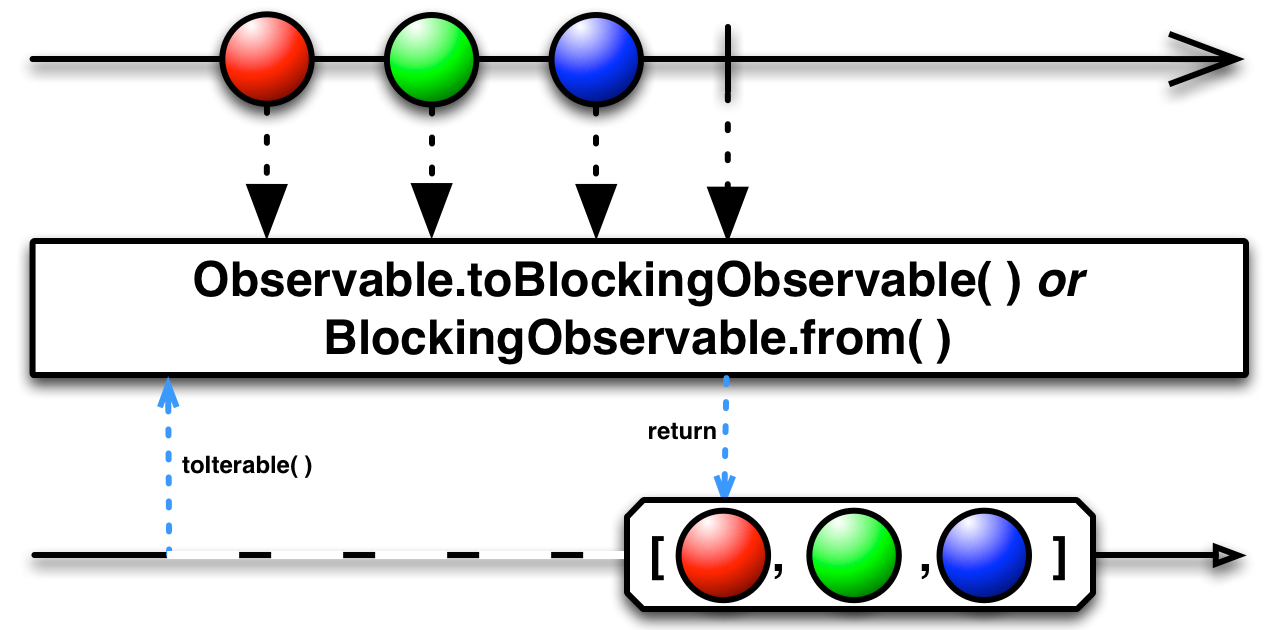
In this implementation, all the emitted values are collected and cached. Because of the caching, no items will be missed. The iterator gets the next value as soon as possible, either immediately if it has already occured, or it blocks until the next value becomes available.
Observable<Long> values = Observable.interval(500, TimeUnit.MILLISECONDS);

Iterable<Long> iterable = values.take(5).toBlocking().toIterable();
for (long l : iterable) {
	System.out.println(l);
}0
1
2
3
4
An interesting thing to note is that either hasNext() or next() block until the next notification is available. If the observable completes, hasNext returns false and next throws a java.util.NoSuchElementException
public java.lang.Iterable<T> next()
In this implementation values are not cached at all. The iterator will always wait for the next value and return that.
Observable<Long> values = Observable.interval(500, TimeUnit.MILLISECONDS);

values.take(5)
	.subscribe(v -> System.out.println("Emitted: " + v));

Iterable<Long> iterable = values.take(5).toBlocking().next();
for (long l : iterable) {
	System.out.println(l);
	Thread.sleep(750);
}Emitted: 0
0
Emitted: 1
Emitted: 2
2
Emitted: 3
Emitted: 4
4
In this example the consumer is slower than the producer and always misses the next value. The iterator gets the next after that.
public java.lang.Iterable<T> latest()The latest method is similar to next, with the difference that it will cache one value. The iterator only blocks if no events have been emitted by the observable since the last value was consumed. As long as there has been a new event, the iterator will return immediately with a value, or with the termination of the iteration.
Observable<Long> values = Observable.interval(500, TimeUnit.MILLISECONDS);

values.take(5)
	.subscribe(v -> System.out.println("Emitted: " + v));

Iterable<Long> iterable = values.take(5).toBlocking().latest();
for (long l : iterable) {
	System.out.println(l);
	Thread.sleep(750);
}Emitted: 0
0
Emitted: 1
1
Emitted: 2
Emitted: 3
3
Emitted: 4
When using the latest iterator, values will be skipped if they are not pulled before the next event is emitted. If the consumer is faster than the producer, the iterator will block and wait for the next value.
It is interesting here that 4 was never consumed. That was because an onCompleted followed immediately, resulting in the next pull seeing a terminated observable. The implicit iterator.hasNext() method reports a terminated observable without checking if the last value has been consumed.
public java.lang.Iterable<T> mostRecent(T initialValue)
The mostRecent iterator never blocks. It caches a single value, therefore values may be skipped if the consumer is slow. Unlike latest, the last cached value is always returned, resulting in repetitions if the consumer is faster than the producer. To allow the mostRecent iterator to be completely non-blocking, an initial value is needed. That value is returned if the observable has not emitted any values yet.
Observable<Long> values = Observable.interval(500, TimeUnit.MILLISECONDS);

values.take(5)
	.subscribe(v -> System.out.println("Emitted: " + v));

Iterable<Long> iterable = values.take(5).toBlocking().mostRecent(-1L);
for (long l : iterable) {
	System.out.println(l);
	Thread.sleep(400);
}-1
-1
Emitted: 0
0
Emitted: 1
1
Emitted: 2
2
Emitted: 3
3
3
Emitted: 4
A BlockingObservable<T> can be presented as a Future using the toFuture method. This method only creates an instance of Future and does not block. Execution blocks as necessary when getting the value. Future allows the consumer to decide how to approach an asynchronous operation. A Future is also capable of reporting errors in the operation.
Observable<Long> values = Observable.timer(500, TimeUnit.MILLISECONDS);

values.subscribe(v -> System.out.println("Emitted: " + v));

Future<Long> future = values.toBlocking().toFuture();
System.out.println(future.get());Emitted: 0
0
Futures that are created in this way expect that the observable will emit a single value, just like the single method does. If multiple items are emitted, the Future will report a java.lang.IllegalArgumentException.
So far we were able to ignore potential deadlocks. Rx's non-blocking nature makes it harder to create unnecessary deadlocks. However, in this chapter we returned to blocking methods, thus bringing deadlocks to the forefront again.
The example below would work as a non-blocking case. But because we used blocking operations, it will never unblock
ReplaySubject<Integer> subject = ReplaySubject.create();

subject.toBlocking().forEach(v -> System.out.println(v));
subject.onNext(1);
subject.onNext(2);
subject.onCompleted();
forEach returns only after the termination of the sequence. However, the termination event requires forEach to return before being pushed. Therefore, forEach will never unblock.
Some blocking ways to access observables, such as last(), require the observable to terminate to unblock. Others, like first(), require it to emit at least one event to unblock. Using those methods on Observable isn't a big danger, as they only return a non-terminating observable. These same methods on BlockingObservable can result in a permanent block if the consumer hasn't taken the time to enforce some guarantees, such as timeouts (we will see how this is done in [Timeshifter sequences](/Part 3 - Taming the sequence/5. Time-shifted sequences.md)).
| Previous | Next |
|---|---|
| Side effects | Advanced error handling |